Selecting a media platform that can reliably host, organize, and distribute video at scale is a critical decision for organizations in 2025. Whether the goal is internal training, public-facing content, corporate communications, or educational delivery, teams need a solution that balances usability, infrastructure, flexibility, and long-term operational efficiency.
Cincopa provides a straightforward solution for organizing and managing media across different formats, designed for both technical and non-technical teams. Kaltura, on the other hand, offers a modular platform focused on deeper control, customization, and integration for large-scale deployments.
| Features | Cincopa | Kaltura |
| Target Audience | Designed for educators, institutions, enterprises, and media platforms that need interactive, multi-format video experiences. | Built for large enterprises, universities, and media organizations that require customizable video infrastructure and modular video solutions. |
| Galleries & Player Management (Allows grouping media into collections and controlling how it’s delivered through players.) | Organize media into galleries for structured viewing, and manage customizable players with options for playlists. | Uses channels, playlists, and media galleries within LMS/enterprise environments. Customizable, but requires administrative setup and configuration. |
| Editor(Edit and manage media for better organization.) | Integrate the meta editor into your platform. | Basic trimming, chaptering, and metadata tools are available; extended editing requires add-ons or separate modules. |
| Players(The playback interface, with options to customize appearance and functionality.) | Deliver content with customizable players that support playlists, branding, and flexible layouts. | Provides configurable players with branding and layout options, but deeper customization often requires admin-level configuration or API development. |
| Analytics(Measure how users engage with media content.) | Track how users engage with content through metrics like engagement, total watch time, play rate, device type, IP info, heatmaps, and detailed reports. | Offers extensive analytics for education and enterprise use cases, including viewing trends, engagement reports, drop-off points, and LMS-linked analytics. |
| E-learning Specific Features(Interactivity for learning and training use cases.) | Enhance the learning experience with in-video quizzes, CTAs, clickable hotspots, lead-generation forms, AI transcription, and subtitles. | Provides quizzes, video assignments, lecture capture workflows, and LMS integrations; interactive tools exist but require appropriate Kaltura modules. |
| Media Support(Which media types the platform can handle.) | Work with multiple media formats, including video, audio, images, and documents, not just video. | Primarily video-focused, but supports other formats (audio, images, documents) depending on configuration and add-ons. |
| CMS Integration(Connects with content management systems for publishing workflows.) | Connect seamlessly with both headless CMS platforms (e.g., Sanity, Strapi) and traditional CMS (e.g., WordPress, HubSpot). | Integrates with major LMS platforms and enterprise systems; CMS integrations exist but often require configuration or institutional IT support. |
Video Hosting
Cincopa
Cincopa provides a straightforward hosting process designed to help teams manage and deliver video without needing a complex setup. The platform handles ingestion and transcoding automatically and distributes content through global CDNs to maintain reliable playback across regions.
Its player options support playlists, chapters, and various layout templates, allowing videos to be presented in structured formats when embedded on websites or internal platforms. Because Cincopa supports additional media types such as images, audio, and documents, all assets can be managed within the same environment.
Kaltura
Kaltura provides a hosting environment geared toward institutions and enterprises that require more complex, configurable video infrastructure. The platform supports advanced encoding pipelines, dynamic packaging, and multi-CDN routing, but these capabilities typically require administrative setup or IT involvement.
Custom workflows can be built through Kaltura’s APIs, though they often introduce added complexity for teams without technical resources. While Kaltura focuses heavily on video hosting, support for other media types exists, but usually depends on additional modules and system configuration. For organizations without dedicated administrators, managing these components may require more time and familiarity with the platform.
Image Hosting
Cincopa
Cincopa includes image hosting as a core component of its platform. Images can be uploaded, organized, and grouped into galleries, and they sit alongside videos and audio within the same management environment. This gives teams a single place to store and present different media formats without relying on separate tools.
Kaltura
Kaltura supports images, but primarily as elements that accompany video assets—such as thumbnails or metadata-related visuals. While the platform can store images, it does not function as a dedicated image-hosting system, and image management typically plays a secondary role within its broader video-centric infrastructure.
Cincotube vs. Kaltura’s Equivalent Solutions
Cincopa
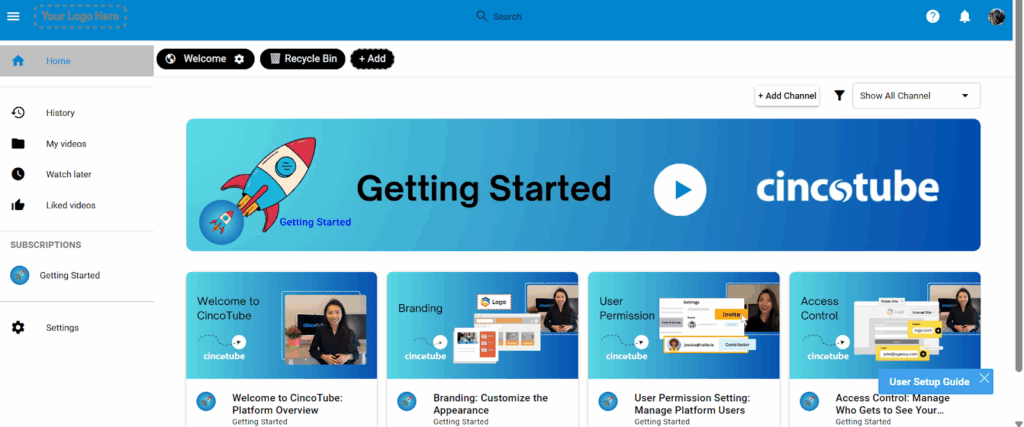
Cincotube is designed as a private, branded video portal that organizations can use to deliver structured content. It provides an environment where teams can organize training lessons into channels, build modules, and arrange courses in a clear and consistent format.
The setup process is straightforward, and the portal can be used immediately without requiring custom development or additional infrastructure. This makes it well-suited for teams that need an organized way to publish, structure, and control access to their video-based training materials.
Kaltura
Kaltura offers its own set of portal-oriented solutions through tools such as MediaSpace, Virtual Classroom, and Town Halls. These modules support a wide range of enterprise and educational workflows, but they generally require configuration and administrative setup before they are ready for use.
Because Kaltura’s platform is modular, organizations often need to assemble different components to match their specific requirements, which can introduce added complexity for teams without technical support.
Galleries vs. Kaltura Playlist/Channels
Cincopa
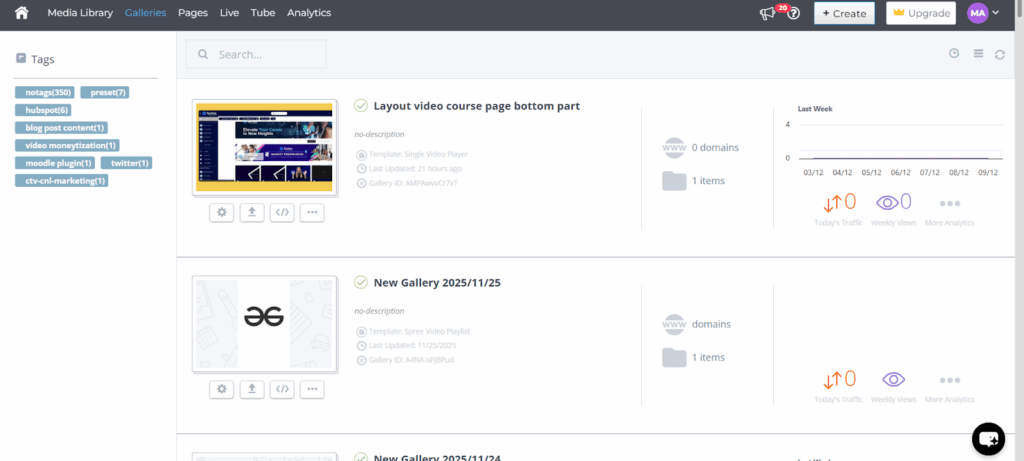
Cincopa uses galleries as a way to organize and present media. A gallery can contain videos, images, or other supported formats and can be arranged into different viewing layouts depending on the content structure. These galleries can be embedded into websites, LMS platforms, and other publishing environments, and the setup does not require code. This approach allows teams to present grouped media in a consistent format.
Kaltura
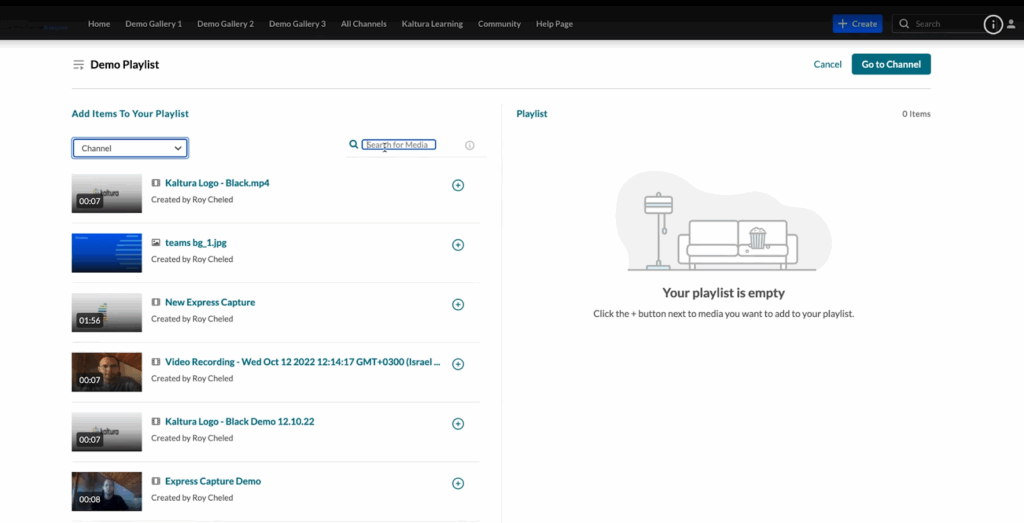
Kaltura organizes media through channels, playlists, and media galleries. These components are part of its broader system and are commonly used in educational and enterprise deployments. Configuration typically happens through administrative settings, and the structure can vary depending on which Kaltura modules are enabled. Channels and playlists serve as the primary way to group and present related media.
Self-Service vs. On-Demand Use
Cincopa
Cincopa is designed for self-service use, allowing teams to set up and manage their media environment without extensive technical steps. Most functions (such as organizing content, configuring players, and updating media) can be handled directly within the interface, with assisted setup available if needed.
Kaltura
Kaltura typically involves more configuration because its system is built around multiple modules and administrative controls. Setting up or adjusting components often requires familiarity with the platform’s configuration options or involvement from technical staff.
Access Control
Cincopa
Cincopa provides several options for controlling how media is accessed, including domain and IP restrictions, password protection, download controls, and role-based permissions within Cincotube.
Kaltura
Kaltura also supports a range of access control methods. These include role-based permissions across channels and portals, single sign-on and LDAP integration, and additional configuration options commonly used in enterprise environments.
Security
Cincopa
Cincopa secures video content through multiple layers of protection. All viewer-server communication is encrypted using AES, preventing unauthorized interception during playback. Access controls can be applied with domain and IP whitelisting, ensuring that videos are only viewable on approved sites or networks.
To further protect distribution, Cincopa uses a proprietary streaming protocol that restricts playback to the Cincopa Player and blocks third-party access. Administrators can also control downloads on a per-file basis, giving flexibility over how content is shared.
Additionally, Cincopa supports watermarking for organizations to place their logo or a custom mark directly on videos. For educators and training providers, this is especially useful for protecting instructional material and maintaining brand presence across courses and shared resources.
Kaltura
Kaltura provides security controls commonly used in enterprise and educational environments. The platform supports tokenized access, domain and referrer restrictions, and single sign-on through SAML and LDAP. Kaltura also offers DRM options, including Widevine, PlayReady, and FairPlay, for encrypted playback when required. Compliance features are available for organizations that need to align with institutional security and data-protection standards, and content access can be governed through role-based permissions within channels and portals.
Usability
Cincopa
Cincopa is designed for both technical and non-technical users. The platform provides a clean interface with pre-built templates like video course players and media galleries tailored for eLearning use cases, making it straightforward to create structured video experiences.
It also includes built-in tools such as attendance tracking, in-video pop-up quizzes, and analytics dashboards. These analytics dashboards allow educators to understand how learners engage with each course, identify where attention drops off, and adjust the curriculum accordingly.
Kaltura
Kaltura’s usability depends largely on how the platform is deployed and which modules are enabled. The interface includes administrative dashboards, channel management tools, and LMS-integrated workflows commonly used in education and enterprise environments.
While it offers a wide range of functions, many tasks—such as configuring channels, uploading content in bulk, or adjusting player settings—require familiarity with the system’s administrative controls. Non-technical users can manage day-to-day tasks once the environment is configured, but initial setup and customization typically require support from administrators or technical staff.
Features
Cincopa
Students learn better when the video is interactive and not just a recorded playback. Cincopa provides a set of built-in features designed to make video engaging and useful in learning contexts, and this is made possible through:
1. Quizzes — Embedded quizzes help learners check their understanding in real time and reinforce key concepts.
Clickable Hotspots — Hotspots can trigger specific actions, such as opening a link, revealing extra information, or navigating to another section of the content.
2. Calls-to-Action (CTAs) — Educators can add CTAs that direct learners to supplementary resources like eBooks, infographics, or additional videos.
3. Video Editing & Accessibility Tools — Videos can be trimmed, divided into chapters, and enhanced with AI-powered transcription and subtitles. These features make it easier for learners to take notes, revisit specific topics, and improve overall accessibility.
4. Replace Asset — This feature allows a new version of a file to be uploaded while keeping the same embed code and sharing links. The updated version is available instantly, without requiring re-embedding or re-sharing.
5. Analytics — This provides detailed video analytics that allow institutions to measure learner engagement and track performance without requiring external tools. This data helps educators to refine the course curriculum.
6. Set Thumbnail — Educators can choose a custom thumbnail for each video, ensuring that the first frame learners see is clear, relevant, and visually engaging.
For more interactivity and engagement features, you can explore the Introducing Cincopa to Developers documentation.
Kaltura
Kaltura offers a broad feature set that varies depending on the modules an organization uses. In education environments, the platform supports lecture capture, video assignments, captions, transcription tools, chaptering, and quiz functionality through its player. In enterprise deployments, it includes tools for video portals, webinars, and internal communications.
Many features are integrated through specific add-ons or plugins, and enabling them typically requires configuration within the administrative console. While the platform supports interactive elements and video editing tasks, availability depends on the organization’s licensing and deployment model.
Integration
Cincopa
Cincopa integrates directly with many LMS systems, including Moodle for educators and trainers to add videos, audio, and image galleries into courses without leaving their LMS. This helps in creating richer lessons, where lectures can include video explanations, visual demonstrations, or recorded discussions alongside standard course materials.
With this, students can easily upload or record multimedia such as videos, audio, or images, while teachers can view or listen to the submissions directly within Moodle and grade them without needing to download first.
Kaltura
Kaltura provides integrations with a wide range of LMS platforms such as Moodle, Canvas, Blackboard, and D2L. These integrations support upload, playback, grading workflows, and media embedding through LTI or platform-specific plugins.
Kaltura also integrates with enterprise systems, video conferencing tools, and authentication providers. While the integrations are extensive, enabling and configuring them typically requires administrative setup and coordination with institutional IT teams, as the platform relies on multiple modules working together.
Industry Support
Cincopa
For the eLearning industry, Cincopa provides a dedicated support team to educators and institutions. If users face any issues while using the platform, whether with video uploads, interactivity, or analytics, the support team offers direct assistance to resolve problems quickly and ensure learning continuity.
Kaltura
Kaltura is used across education, enterprise, and media environments. The platform offers support through ticketing systems, documentation, and administrator resources. Support requests are typically handled through an organization’s designated administrators, and available assistance varies based on the deployment model and service agreement.
Case Study
Cincopa
edWeb.net is a free & professional learning community that hosts around 75 educator communities along with a library of approximately 2,000 one-hour webinars, which averages 65,000 monthly viewers.
Initially, edWeb has been using a third-party platform to redirect users off-site. But it lacked mobile tracking (despite 30% of users using mobile), and delivered viewership data every 2 weeks via spreadsheets. This lacked real-time integration and delayed certification with edWeb’s CRM.
Cincopa replaced this system by introducing an on-site video hosting solution along with real-time tracking. Now, data flows into edWeb’s CRM to allow a 48-hour certificate turnaround. Cincopa has created dedicated webinar landing pages to engage viewers on-site and brought in AI-generated closed captions along with an SRT editor that helps editors to finalize and publish content.
Cincopa’s analytics part helps edWeb verify if a learner has completed a webinar, which is necessary for professional development credit.

Kaltura
Wake Forest University needed a more organized way to manage instructional video content, which was previously stored across multiple platforms like Google Drive, YouTube, and local devices. By implementing Kaltura within their LMS, the university centralized video storage, allowing faculty to record, upload, and embed videos directly into their courses. This streamlined content management and made it easier to keep materials up to date.
Students benefited from consistent access to all video content within the same environment, and faculty adapted quickly due to the user-friendly interface. The result was a more efficient and organized video experience for both instructors and learners.
Video API
Cincopa
Cincopa provides developer APIs to upload and manage media, create and customize video experiences, and access media analytics. The APIs support both on-demand and live streaming, and you can test them directly from the documentation.
Kaltura
Kaltura offers APIs for uploading media, managing entries, and configuring playback. The API supports both on-demand and live streaming, and its use depends on the modules enabled within an organization’s Kaltura setup.
Reviews & Testimonials
What users are saying about Cincopa:
Educators often cite Cincopa’s ease of use and rich feature set as key benefits.