Video Hosting

Video hosting for training, product education, and searchable knowledge

Host, stream, embed, protect, and analyze your videos - then turn them into structured knowledge people can actually find, watch, and ask.

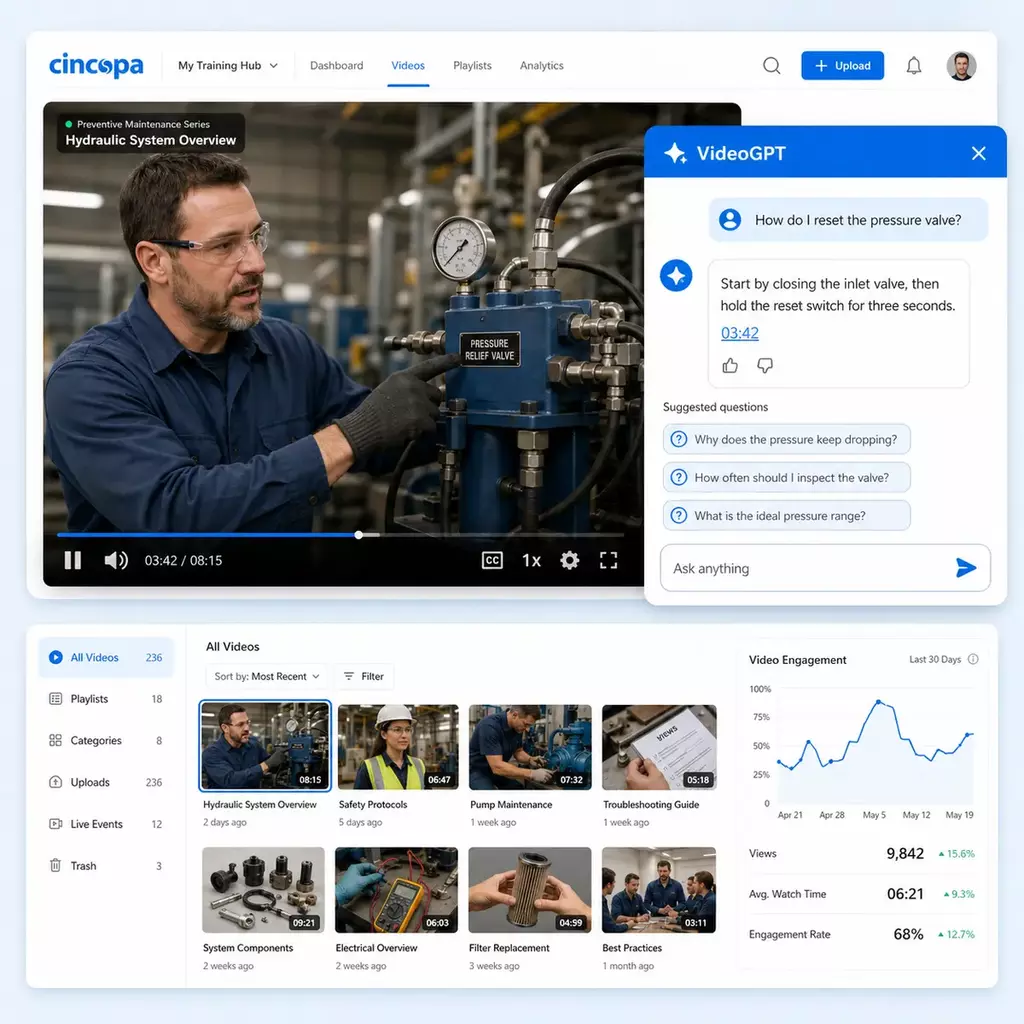
Cincopa gives teams the video hosting foundation they need, including upload, streaming, responsive embeds, player control, captions, access options, and analytics. But when videos are used for training, product education, support, or internal knowledge, hosting is only the beginning. Cincopa helps organize videos, documents, transcripts, and metadata into knowledge experiences powered by Galleries, Pages, Tube, and VideoGPT.

  • Secure hosting and streaming
  • Embeds and galleries
  • Captions and transcripts
  • VideoGPT answer retrieval
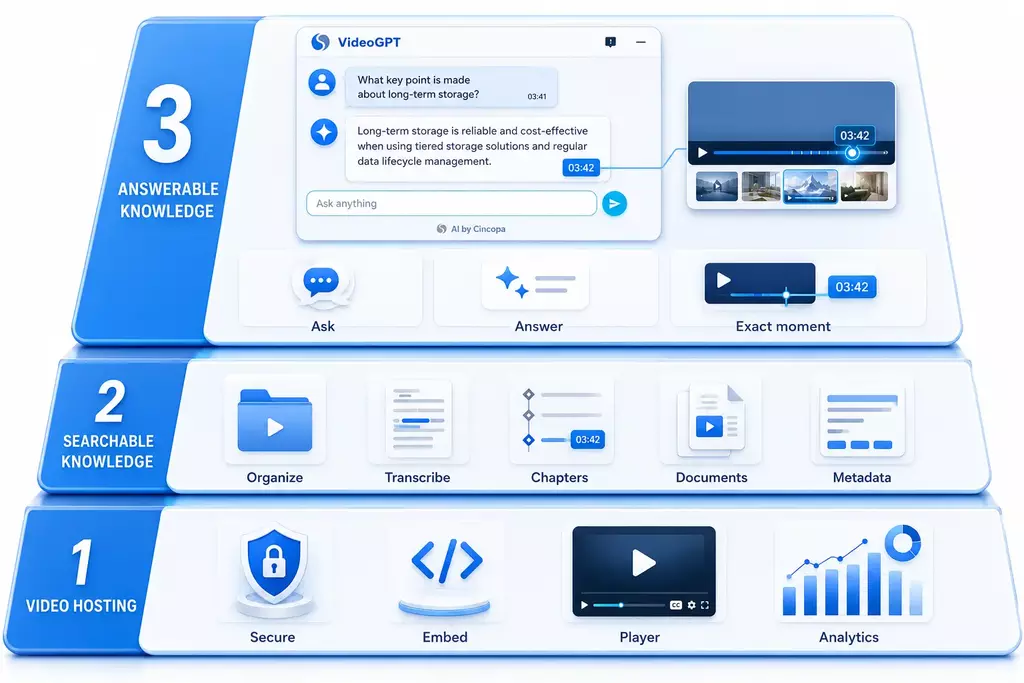
From video hosting to VideoGPT Knowledge evolution
Video hosting to VideoGPT knowledge platform evolution

Built for teams that need video to support real knowledge work, not just playback.

What video hosting means today

Video hosting is the foundation. Video knowledge is the outcome.

If you only need to store and play a few videos, basic video hosting may be enough. But when video becomes part of training, support, onboarding, product education, or internal knowledge, teams need more than a file, a player, and an embed code.

They need structure. They need access control. They need transcripts, captions, documents, analytics, and reusable collections. Most importantly, users need a way to find the right answer without watching a long video from the beginning.

Basic video hosting is enough when...

  • You have a small number of standalone videos.
  • Users already know exactly what they need to watch.
  • You only need simple playback and an embed code.
  • The video is not part of a larger training, support, or knowledge workflow.

You need more when...

  • Your video library keeps growing and becomes hard to navigate.
  • Videos are used for product education, customer training, support, or internal know-how.
  • Different audiences need different access, pages, or portals.
  • Users need to search, ask questions, and jump to the right moment.

Hosting foundation

What Cincopa includes as a video hosting platform

Cincopa gives teams the practical hosting features they expect, then connects those features to real delivery workflows for customers, learners, partners, employees, and support users.

Upload, host, and stream video

Upload videos to Cincopa, prepare them for reliable playback, and deliver them across websites, Pages, portals, and embedded environments.

Embed videos and galleries

Use individual videos or structured galleries inside product pages, help centers, documentation, LMS pages, intranets, and customer-facing websites.

Control the viewing experience

Choose player behavior, templates, playlist layouts, branding options, chapters, captions, calls to action, and other presentation settings.

Add captions, transcripts, and metadata

Make hosted videos easier to understand, search, translate, and reuse with transcripts, captions, metadata, descriptions, and supporting context.

Manage public and private access

Support public embeds, private links, controlled Pages, gated environments, team access, and portal-style delivery depending on the audience.

Measure viewing and engagement

Track how people watch, where they engage, what content is used, and where your library may need better structure or clearer answers.

Beyond hosting

Turn hosted videos into a video knowledge system

The real value appears when hosted videos become organized, reusable, searchable, and connected to the documents and workflows around them. Cincopa gives teams multiple product shapes so they can publish knowledge in the right form for each audience.

Galleries

Reusable embedded collections

Group videos and documents into structured collections that can be embedded across sites, help centers, product pages, LMS environments, and internal systems.

Explore Galleries
Pages

Hosted knowledge destinations

Create branded hosted Pages for training, onboarding, public education, partner guidance, or controlled knowledge delivery without building a full portal.

Explore Pages
Tube

Portal-style video environments

Build structured environments with workspaces, channels, permissions, watch history, resume watching, subscriptions, and repeat usage.

Explore Tube
VideoGPT

AI answers from the library

Let people ask questions across videos and documents, get grounded answers, and jump to the exact moment that explains the answer.

Explore VideoGPT

Comparison

Basic video hosting vs. video hosting for knowledge

A growing library needs more than storage. It needs a structure that helps people learn, solve, revisit, and act.

Need Basic video hosting Cincopa video knowledge approach
Playback Stores and plays videos. Hosts, streams, embeds, and connects videos to structured delivery experiences.
Organization Often relies on folders or flat playlists. Uses galleries, pages, channels, templates, metadata, and reusable collections.
Context Video usually stands alone. Videos can stay connected to transcripts, PDFs, guides, captions, chapters, and related materials.
Access Simple public or private settings. Supports public embeds, controlled Pages, private portals, user-based access, and audience-specific delivery.
Search and answers Users usually search by title or browse manually. Users can search and ask across videos and documents with VideoGPT, then jump to exact moments.
Outcome Videos are online. Knowledge becomes easier to find, reuse, measure, and improve.

Customer example

From video hosting need to multiple video knowledge environments

Some teams start with a practical need: upload videos, organize them, publish them, and make them easy to use. Over time, the same foundation can support different knowledge jobs for different audiences.

Leidos uses Cincopa across separate product education, customer training, and internal knowledge environments. The important lesson is not simply that one customer hosts many videos. It is that each audience needs the right structure, access model, and delivery experience.

Product education

Videos and documents where users learn the product

Feature walkthroughs, onboarding, release updates, and product guidance organized into usable knowledge.

Training portals

Structured learning environments

Training videos organized by audience, topic, channel, course, or customer workflow.

Support knowledge

Answers inside support surfaces

Troubleshooting videos and support docs embedded where people need to solve problems.

Internal knowledge

Know-how that stays usable

Meetings, workshops, webinars, and release briefings preserved as secure searchable knowledge.

How to choose

Choose the delivery model by where people need the video

You can start small with one video library, one Page, one gallery, or one portal. The right starting point depends on where your audience already works and how much structure they need.

If your users need... Start with... Good fit for...
Videos inside an existing website, product page, help center, documentation system, or LMS Galleries Product education, support libraries, documentation, and embedded training.
One branded hosted destination for a specific audience or program Pages Customer onboarding, partner programs, public education, and controlled rollouts.
A portal with channels, permissions, repeat visitors, watch history, and ongoing usage Tube Customer academies, internal knowledge hubs, and structured training portals.
Answers from long videos, transcripts, and supporting documents VideoGPT Searchable libraries, support deflection, learner guidance, and content insight.

FAQ

Video hosting questions

Clear answers for teams comparing basic hosting with a more structured video knowledge platform.

Is Cincopa a video hosting platform?

Yes. Cincopa includes secure video hosting, streaming, embedding, player control, analytics, captions, access options, and reliable delivery. It is especially useful for teams that need hosted videos to become structured, searchable knowledge for training, product education, support, and internal use.

How is Cincopa different from basic video hosting?

Basic video hosting stores and plays videos. Cincopa adds reusable galleries, hosted Pages, portal-style Tube environments, transcripts, documents, viewer analytics, access control, and VideoGPT so users can search and ask questions across the library.

Who should use Cincopa for video hosting?

Cincopa is best for teams that use video to teach, train, support, onboard, or explain complex products and processes. It is especially useful when a video library has grown beyond a few standalone clips and people need a better way to navigate or ask questions.

Can I embed Cincopa videos on my website or help center?

Yes. Cincopa supports embedded videos and galleries for product pages, help centers, documentation, LMS environments, internal portals, and other websites. A gallery can keep videos, order, template behavior, attached documents, and viewing experience together.

Can users search inside hosted videos?

Yes. With transcripts, metadata, structure, and VideoGPT, users can search and ask questions across hosted videos and supporting documents, then jump to relevant moments in the video.

Can Cincopa support public and private video libraries?

Yes. Cincopa can support public embeds, hosted Pages, controlled-access libraries, private portals, and different access models depending on the audience and use case.

Do I need a full portal to use Cincopa?

No. Many teams start with embedded galleries or a hosted Page. Tube is useful when you need a full portal-style environment with workspaces, channels, permissions, watch history, and recurring usage.

Host video. Build knowledge.

Start with video hosting, then make the library searchable, structured, and useful

Whether your first rollout is product education, customer training, support troubleshooting, or internal knowledge, Cincopa gives you the hosting foundation and the knowledge layer to grow.