How to Create a YouTube-Like Video Sharing Website?

To create a YouTube-like video sharing website, choose one of three paths: launch a managed video portal, add video collections to an existing content management system, or build a custom application. For most organizations that need a branded public or private video hub - rather than an open consumer network - a managed portal is the fastest and most maintainable option.

Originally written by Simi. Updated September 28, 2026.

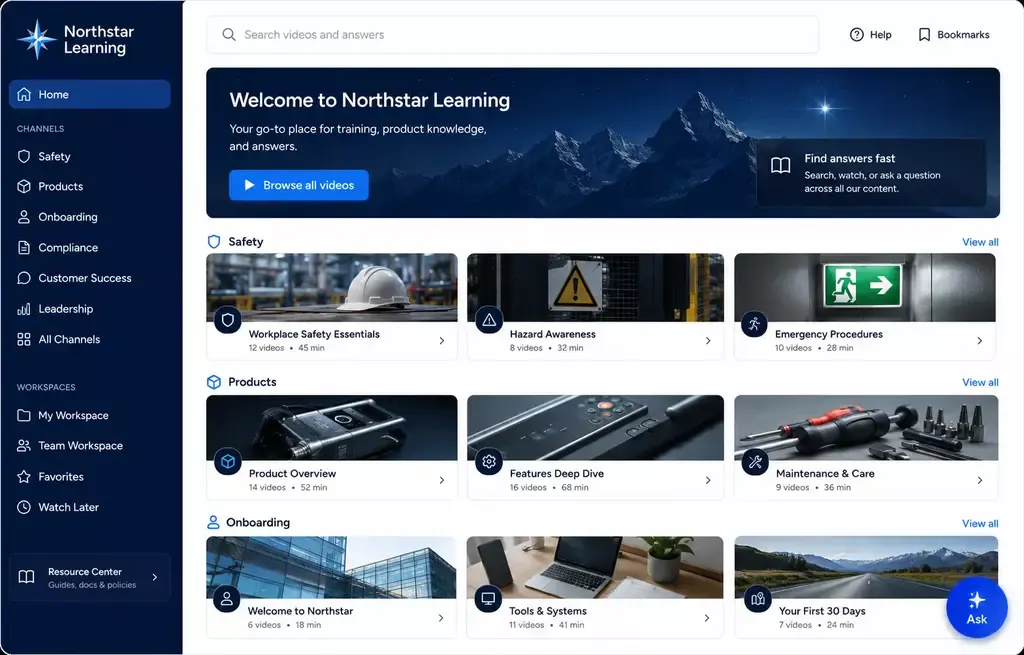
Branded video portal with organized channels and search

What Is a YouTube-Like Video Sharing Website?

A YouTube-like website is a destination where people can browse, search, and watch an organized collection of videos. The phrase can describe two very different products.

A public user-generated network allows anyone, or a large creator community, to open an account and upload content. It also needs moderation, abuse controls, copyright processes, recommendation systems, and a large operational team.

A branded video hub is controlled by one organization. The organization decides who can publish, how videos are grouped, what viewers can access, and whether the destination is public, private, or a mix of both. It may serve customers, employees, partners, students, or a public education audience.

Common business examples include a video training portal, an internal knowledge hub, a partner resource center, and a public education library.

Most businesses do not need to reproduce the whole YouTube model. They need the useful part: a branded place where the right audience can find and understand the right videos.

Three Ways to Create a Video Sharing Website

1. Launch a managed video portal

A managed portal is the closest option to a no-code video sharing website maker. The platform supplies the video experience, while your team controls the branding, structure, content, and access.

Cincopa Tube is designed for portal-style video environments with channels, workspaces, permissions, and multiple content areas. It is a practical fit for a customer academy, employee knowledge hub, partner portal, university library, or public education destination.

Choose this route when you want to launch quickly, keep administration in the hands of a content team, and avoid maintaining a separate portal application.

2. Add video collections to an existing CMS

If you already have a website, help center, intranet, or learning environment, you may not need another portal. You can organize videos and supporting documents in Galleries and embed them where people already work or learn.

When a collection needs its own hosted destination, a branded Page can provide one without requiring a full multi-channel portal. This approach works well for a focused product area, training program, event library, or support topic.

Choose this route when your existing website provides the navigation and you need a better way to organize, present, and maintain the video content inside it.

3. Build a custom application

A custom build offers the most control, but it also creates the most responsibility. You will need to design the user experience, connect storage and playback, manage identity and permissions, create search and metadata workflows, monitor performance, and maintain the application over time.

If viewers can upload their own videos, the project also needs moderation, abuse prevention, reporting, copyright and takedown procedures, and clear publishing rules. Those requirements make a true public YouTube clone a much larger project than a branded business video hub.

Choose a custom build when the video workflow itself is proprietary and cannot be handled by a managed portal or an embedded collection.

Which Approach Should You Choose?

Managed Tube portal

Best for branded public or private multi-channel hubs. Development effort is low, while the organization controls the content, access, and structure.

CMS plus Gallery or Page

Best for video inside an existing website, help center, LMS, or intranet. Development effort is low to moderate, and the organization keeps control of the collection.

Custom application

Best for proprietary workflows or open user uploads. Development and ongoing operational effort are high, but the experience can be fully customized.

The choice should start with the audience and workflow, not with the visual resemblance to YouTube. A familiar channel-and-library experience can be useful without copying every feature of a consumer platform.

Features a Video Sharing Website Needs

Clear organization

Group videos by audience, topic, product, course, department, or workflow. Use useful titles, descriptions, thumbnails, tags, chapters, and captions so viewers understand what each video contains before they press play.

Channels and categories should reflect how people look for information. An internal portal may be organized by department and process, while a customer hub may use products, tasks, or common problems.

The right access model

Decide whether the hub is public, private, or mixed. Public content should be easy to discover and share. Private content may require passwords, domain restrictions, named-user access, roles, or more detailed portal permissions.

Secure video hosting is only one part of the design. Your publishing workflow must also define who can upload, approve, edit, and remove content.

A branded viewing experience

Use consistent navigation, colors, logos, player settings, and page layouts. A branded hub keeps viewers focused on your organization and gives content owners a predictable way to publish new material.

The design should work on different screen sizes and preserve essential controls, captions, keyboard access, and readable supporting text.

Search and supporting documents

Long libraries become difficult to use when viewers can only browse thumbnails. Add search, transcripts, chapters, and clear metadata. Keep related PDFs, setup guides, release notes, and reference files next to the videos they support.

For a smaller collection, a searchable Gallery may be enough. For a broader destination with several channels and audiences, Tube is usually the better fit.

Analytics and improvement

Measure more than total plays. Review which videos people open, where attention drops, what content is reused, and which subjects attract repeated interest. Video analytics can help content teams decide what to update, shorten, expand, or explain differently.

Moderation and governance

If only approved administrators publish, governance can stay relatively simple. If employees, partners, students, customers, or the public can contribute videos, define an approval queue, ownership rules, retention policies, reporting procedures, and a process for removing inappropriate or outdated material.

How to Create a YouTube-Like Website Step by Step

1. Define the audience and purpose

Write down who the hub is for and what those viewers should be able to accomplish. Examples include learning a product, completing training, finding a repair procedure, reviewing recorded internal knowledge, or exploring public educational content.

2. Decide who can publish

Choose between administrator-managed publishing and audience uploads. Do not add open uploads simply because YouTube has them. They create moderation and support requirements that many organizations do not need.

3. Select the delivery model

Use Tube for a broader portal with channels and permissions. Use Galleries when the content belongs inside existing pages. Use Pages when one collection needs a hosted destination. Build a custom application only when the required workflow cannot be achieved with those options.

4. Plan the information structure

Define the channels, categories, naming rules, metadata, and access groups before moving the full library. Start with one audience or use case, test whether people can find what they need, and then expand.

5. Prepare and organize the content

Upload the approved videos, add useful titles and descriptions, create captions, choose thumbnails, and attach relevant documents. Remove duplicates and obsolete material before they become part of the new hub.

6. Apply branding and access controls

Configure the visual identity, navigation, player behavior, domain settings, and user access that match the audience. Test the experience as both an administrator and a viewer.

7. Launch a focused pilot

Begin with one department, customer program, course, partner group, or public topic. Collect feedback about navigation, search, access, and missing content before rolling the model out more broadly.

For an example of a structured video knowledge environment, see how Leidos organizes videos, Galleries, and supporting documents for different audiences and learning needs.

8. Measure and improve

Review viewing patterns and search behavior regularly. Update content that viewers abandon, expand topics that attract repeated interest, and retire information that is no longer accurate.

Add Video Knowledge as an Optional Layer

A well-organized video hub works without AI. Viewers can browse channels, search the library, open a video, and use the related documents.

When the library becomes large or the videos are long, VideoGPT can be added as an optional knowledge layer. It can answer questions across an approved collection of videos and supporting documents, including PDFs, and guide a viewer to the relevant source or moment.

This changes the experience from "find a video and watch until you reach the answer" to "ask a question, review the grounded answer, and open the supporting source." Teams can also review recurring questions to identify missing or unclear knowledge.

The core portal and hosting experience do not depend on VideoGPT. Add it when conversational retrieval solves a real discovery problem. For a closer comparison with YouTube's own question experience, see Ask YouTube for Private Videos.

YouTube or Your Own Video Hub?

YouTube remains useful when public reach, subscriptions, recommendations, and discovery on YouTube are central to the goal. An organization-owned hub is useful when branding, access, structured navigation, supporting documents, and control over the viewer journey matter more.

The choice is not always either-or. Public clips can support discovery on YouTube, while complete training, support, partner, or internal knowledge lives in a controlled hub. The important decision is which destination owns the primary viewer relationship and the authoritative version of the content.

Frequently Asked Questions

Can I make a website like YouTube without coding?

Yes, if you mean a branded video hub rather than an open consumer network. A managed portal such as Tube can provide channels, navigation, branding, and access controls without requiring you to build the full application. A public site with open uploads and large-scale moderation is a custom product and requires substantially more work.

Can WordPress be used to create a video sharing website?

Yes. WordPress or another CMS can provide the website structure, while embedded Galleries organize and present the video collections. This is a good approach when video is one part of an existing site. Use a managed Tube portal when the video library itself needs several channels, workspaces, or permission models.

What is the difference between a video sharing site and a video portal?

A video sharing site often implies that many users can upload and distribute videos. A video portal is usually controlled by one organization and designed for a defined audience. Both can offer channels, browsing, search, and playback, but the publishing and governance models are different.

Can a YouTube-like video website be private?

Yes. A private hub can use named-user access, roles, passwords, domain restrictions, or other controls, depending on the destination and audience. Decide the access model before selecting the platform because public and private portals have different identity and administration needs.

Should viewers be allowed to upload videos?

Only when audience contributions are essential to the use case. User uploads require approval rules, moderation, ownership and removal processes, and additional support. Many customer, employee, partner, and education hubs work better with administrator-managed publishing.

How much does it cost to build a video sharing website?

The cost depends on the delivery model, audience size, storage and usage, access requirements, integrations, design, and administration. A managed portal usually has lower implementation and maintenance costs than a custom application. A custom public network also carries ongoing engineering, moderation, security, and support costs.

Do I need VideoGPT to create a video hub?

No. Tube, Galleries, and Pages can organize and deliver videos without VideoGPT. Add VideoGPT only when viewers need to ask questions across the library and content owners want insight into recurring questions and knowledge gaps.

Build the Right Kind of Video Hub

Do not begin by copying every feature of YouTube. Begin with the audience, the content, the access model, and the job the hub must perform.

For a branded multi-channel destination, start with Tube. For a focused collection inside an existing website, use Galleries. For one hosted destination, use Pages. Add VideoGPT later if conversational answers make the library more useful.

NEXT STEP

Create a Video Hub Around One Real Audience

Create a branded public or private video hub without building every portal feature yourself. Start with Tube for a multi-channel destination, or Galleries and Pages for a focused collection. Add VideoGPT only when viewers need to ask questions across the library.