Knowledge layer
Not just files
Videos, PDFs, transcripts, metadata, and related documents stay connected as one reusable knowledge layer.
A Video Knowledge Platform helps organizations turn videos, documents, training content, and recorded expertise into structured knowledge that people can organize, share, search, ask, and improve with AI.
Cincopa is now focused on this category: a Video Knowledge Platform built on top of enterprise video hosting, so teams can move from publishing videos to making the knowledge inside them answerable.
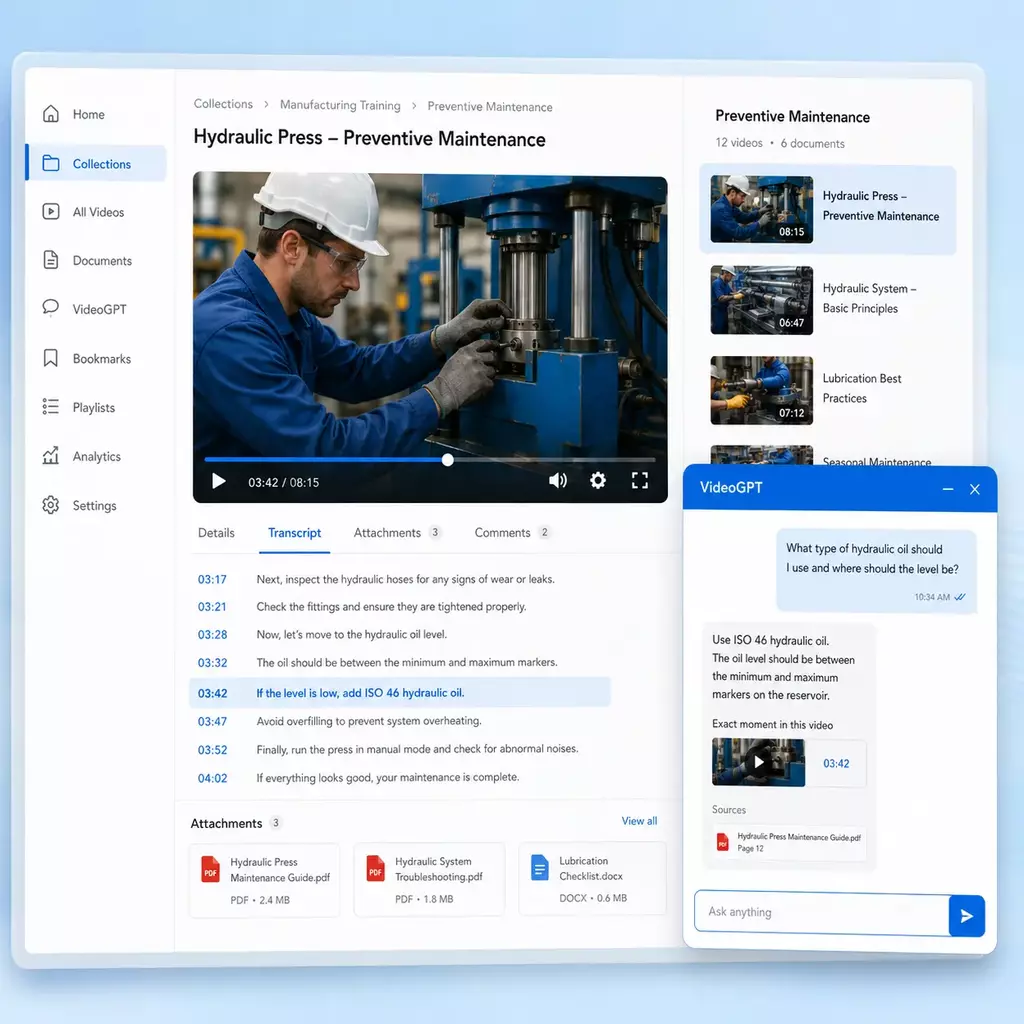
Organizations already create useful knowledge in videos: product walkthroughs, training sessions, webinars, support procedures, software demos, release briefings, field-service guidance, and recorded internal explanations. The problem is that this knowledge is often hard to find after the video is published.
A Video Knowledge Platform adds the structure, access, context, search, AI retrieval, and analytics needed to turn those assets into a knowledge system people can use repeatedly.
Videos, PDFs, transcripts, metadata, and related documents stay connected as one reusable knowledge layer.
Public users, customers, partners, employees, technicians, learners, and internal teams can each get the right delivery model.
Users can ask questions, receive grounded answers, and jump to the exact moment where the explanation appears.
Cincopa should not be understood only as a place to upload, host, and embed video. The video hosting foundation still matters, but it now supports a broader knowledge system.
Upload, players, embeds, captions, access control, analytics, branding, and reliable delivery remain part of the platform.
Galleries, Pages, Tube environments, PDFs, transcripts, metadata, and supporting files become structured knowledge assets.
Users can ask across videos and documents with VideoGPT, get grounded answers, and jump to the exact video moment or source material.
Repeated questions, weak answers, search behavior, and content-gap signals help teams decide what to improve or create next. This ongoing cycle is the Video Knowledge Base Loop.
The category exists because people no longer just need to watch videos. They need to retrieve answers from them, connect them to documents, control who sees them, and reuse them across training, support, product education, and internal knowledge workflows.
Training sessions, demos, webinars, support walkthroughs, and release updates contain answers users cannot quickly reach.
A folder of recordings or a flat playlist may work at first. As content grows, teams need structure and search.
Some tasks are easier to show than explain, especially product workflows, procedures, troubleshooting, and training.
Users increasingly expect to ask a direct question, get a direct answer, and see the source behind that answer.
The category is broader than video hosting and broader than a single AI chat feature. It connects content management, publishing, access, retrieval, and improvement so knowledge can move from a recording into the places where customers, employees, partners, or learners need it.
Upload existing videos, webinars, screen recordings, transcripts, PDFs, and new content.
Group knowledge by product, audience, workflow, topic, channel, or role.
Deliver through embeds, branded Pages, portal-style Tube environments, or connected systems.
Retrieve knowledge across videos and documents, cite the source, and open the exact moment.
Use recurring questions, weak answers, and viewing behavior to decide what to update or create next.
A Video Knowledge Platform can overlap with hosting, learning, and knowledge tools, but its purpose is different: it makes video and related documents easier to organize, distribute, search, retrieve, and improve over time.
| System | Main job | Where it falls short | Video Knowledge Platform difference |
|---|---|---|---|
| Video hosting | Store, encode, stream, and play video. | Often focuses on one video or one asset at a time, rather than a reusable collection, playlist, or searchable knowledge library. | Adds organization, documents, access logic, AI retrieval, and analytics. |
| LMS | Manage courses, learners, completion, quizzes, and certificates. | Can be too narrow or heavy for support, product education, partner enablement, and knowledge retrieval. | Supports training, but also works across help centers, product pages, portals, and internal hubs. |
| Knowledge base | Organize articles, documentation, and written answers. | Often treats video as an attachment instead of a first-class knowledge source. | Makes video, transcripts, PDFs, and related assets searchable and answerable together. |
| Public video networks | Help public audiences discover and watch creator content. | Not designed for controlled, branded, operational knowledge experiences. | Focuses on organizational knowledge, audience control, internal or external delivery, and usage insight. |
Enterprise video platforms such as Brightcove, Kaltura, and Vbrick are commonly evaluated for hosting, streaming, portals, governance, and internal video delivery. A Video Knowledge Platform starts with that same hosting foundation but goes further by making videos and documents searchable, answerable, and improvable through AI.
The distinction is visible in our Brightcove comparison, Kaltura comparison, and Vbrick comparison. Cincopa is positioned around VideoGPT, exact-moment answers, and knowledge analytics rather than hosting alone.
Browsing is useful, but organizational knowledge sharing requires more: clear destinations, audience control, transcript search, AI-guided orientation, answers across the library, source evidence, exact-moment playback, and a feedback loop for missing knowledge.
Preserve institutional expertise from workshops, briefings, training, demonstrations, town halls, and process recordings.
Create branded portals or focused pages for customers, partners, public audiences, and learners without forcing the experience into a public video network.
Embed searchable video knowledge in a help center or launch a standalone video-based help portal with answers and exact-moment links.
Turn demonstrations and screen recordings into reusable product education, onboarding, and workflow documentation.
A video knowledge platform is useful when video has become recurring knowledge - something customers, employees, partners, or support teams need to find, reuse, and act on over time.
The exact product shape can vary, but a complete video knowledge system usually includes structure, context, delivery, control, AI retrieval, and improvement loops.
Group videos and related assets into galleries, playlists, channels, pages, portals, or collections that match how people search and learn.
Keep PDFs, guides, diagrams, transcripts, slides, release notes, and supporting files connected to the video experience.
Publish knowledge in websites, product pages, help centers, LMS environments, internal systems, partner portals, or hosted pages.
Support public, gated, internal, customer-only, partner-only, or selected-user access models.
Let users ask questions across videos and documents, get grounded answers, and jump to the relevant moment.
Understand what users watch, ask, miss, repeat, and need next so teams can improve content over time.
A video knowledge platform is built for recurring knowledge needs - the videos, documents, and answers people return to again and again.
Teach customers and users how a product works with embedded walkthroughs, onboarding videos, release updates, and supporting guides.
Deliver structured training for customers, employees, or external audiences through hosted pages, portals, or LMS embeds.
Help users, installers, technicians, or support teams solve problems by finding the right video, document, and exact moment faster.
Preserve meetings, workshops, release briefings, webinars, and team know-how in a secure searchable knowledge environment.
Capture software workflows, SOPs, operational procedures, and internal how-to guidance so teams can reuse them.
Train distributors, contractors, installers, lenders, channel partners, and other external audiences with consistent video knowledge.
A platform-level intelligence layer can retrieve from many videos, long transcripts, PDFs, metadata, and related documents while preserving links to the governed source. This is what turns disconnected recordings into answerable knowledge.
Long transcripts can be indexed in retrievable segments with metadata pointers to the source video and timestamp, while original media remains in the video platform.
Answers can combine the visual explanation in a recording with the detail in a guide, policy, spec sheet, or other document and show the relevant sources.
Screen captures and exported MP4 documentation created elsewhere can be ingested, transcribed, organized, published, and made searchable in the same knowledge environment.
Welcome messages and starter questions help users understand what a rich or unfamiliar library contains before they formulate the first query.
Source references, exact-moment deep links, and suggested follow-up questions guide people from an answer into the evidence and next action.
Useful answers reduce avoidable requests, while unanswered or repeated questions reveal which knowledge is missing, weak, or outdated.
A Video Knowledge Platform should not force every use case into one format. Some knowledge belongs inside an existing website. Some needs a branded hosted page. Some needs a portal. Some needs AI answer retrieval across the whole library. Cincopa supports those delivery models through Galleries, Pages, Tube, and VideoGPT.
Galleries organize videos, documents, playlists, templates, and playback behavior into reusable collections that can be embedded across websites, product pages, help centers, documentation, LMS environments, and internal systems.
Embedded video knowledge where the audience should stay inside an existing page, product, help center, LMS, or support workflow.
Product walkthrough playlists, troubleshooting video libraries, feature update galleries, help-center embeds, LMS video modules, and video-plus-PDF collections.
Pages turn galleries and related content into branded hosted destinations with page-level design, access control, viewer analytics, supporting documents, and optional VideoGPT.
Focused rollouts that need their own branded destination but do not require a full portal structure.
Customer onboarding pages, partner training pages, public education series, gated knowledge libraries, product education microsites, and controlled program pages.
Tube creates portal-style video knowledge environments with workspaces, channels, user groups, permissions, watch history, subscriptions, and repeat audience engagement.
Larger or recurring knowledge environments where users return over time and need structure, identity, permissions, and continuity.
Customer academies, internal knowledge hubs, partner portals, training channels, private workshop libraries, and department-level video knowledge environments.
VideoGPT lets users ask questions across videos, transcripts, metadata, and supporting documents, then receive grounded answers with links to the exact moment where the answer appears.
Large or growing video libraries where users need answers faster than they can browse, search titles, or watch full recordings.
Ask-the-video experiences, support deflection, training Q&A, product education search, internal knowledge retrieval, repeated-question insights, and exact-moment navigation.
Cincopa is strongest when a team has a real knowledge job to solve: product education, customer training, support, internal knowledge, workflow documentation, partner enablement, or public education. These public-safe deployment patterns show how that takes shape across different organizations.
Leidos shows how one organization can use separate Cincopa environments for product education, customer training, and internal knowledge, each with its own audience and delivery model.
Chamberlain shows how video knowledge can support both technical troubleshooting and structured customer training for installers, technicians, distributors, and service partners.
Verily shows the value of embedding video knowledge across product, help, documentation, learning, and workflow environments rather than sending users to one separate library.
Emerson Swan shows how video knowledge can support manufacturer and product education, distributor and contractor education, and internal workflow training.
Virginia Housing shows how structured video can support lender and partner enablement, program education, and public-facing educational content.
Texas Mutual shows the broader need for organized video communication and knowledge distribution across internal and external audiences.
Most organizations do not need to transform every video workflow at once. A practical rollout starts with one audience, one content library, and one business problem.
Start with product education, training, support, internal knowledge, partner enablement, or another clear use case.
Group videos, documents, transcripts, and supporting materials around topics, workflows, roles, or audiences.
Embed a gallery, launch a Page, create a Tube portal, or combine delivery models when the audience needs more structure.
Use AI retrieval and analytics to understand what people watch, ask, struggle with, and need next.
See the commercial product experience for turning videos, recordings, transcripts, and PDFs into a branded searchable knowledge base with VideoGPT, exact-moment answers, and flexible publishing.
Short answers to common questions about the category and how it compares to familiar tools.
Cincopa is a Video Knowledge Platform built on top of enterprise video hosting. Hosting remains the foundation, but Cincopa now helps teams organize videos and documents, publish knowledge through Galleries, Pages, and Tube, make libraries answerable with VideoGPT, and learn from real user questions.
A Video Knowledge Platform is software that helps organizations turn videos, documents, transcripts, and training content into structured knowledge. It helps teams organize, publish, secure, search, analyze, and retrieve answers from video-based knowledge libraries.
Video hosting is mainly about storing, streaming, and playing video. A Video Knowledge Platform includes hosting, but adds structure, knowledge organization, document context, audience control, AI retrieval, analytics, and delivery models for training, support, education, and internal knowledge.
An LMS manages formal learning programs, including courses, enrollment, quizzes, completion rules, and certifications. A Video Knowledge Platform can support training, but it also supports product education, support troubleshooting, internal knowledge hubs, partner enablement, public education, and on-demand answer retrieval.
A traditional knowledge base is usually article-first. A Video Knowledge Platform is video-first and document-aware. It is built for knowledge that lives inside recordings, walkthroughs, demos, training sessions, transcripts, PDFs, and visual explanations.
Teams need one when video becomes central to product education, customer training, support, onboarding, partner education, internal knowledge sharing, or public education, especially when libraries become too large or important to manage as simple media files.
Cincopa helps organizations build structured video knowledge systems using Galleries, Pages, Tube, and VideoGPT. Teams can organize videos and documents, publish them across multiple surfaces, control access, track engagement, and let users ask questions across the library.
Yes. A Video Knowledge Platform can complement existing systems by embedding structured video libraries inside them, launching hosted knowledge destinations, or providing an AI answer layer over video and document content.
Simple video hosting is usually enough when a team only needs to upload, embed, and play a small number of videos. A Video Knowledge Platform is useful when video becomes recurring knowledge that needs structure, search, access control, supporting documents, analytics, and AI answer retrieval.
No. It is not meant to replace every recording, editing, or learning tool. It is meant to make important video knowledge easier to organize, distribute, retrieve, and improve over time.
Cincopa helps teams organize videos, documents, and training content into searchable knowledge experiences for product education, training, support, internal knowledge, partner enablement, and public education.