Structured around how people look for answers
Collections can be built around roles, products, training paths, support issues, processes, departments, or customer journeys.
A video knowledge base is a structured, searchable system for turning videos, transcripts, captions, documents, metadata, and AI answers into usable knowledge.
It helps teams organize product walkthroughs, training sessions, support procedures, internal updates, and recorded expertise so people can find the right answer, watch the right moment, and understand what to do next.
The answer appears in the partner onboarding walkthrough and the access-control PDF. Start with the user group settings, confirm the role, then verify access from the partner Page.
Jump to exact moment: 03:18
A video knowledge base is not just a place to store video files. It is a structured environment where videos are organized by topic, audience, product, workflow, or problem, then enriched with transcripts, captions, metadata, supporting documents, access rules, search, analytics, and AI retrieval.
The goal is simple: when someone needs an answer, they should not have to scan a long recording, open five different tools, or guess which playlist contains the explanation. They should be able to browse the right collection, search the library, or ask a question and jump to the exact moment that shows the answer.
Collections can be built around roles, products, training paths, support issues, processes, departments, or customer journeys.
The knowledge base becomes stronger when the video is paired with captions, searchable text, PDFs, guides, tags, titles, summaries, and descriptions.
Instead of forcing users to watch everything, a video knowledge base lets them find the relevant answer and open the moment that supports it.
Product teams record feature walkthroughs. Training teams publish onboarding content. Support teams create troubleshooting clips. Internal teams record workshops, webinars, demos, release briefings, and process explanations. The problem is no longer whether video exists. The problem is whether people can actually retrieve and apply what is inside it.
A one-hour training may contain a thirty-second answer. Without transcripts, search, and exact-moment navigation, that answer is effectively buried.
A folder or playlist works when there are ten videos. It breaks when there are hundreds of videos, repeated updates, mixed audiences, and supporting files.
Troubleshooting, software workflows, setup steps, product behavior, and technical procedures are often easier to show than to explain in text only.
Users increasingly expect to ask a direct question, get a grounded answer, and see the source behind that answer immediately.
The phrase is easy to confuse with nearby categories. The difference is that a video knowledge base is organized around usable knowledge, not only media playback, course completion, or static help articles.
A knowledge base also organizes the file, connects it to text and documents, controls where it appears, and helps people retrieve answers from it.
A video library may list assets. A video knowledge base adds structure, intent, access, transcripts, search, AI retrieval, and improvement signals.
A video knowledge base focuses on access to reusable knowledge. It can support training, but it does not need to be a formal course, certification, or HR learning system.
A good video knowledge base can include text, but it keeps the visual explanation and supporting documents connected to the answer.
Most organizations already know how to record or upload video. The harder problem is turning that content into a system that supports onboarding, support, product education, partner enablement, and internal knowledge reuse.
Support, training, and customer success teams stop answering the same basics manually when users can find or ask the library.
New customers, partners, or employees can learn from structured videos and documents without waiting for live sessions.
Workshops, webinars, demos, and internal updates become reusable knowledge instead of disappearing after the live session ends.
Videos, transcripts, PDFs, captions, release notes, and support guides can be connected in one knowledge experience.
Transcription, metadata, and AI search help users reach the relevant segment without watching the entire recording.
Analytics and question data show what people watch, what they ask, where answers are weak, and which topics need better content.
A strong video knowledge base is not one feature. It combines media management, knowledge structure, transcript intelligence, delivery surfaces, access control, and AI retrieval into a practical system.
Tutorials, demos, webinars, training sessions, troubleshooting clips, release briefings, internal meetings, and workflow walkthroughs.
Searchable text that makes spoken content discoverable, supports accessibility, feeds AI retrieval, and helps users scan what a video contains.
PDFs, setup guides, spec sheets, release notes, worksheets, SOPs, and supporting materials that keep visual and written knowledge connected.
Titles, descriptions, tags, topics, roles, product names, categories, and playlists that make the library navigable before AI is even used.
Reusable groups of assets that can be embedded across websites, help centers, documentation, LMS environments, internal portals, and hosted Pages.
Public, private, gated, role-based, domain-specific, or account-based delivery depending on who should see the knowledge.
A question layer that can answer from videos and documents, then point users back to the source and relevant timestamp.
Viewer behavior, engagement, repeated questions, weak answers, and missing-topic signals that help teams improve knowledge over time.
The best content is usually practical, repeatable, and tied to a real question or workflow. It should help someone learn a product, solve a problem, follow a process, complete onboarding, or understand an update.
Feature overviews, onboarding flows, admin guides, product demos, release updates, and role-specific workflows.
Customer training, employee training, partner onboarding, certification support, academy modules, and recurring learning paths.
Installation steps, problem diagnosis, field-service procedures, technical fixes, known issues, and product-specific support guides.
Workshops, webinars, team updates, release briefings, operational sessions, process explainers, and subject-matter-expert recordings.
PDF guides, SOPs, product sheets, checklists, implementation notes, worksheets, transcripts, and supporting documentation.
Program explainers, community education series, partner procedures, distributor training, installer guidance, and external enablement resources.
The same underlying concept can support public, customer-facing, partner-facing, and internal knowledge work. The right structure depends on the audience, access model, and outcome.
Help users understand products, features, workflows, release updates, and onboarding steps inside product sites, help centers, and dedicated Pages.
Explore product educationDeliver structured customer, employee, or partner training without forcing every rollout into a heavy LMS project.
Explore training portalsEmbed searchable troubleshooting videos directly inside support documentation and field-service workflows.
Explore support use casesTurn meetings, webinars, workshops, release briefings, and team know-how into a controlled, searchable internal resource.
Explore internal hubsGive distributors, contractors, installers, lenders, agencies, or channel partners a consistent source of process and product knowledge.
See hosted PagesPublish structured educational video series for public audiences, communities, programs, or external stakeholders.
See reusable galleriesCincopa is a Video Knowledge Platform. That means the platform supports the full path from asset management to structured collections, hosted destinations, portal-style environments, VideoGPT, access control, analytics, and customer-safe delivery.
Use galleries, playlists, templates, tags, descriptions, attached documents, and captions to make the knowledge base understandable before users even search.
Best for
Product education, support libraries, training modules, embedded knowledge, and mixed video-plus-PDF collections.
Typical examples
Feature walkthrough galleries, installer setup playlists, onboarding modules, and release update libraries.
Embed galleries in existing sites, launch hosted Pages for focused rollouts, or use Tube for a full portal-style environment with workspaces, channels, permissions, and repeat usage.
Best for
Customer-facing pages, gated partner resources, internal hubs, training portals, and support documentation.
Typical examples
Help-center embeds, branded training Pages, partner portals, product sites, and internal knowledge workspaces.
VideoGPT uses transcripts, metadata, attachments, and structured collections to answer questions from the library and point users back to the source moment.
Best for
Large libraries, long recordings, technical troubleshooting, product workflows, and teams that need answers faster than browsing allows.
Typical examples
Ask this video, ask a gallery, answer from a support library, and find the exact timestamp inside a recorded training.
VideoGPT is the AI layer that lets users ask across videos and documents, receive grounded answers, and jump to the exact moment that shows the explanation. It works best when the video knowledge base has clean transcripts, useful metadata, supporting documents, and well-organized collections.
The latest release changes the setup sequence after the access-control step. The walkthrough shows the new workflow in the admin setup video, and the release note PDF confirms the configuration change.
These systems can overlap, but they are designed around different jobs. A video knowledge base is strongest when the organization needs visual explanation, supporting documents, search, and answer retrieval in one reusable knowledge layer.
| System | Primary purpose | Strength | Limitation | Where Cincopa fits |
|---|---|---|---|---|
| Text knowledge base | Publish articles, help docs, FAQs, and written procedures. | Fast to scan, easy to update, strong for short written answers. | Does not always show the workflow, physical process, UI behavior, or expert explanation. | Cincopa complements text by connecting videos, transcripts, captions, and documents into the knowledge experience. |
| Video hosting | Upload, stream, embed, and deliver video files. | Reliable playback and distribution. | Often treats each video as a single asset, not as a structured collection or answerable knowledge system. | Cincopa adds galleries, Pages, Tube, transcripts, documents, analytics, and VideoGPT on top of delivery. |
| Video library | Collect and browse a set of videos. | Good for organizing visible assets into topics or playlists. | Can become a passive archive if users still need to browse manually or watch long videos to find answers. | Cincopa turns libraries into structured video knowledge bases with AI retrieval and reusable delivery models. |
| LMS | Manage formal learning, courses, enrollments, completion, and certifications. | Strong for structured training administration. | Not every knowledge need is a course. Support answers, product help, partner resources, and internal know-how often need faster retrieval. | Cincopa can stand alone as a training portal or embed inside an LMS as the richer video knowledge layer. |
| Video knowledge base | Make video and related documents organized, searchable, answerable, and reusable. | Combines visual learning, documentation, metadata, AI retrieval, and exact-moment navigation. | Needs thoughtful structure and clean source content to perform well. | This is where Cincopa’s Video Knowledge Platform story becomes practical for buyers and teams. |
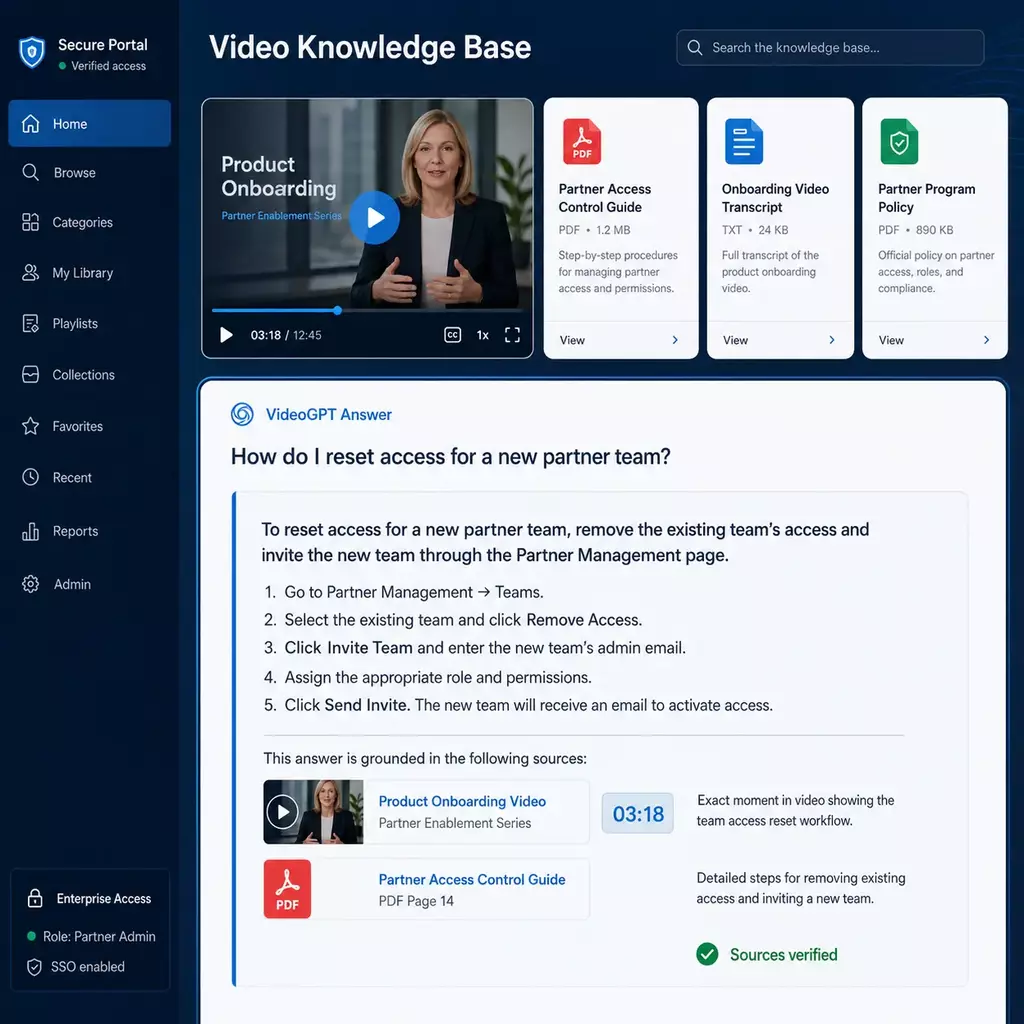
The right implementation depends on where the audience already works. Some teams need embedded knowledge inside existing pages. Others need a dedicated hosted destination. Larger or repeat-use environments may need a full portal.
Use Galleries when the knowledge should appear inside a website, product page, documentation page, LMS, intranet, partner system, or support article.
Use Pages when one audience needs a branded, focused destination with controlled access, attached documents, analytics, and VideoGPT.
Use Tube when the knowledge base needs a portal-style environment with workspaces, channels, user groups, permissions, watch history, and repeat usage.
A video knowledge base does not always look like one front-end portal. In real customer environments, the same platform can support embedded product education, training portals, support documentation, and controlled internal hubs.
Leidos shows how a video knowledge system can expand across separate environments, including embedded product education, structured training, and controlled internal knowledge access.
Read the Leidos customer hubChamberlain shows the difference between point-of-need support knowledge and structured technical training, both supported by reusable video collections.
Read the Chamberlain customer hubVerily is relevant because it reflects a distributed knowledge pattern: video can support product UI, documentation, training systems, and internal workflows without forcing everything into one destination.
See related product education patternsA video knowledge base is a structured system for organizing videos, transcripts, captions, documents, metadata, and AI search so people can find and use answers inside video content.
A text knowledge base explains through written articles. A video knowledge base keeps the visual explanation available and makes it searchable through transcripts, captions, metadata, documents, and AI retrieval. The strongest systems use both text and video together.
Video hosting focuses on upload, playback, embedding, and delivery. A video knowledge base adds structure, collections, access control, transcripts, documents, search, AI answers, and analytics so the video can function as usable knowledge.
An LMS manages formal learning, courses, enrollment, completion, and certification. A video knowledge base focuses on making video and related documents searchable and reusable. It can support training, but it can also support support teams, product education, partner enablement, and internal knowledge retrieval.
Common users include product education teams, training managers, support teams, customer success teams, partner enablement teams, field service teams, internal operations teams, multimedia managers, and knowledge managers.
Useful content includes product walkthroughs, onboarding videos, training modules, support procedures, troubleshooting clips, SOPs, webinars, workshops, release briefings, internal updates, partner resources, public education content, PDF guides, captions, and transcripts.
Transcripts and captions make spoken content searchable, accessible, easier to scan, and more useful for AI retrieval. They help users find the relevant part of a video without watching everything.
AI can answer natural-language questions from videos and documents, summarize relevant information, point users to source material, and jump them to the exact moment in a video that supports the answer.
If an organization needs formal course enrollment, grading, certification management, or HR learning records, an LMS may still be needed. In that case, a video knowledge base can complement the LMS by providing a richer searchable video and document layer.
Cincopa supports video knowledge bases through reusable Galleries, hosted Pages, Tube portals, transcripts, captions, document attachments, access control, analytics, and VideoGPT for AI-powered answer retrieval across videos and documents.
Start with one audience, one knowledge problem, and one delivery model. Cincopa helps you organize the content, publish it where people need it, and make it searchable with VideoGPT.