Titles are too shallow
A title can say “Admin Training,” but it cannot expose every workflow, exception, feature, and answer inside the video.
AI video search helps people find answers inside videos, not just find video files. It uses transcripts, captions, metadata, attached documents, and AI retrieval so users can ask a question, get a useful answer, and jump to the exact moment that explains it.
Use transcripts and captions to find what was actually said.
Search videos together with PDFs, guides, and supporting documents.
Move directly to the timestamp where the answer appears.
Definition
What is AI video search?
AI video search is a way to search inside video content using the spoken transcript, captions, metadata, related documents, and AI understanding. Instead of only returning a video title or playlist, it helps users retrieve the specific answer, topic, step, quote, or moment they need.
In Cincopa’s broader story, AI video search is one part of a Video Knowledge Platform: a system for organizing, distributing, searching, asking, and improving video-and-document knowledge over time.
Why basic search breaks down
Basic video search works until the library becomes real
A small library can survive with titles, folders, and tags. A real training, support, product education, or internal knowledge library cannot. Once there are hundreds of videos, long recordings, repeated topics, and attached documents, users need more than file discovery.
A title can say “Admin Training,” but it cannot expose every workflow, exception, feature, and answer inside the video.
Manual tags are useful, but they break down when libraries grow, products change, and different teams use different vocabulary.
Webinars, workshops, product updates, and troubleshooting guides often contain valuable answers buried deep inside the recording.
Users should not have to search a video library, a PDF folder, an LMS, and a help center separately to answer one question.
Basic search asks, “Which video might contain this?” AI video search asks, “What is the best answer, where does it appear, and what supporting material confirms it?” That difference is what turns a video library into a usable knowledge system.
From accumulated videos to usable knowledge
Start with the library you already have
Many teams already have the raw material. Over time they have recorded onboarding sessions, product walkthroughs, release updates, support videos, webinars, internal training, and customer education content. The problem is not that the knowledge does not exist. The problem is that the library becomes too hard to navigate, too hard to maintain, and too hard to trust.
VideoGPT changes the starting point. Instead of waiting until every video is perfectly tagged, grouped, and documented, teams can bring a large collection into a Gallery, Page, or Tube environment and start asking across it. The existing library can become useful sooner, even before the structure is perfect.
Start with the videos and documents you already have. Product education videos, support walkthroughs, internal recordings, and training materials do not need to be rebuilt from scratch before they can start creating value.
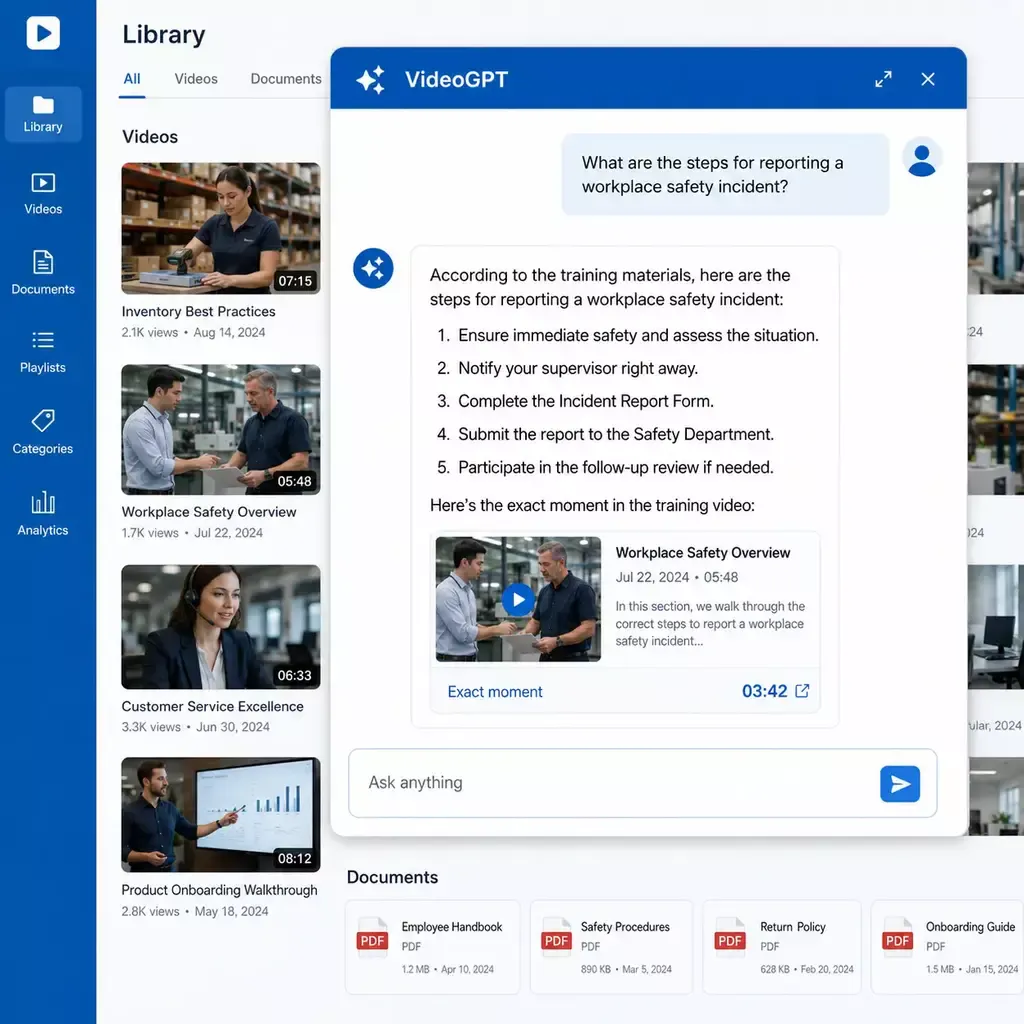
With VideoGPT, users do not have to browse one video at a time and guess where the answer lives. They can ask across the collection and get a direct answer with links back to the relevant moment and supporting materials.
Once people start asking questions, a new signal appears. You can see repeated questions, weak answers, and missing topics. That turns VideoGPT into more than a delivery layer. It becomes a planning tool that helps teams decide what content to improve, what content to create next, and where the library still has gaps.
Organizations often accumulate hundreds of meeting recordings, employee training sessions, product demonstrations, webinars, and internal walkthroughs. Valuable knowledge exists inside these recordings, but finding it becomes difficult when people must rely on filenames, folders, or manually added tags.
AI video search makes the spoken content inside every recording searchable. Instead of opening videos individually and scanning their timelines, users can ask a question across the collection and receive an answer based on the available transcripts, captions, metadata, and supporting documents.
For example, a user might ask:
“Where was the new customer onboarding process explained?”
“Which product demo covers role-based permissions?”
“What did the training team say about handling failed installations?”
“When was the updated approval workflow discussed?”
“Which recording explains how partners receive account access?”
VideoGPT can search across the approved collection, identify the most relevant source, and direct the user to the corresponding moment in the recording. This allows employees to verify the answer in context without watching an entire meeting, training session, or demonstration.
Traditional video search may help users find a recording based on its title, description, folder, or tags. That approach becomes less reliable as the library grows and the same subject appears across multiple recordings. Collection-level AI search examines the knowledge contained across the available videos and documents. A question about a product feature, internal process, customer issue, or training topic can be matched with relevant information even when the wording used in the question differs from the recording title.
The answer to a business question may be spread across several sources. A product demonstration might explain the workflow visually, a training recording might describe exceptions, and a PDF might document the approved process. Teams can organize these materials within a Cincopa Gallery, Page, or Tube environment and use VideoGPT to ask questions across the collection. Access controls help ensure that users search only the content made available to them.
Finding the correct recording is only part of the task. Users also need to locate the specific explanation inside it. Timestamped source links let users move directly to the relevant section of a meeting, training session, or product demo. This makes large recording archives more useful for onboarding, internal knowledge sharing, product education, support, and day-to-day decision-making.
First, it helps users get answers from the library you already have. Then it helps your team understand what the library is missing. That is why AI video search is not only a way to retrieve knowledge. It is also a practical way to plan the next phase of product education, support content, training content, or internal knowledge development.
How it works
AI video search can make sense of an existing video and document library
Teams should not have to perfectly tag, organize, and document every video before search becomes useful. With VideoGPT, a user can add a large collection of videos and documents to a Gallery, Page, or Tube environment and start asking questions across the content. Transcripts, captions, metadata, and attached documents make the answers stronger, but the first value should come quickly. See the complete workflow for building a searchable AI video knowledge base.
Add videos, recordings, PDFs, guides, and supporting documents to a Gallery, Page, or Tube environment.
Transcripts, captions, and AI-generated context help turn spoken video content into searchable knowledge.
Users can ask questions across the full collection instead of opening videos one by one.
VideoGPT can return a direct answer and point users to the relevant video moment or supporting document.
Teams can later add better metadata, categories, documents, and structure based on what users ask and where answers are weak.
Core components
AI video search is not one feature in isolation. It combines content understanding, retrieval, delivery, and insight. The system can start creating value quickly, then become more useful as transcripts, captions, metadata, documents, and usage signals improve.
Transcripts make spoken content searchable. Captions make the same content easier to consume, verify, and reuse. Together, they create a text layer that improves AI retrieval.
Metadata gives the system more context: product, topic, role, workflow, issue, audience, source, language, and document relationship. AI enrichment can help generate and normalize this structure over time.
Many answers live across a video and a document. A support fix may appear in a walkthrough and a manual. A product workflow may be explained in a demo and a release note. AI video search is stronger when these assets are connected.
The goal is not only to answer. The goal is to prove the answer by pointing users to the exact section of the source video, training module, support walkthrough, webinar, or internal recording.
VideoGPT is Cincopa’s AI answer layer over video-and-document knowledge. It lets users ask across the library, retrieve a direct answer, and move to the relevant moment.
Solutions and use cases
AI video search is strongest when people need answers at the point of learning, support, enablement, or work. Each solution has a different knowledge job, but the same pattern applies: users ask across videos and documents, then teams learn what content is missing.
Help users ask about features, workflows, onboarding, updates, and product usage.
Let trainees ask across lessons, modules, recordings, documents, and course content.
Help users and technicians find fixes, procedures, and visual steps without scanning long videos.
Make workshops, release briefings, meetings, and internal training searchable after they happen.
Turn process walkthroughs, SOP videos, and internal how-to recordings into reusable searchable guidance.
Help distributors, installers, lenders, contractors, and partners retrieve the right guidance when they need it.
Help public audiences ask across educational videos, explainers, documents, and program guidance.
How Cincopa helps
Search only matters when it is available where people actually learn, troubleshoot, train, and work. Cincopa combines structured video delivery with VideoGPT, analytics, access control, and multiple publishing models.
Use Galleries to organize and embed topic-based video collections in product pages, support docs, help centers, websites, and documentation.
Best for: embedded product education and troubleshooting
Use Pages for branded, hosted, or gated knowledge destinations where users can browse, search, ask, and consume content.
Best for: focused training, customer education, and partner hubs
Use Tube when you need workspaces, channels, permissions, watch history, and a more portal-like training or knowledge environment.
Best for: academies, internal hubs, and structured portals
Use VideoGPT to let users ask across videos and documents, get answers, and jump to the relevant source moment.
Best for: answer retrieval and content-gap discovery
Customer proof patterns
Cincopa’s AI video search story should be tied to real deployment patterns, not abstract AI promises.
Product education, public training, and internal knowledge hub patterns.
Support troubleshooting and training academy patterns.
Traditional search returns results. VideoGPT is designed for questions. It helps users ask across a video-and-document library, get a direct answer, and inspect the source content through timestamped moments.


Example answer flow
Training module: 08:16 PDF guide: Access roles
Insight loop
AI video search should show what people still cannot find
The hidden value of AI video search is not only retrieval. It is the feedback loop. Every repeated question, weak answer, failed search, and content gap tells the team what to improve next.
See what customers, trainees, partners, or employees are asking across your video knowledge library.
Identify questions where the library does not yet have a clear enough answer or source.
Turn missing answers into a practical backlog for new videos, better documents, updated captions, or richer metadata.
Improve the library based on actual user demand instead of guessing which videos need to be produced next.
For product education, repeated questions can reveal onboarding friction. For support, they can reveal unresolved troubleshooting gaps. For training, they can reveal unclear lessons. For internal knowledge base software, they can reveal missing process documentation. That is why AI video search belongs inside the broader Video Knowledge Platform strategy.
Comparison
These terms overlap, but they are not the same. A buyer should understand the difference before choosing a platform.
Basic video search: Titles, descriptions, tags, folders, and playlist names.
AI video search: Transcripts, captions, metadata, topics, and related documents.
VideoGPT: Video and document knowledge across Cincopa delivery surfaces.
Basic video search: User scans search results and chooses a likely video.
AI video search: User searches by meaning, topic, phrase, or question.
VideoGPT: User asks a question and receives an answer with source context.
Basic video search: Limited or unavailable unless manually tagged.
AI video search: Can find moments inside long videos using transcript and metadata context.
VideoGPT: Returns answers and timestamped source moments when available.
Basic video search: Usually separate from video search.
AI video search: Can connect supporting PDFs, manuals, guides, and notes.
VideoGPT: Designed to answer across videos and documents together.
Basic video search: Shows basic search or engagement data, if available.
AI video search: Can reveal repeated questions and discovery behavior.
VideoGPT: Connects Q&A analytics, weak answers, and content-gap signals.
Basic video search: Small libraries with clear titles and low complexity.
AI video search: Growing libraries where users need precise retrieval.
VideoGPT: Training, support, product education, internal knowledge, and partner enablement environments where users need answers from full collections.
Familiar reference point
Some users may already understand the idea of asking questions about a video. The important difference is scope. YouTube-style AI asking is usually centered on the video someone is watching. Cincopa VideoGPT is built for business knowledge libraries, so users can ask across a full Gallery, Page, or Tube environment, including videos, transcripts, captions, metadata, and attached documents.
Media Preview
Related pages
AI video search should connect naturally to category education, platform pages, solution pages, and customer proof.
Use Cincopa to bring videos and documents together, deliver them through Galleries, Pages, or Tube, and add VideoGPT so users can ask questions, jump to the exact answer, and help your team see what content to improve next.

