
cincopa cincopa
Products

Products

Video Hosting

Upload and manage your videos in a centralized video library

CincoTube

Create your own community video hub for your team, students, or fans

Pages

Create dedicated website pages to showcase your images and videos

Players & Galleries

Launch beautiful playlists, academies, and e-learning courses instantly—no code needed

Solutions

eLearning & Training

Upload and manage your videos in a centralized video library

Enterprise

A-Z Video solutions for those that think big

eCommerce

Boost sales with interactive video & easy embedding

Sales & Marketing

Empower your sales team with video that closes deals

Townhalls Webinars Team Collaboration Learning & Development See All Solutions
Developers

Video API

Build your live and on-demand video experience from a web player to a full-blown video portal with advanced features

REST & GraphQL

Strapi Plugin

Embed video with powerful features in your headless websites

CMS Integration

Flutter Plugin

Easily embed Cincopa-powered video playback in your Flutter apps

Mobile First

Sanity

Upload media files, or link existing Cincopa assets directly from Sanity Studio

Mobile First

JotForms DeepUploader

Add media galleries, videos, audios, and images to your Jot forms

Form Builder
About Us
Meet Cincopa Image

Meet Cincopa

Power for developers, simplicity for content teams

Learn More

Integration

Cincopa & the tools you love, together

Demos

Know more about Cincopa platform via live demo

Professional Service

Services that boost your business

Help & Support Centre

Get access to help articles, FAQs, and all things Cincopa

Product Updates

Stay up-to-date with our latest greatest features

Customer Stories

Hear how we've helped businesses succeed

Pricing Log in Get a demo Get Started
  • Audio Galleries
  • Cincopa General Frequently Asked Questions
  • Galleries
    • Getting Started with Cincopa
    • Photo Details
  • Home Page
  • My Account
  • My Galleries
  • My Media
  • Photo’s & slideshows
  • Search Results
  • Video Galleries

My Account

Help>>My Account:What is the difference between storage and traffic?

Related posts

  • Change password
  • Activate your Cincopa account
  • Deactivate Cincopa account
  • Set up emails for Cincopa
  • Change email address
  • Change credit cards for current credit card payments
  • Cancel plan or package from your PayPal account
  • Cancel plan or package paid with Credit Card
  • Cancel Cincopa Pro account
  • What is the difference between storage and traffic?
  • What is traffic? How is traffic calculated?
  • What is the traffic usage indicator?

November 23, 2016 Liraz My Account

What is the difference between storage and traffic?

Storage is the amount of space that your account has allocated to it on the Cincopa servers.

The storage includes the size of your uploaded files. Please notice that the system automatically saves different versions of your file, for example for hi-resolution, mobile, video files with different qualities and for different devices. 

Traffic is the bandwidth that is used while your media is being watched. You can think of bandwidth as lanes on a highway. The more people that watch your media (cars) the more bandwidth (lanes) you will take up.

You can see how much storage and traffic you have used by logging in to your Cincopa Account and clicking My Account at the top of the page. There you will see the usage information box like the one below.
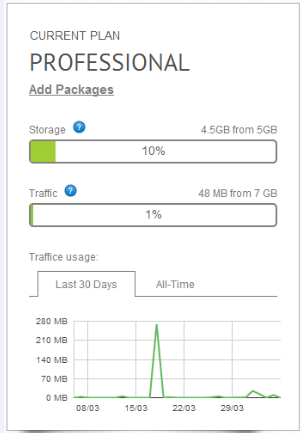
If you need more storage or traffic you can upgrade your account to a Pro Account if you are on a Free Account. If you are already on a Pro Account, you can add packages to your account for more storage and bandwidth.

Estimating the amount of traffic your account will need is not an easy task, as there are many factors involved.

The best practice is to let your account run for a few days and monitor your traffic usage in your My Account page. The chart is showing how much traffic your site consumes each day, multiply it by 31 days and you have a good estimate.

Also note that traffic will be higher if you have a heavier gallery, but as soon as a returning client watches/loads the gallery, the traffic will be taken out of his browser’s cache, and not your account.

Tags:Account
<< Cancel Cincopa Pro account What is traffic? How is traffic calculated? >>

Didn't find what you were looking for?

Submit A Ticket
Templates
  • All Templates
  • Slideshows
  • Player Layouts
  • Interactive Gallery
  • Photo Gallery
  • Audio, Music & Podcast Players
  • HTML Slideshows
FEATURES
  • Video Platform
  • Video Gallery
  • Video Marketing Tools
  • Enterprise
  • Plugins And Integrations
  • Video Player
  • Developers API
COMPANY
  • About Cincopa
  • Customer Stories
  • Product Changelog
  • Brand Guidelines
  • Cincopa Partners
  • Contact Us
MEET CINCOTUBE
  • CincoTube Product
  • Cincopa Video Tube
  • Cincopa's Video Help Tube
GET A DEMO
FREE TRIAL
Facebook Twitter Instagram Linkedin

Need a ride up?
©2026 All rights reserved to Cincopa.com Privacy and Terms.