icon Platform - Galleries

Reusable video galleries for every destination

Organize videos and documents into one structured collection, then embed it across product pages, help centers, training systems, and hosted Pages - without rebuilding the library for each destination.

  • Reuse one maintained gallery
  • Keep videos and documents together
  • Add VideoGPT when needed
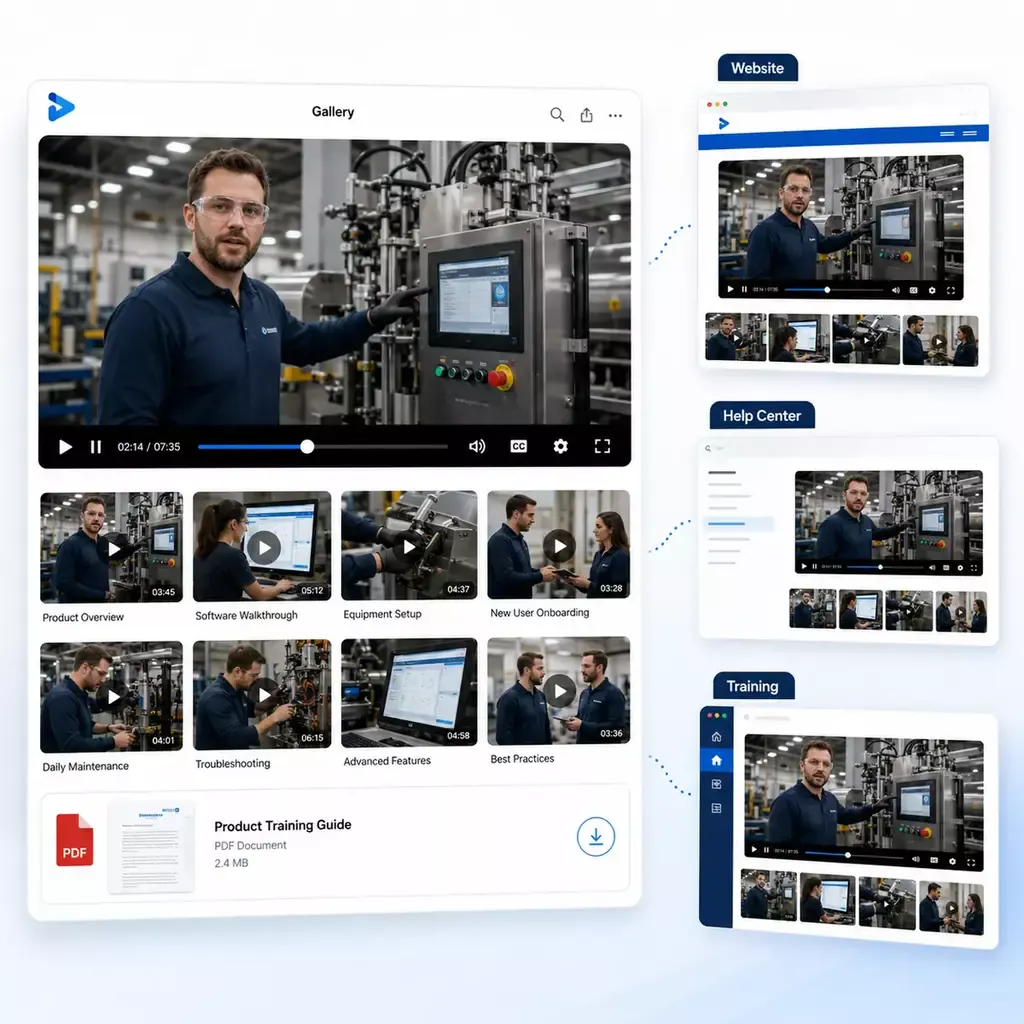
One video and document gallery reused across website, help center, and training portal layouts

What Galleries are

More than a playlist. More than a widget.

A gallery is the reusable collection layer behind embedded video and document knowledge.

Each gallery defines which assets are included, how they are grouped and ordered, which template shapes the experience, what features are enabled, how attached documents appear, and how the collection behaves across every surface where it is deployed. With VideoGPT, the gallery can also become easier to enter: viewers can see what the collection covers, ask across the content, and jump to the source moment that answers them.

Collection

Group the right knowledge together

Organize videos, PDFs, and supporting assets by topic, role, workflow, product area, release, support issue, or audience so the knowledge matches how people actually look for answers.

Reusable delivery

Use the same gallery in more than one place

One gallery can support product pages, documentation systems, help centers, LMS environments, internal portals, partner portals, knowledge bases, SharePoint, Salesforce, and hosted Pages without turning into separate disconnected libraries.

Behavior

Keep the experience consistent

Templates, branding, player options, search settings, attached-document visibility, downloads, VideoGPT, and optional welcome-message behavior all stay tied to the gallery so the collection remains coherent wherever it appears.

AI-guided gallery orientation

Help viewers understand the collection before they browse

A gallery can be valuable even when it is not huge. A few long webinars, a focused set of tutorials, or a support playlist with many procedures can still be hard for viewers to enter if they do not know what is inside or where to start.

When VideoGPT is enabled, the gallery can open with a welcome message that explains what the collection covers and suggests useful questions based on the actual videos and documents inside.

Why this matters

Keep knowledge consistent wherever the work happens

Most teams do not struggle because the video is missing. They struggle because the knowledge gets copied, split, stripped of context, and rebuilt across too many destinations. Even when the right video exists, viewers may not know which collection to open, what the collection covers, or where the exact answer appears.

Consistency and reuse

Consistency and reuse

  • Fewer duplicated libraries — The same collection can support many deployment surfaces, so teams do not need separate video libraries for every site, page, or internal system.
  • Easier updates — Update the gallery once and the refreshed structure, videos, and attached documents stay aligned across the places where the collection is deployed.
Workflow delivery

Workflow delivery

  • Better workflow delivery — People learn faster when the right gallery appears inside the page, article, portal, or system they already use instead of sending them somewhere else.
  • Video and docs stay together — Walkthroughs, PDFs, release notes, technical guides, and support documents stay attached to the same gallery instead of drifting apart in different tools.

Operational payoff — Organize it once. Keep it useful everywhere. Galleries help teams maintain one structured collection and reuse it across the places where customers, trainees, support users, and internal teams actually need it. Consistency. Reuse. Fewer rebuilds.

How Galleries work

How Galleries organize, deliver, and improve knowledge

The workflow is simple: structure the collection, choose the right view, deploy it where the work happens, help people understand what is inside, then improve the library over time.

Structure / delivery / discovery

Deployment surfaces

Where teams embed Galleries

Galleries are built for reusable embedded deployment. One gallery can appear across many surfaces while keeping the same structure, attached documents, and viewing logic intact.

Web and product surfaces

Web and product surfaces

Embed galleries in websites, product pages, product UI help layers, customer-facing resource areas, and knowledge bases where users need guided video and document knowledge inside the workflow.

Documentation and support systems

Documentation and support systems

Use galleries inside help centers, documentation systems, support portals, technical articles, and troubleshooting pages so the right playlist and supporting docs stay close to the problem.

Training environments

Training environments

Add galleries to LMS environments, training pages, onboarding flows, academy content, and other learning systems when the library needs stronger video delivery and easier discovery.

Internal portals and intranets

Internal portals and intranets

Deploy galleries inside internal portals, intranet pages, team sites, SharePoint, Salesforce, and other controlled internal systems where embeds make sense and the content needs to stay current without duplicate libraries.

Partner environments

Partner environments

Use the same gallery inside partner portals, distributor resources, contractor training environments, and other external systems where structured video and document knowledge needs to stay consistent.

Hosted destinations when needed

Hosted destinations when needed

When a rollout needs its own destination, the same gallery can also support a hosted Page without losing the collection structure, attached documents, or discovery layer.

Galleries, Pages, and Tube

Three product shapes, three different jobs

Pages and Tube still matter. Galleries simply own the embed-first story.

Reuse and consistency

Scale one working gallery into many consistent surfaces

The most practical gallery advantage is not only the first deployment. It is the ability to keep a working collection consistent across many surfaces over time.

Master galleries

Keep multiple gallery instances aligned

Use a master gallery to keep branding, layout settings, player behavior, and customization consistent across linked gallery instances.

Template logic

Change the shape without rebuilding the library

Training-style playlists, category views, billboard-style player experiences, and simpler single-video layouts can all be driven by gallery and template choices instead of rebuilding the knowledge from scratch.

Video + document knowledge

Keep supporting materials with the collection

Pair walkthroughs with release notes, technical documentation, onboarding guides, and service PDFs so the gallery stays complete wherever it is deployed.

Light security

Protect the collection where needed

Galleries support password protection and domain locking for embedded environments. When a rollout needs deeper access control, Pages or Tube can add a stronger access layer on top.

What teams build with Galleries

A practical starting point for real knowledge rollouts

Galleries are often the cleanest first move because they work well when one team needs structured knowledge in one environment before anything broader exists.

Customer examples

How teams use Galleries across product education, support, and training

Galleries support different knowledge jobs without forcing every deployment into the same front end. These examples show how teams use reusable galleries in embedded product education, distributed knowledge delivery, and structured technical support and training.
Large reusable gallery system

Leidos

Embedded product education

Product educationhosted training Pagesdemosrelease updatesrole-based learning paths

At Leidos, Galleries organize a large product education library with around 600 videos, about 150 galleries, and 350+ attached documents across embedded product pages, hosted training Pages, demos, release updates, and role-based learning paths.

What Leidos built: A structured gallery setup supports embedded delivery, video-and-document pairing, and reusable organization across multiple product education surfaces.

Deployment highlights: Hosted Pages, attached documents, role-based grouping, and VideoGPT all work inside the same gallery-based setup, helping viewers understand the collection and move to the right source faster.

View more
Distributed embedded knowledge

Verily

Distributed embedded knowledge

At Verily, Cincopa is used as a distributed video-and-document knowledge layer across product UI, support documentation, LMS environments, internal systems, and development workflows.

  • More than a thousand videos across multiple systems
  • More than a thousand PDFs paired with the knowledge layer
  • Strong fit for reusable embedded knowledge delivery
View more
Support and training

Chamberlain

Support and training

At Chamberlain, Galleries support structured technical playlists across support documentation and training environments, especially where installers and technicians need to see the right step fast.

  • Around 400 videos across support and training environments
  • Structured playlist galleries across support docs, academy, and hosted pages
  • Strong fit for gallery reuse in technical product ecosystems
View more
FAQ
Frequently asked questions
Next step

Build one gallery that can work across more than one surface

Start with one product area, one documentation surface, one support library, one internal portal, or one embedded training flow. Get that collection working well, help viewers understand what is inside, then reuse the same gallery across adjacent destinations without duplicating the library.