Compare

Best screen recording and workflow documentation tools for training, support, and product knowledge

Screen recording tools help people explain something quickly. Workflow documentation tools turn processes into repeatable guides. Interactive demo tools let buyers or learners click through a product story. They all help teams create knowledge.

The next question is what happens after the recording, guide, demo, webinar, or document is created. Can people find it later? Can they ask questions across it? Can the team see what is missing and know what to create next?

Quick answer

Choose by what needs to happen after someone records or documents the workflow.

Use a screen recorder when the main goal is a fast personal explanation, update, reply, or walkthrough.
Use a guide tool when the main output should be a clean click-by-click process document.
Use an interactive demo tool when prospects or learners should click through a guided product story.
Use Cincopa when videos, recordings, webinars, walkthroughs, demos, and documents need to become searchable, answerable knowledge.
Category fit

Creation tools solve the capture problem. Cincopa solves the knowledge-use problem.

A screen recorder is useful when someone needs to explain a bug, demo a feature, answer a support question, or show a workflow. A workflow documentation tool is useful when the team needs a clean guide with screenshots and steps. An interactive demo tool is useful when marketing or sales wants a guided product experience.

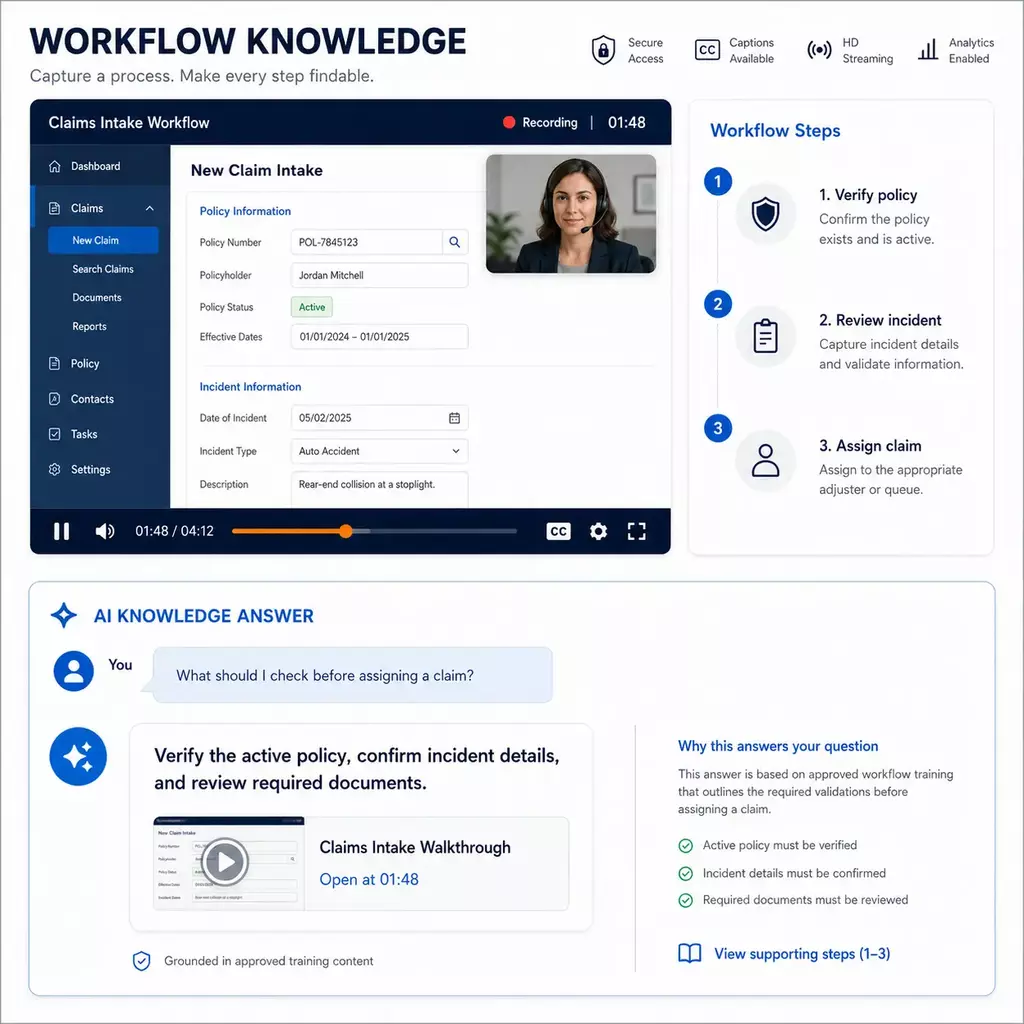
Cincopa can start at the creation step through RecTrace, but the broader value is what happens next: publish recordings and documents into structured video knowledge environments, let people ask across them with VideoGPT, and let AI suggest which videos, guides, articles, FAQs, or supporting assets are missing.

Need Screen recording tools Step-by-step guide tools Interactive demo tools Cincopa
Fast personal explanationStrongMediumMediumSupported through RecTrace
Click-by-click process guideMediumStrongMediumCan publish and organize alongside videos/docs
Interactive product tourMediumMediumStrongBest when tours are part of a broader knowledge library
Search across many videos and documentsLimitedLimitedLimitedStrong with VideoGPT
Find the exact answer inside long recordingsUsually limitedNot the main useNot the main useStrong with answer retrieval and deep links
Use AI to suggest missing contentUsually limitedUsually limitedUsually limitedCore part of the content-improvement loop
Best options

Best screen recording and workflow documentation tools by goal

The right choice depends on whether you need to record a message, create a guide, build an SOP, publish an interactive demo, or turn many videos and documents into a reusable knowledge system.

Video knowledge platform

Best for video and document knowledge

Cincopa + RecTrace

Cincopa includes RecTrace for quick screen and webcam recording, then helps teams publish videos, webinars, walkthroughs, demos, and documents into searchable knowledge environments. Users can ask with VideoGPT, jump to the exact answer, and teams can see what content AI suggests creating next.

Best for: Product education, customer training, support walkthroughs, internal knowledge, and reusable video/document libraries.

Async screen recording

Best for quick video messages

Loom

Loom is useful when teams need fast screen and webcam recordings for async updates, feedback, support replies, engineering notes, sales follow-ups, and quick explanations.

Best for: One-to-one or team video communication where fast recording and sharing matter more than building a structured knowledge library.
Best for education-style recording and editing

ScreenPal

ScreenPal combines screen recording, video editing, hosting, quizzing, and education-oriented workflows. It is a strong fit when teachers, trainers, or teams need video creation and sharing tools.

Best for: Instructional video creation, classroom-style training, simple video editing, and video sharing.

Workflow documentation and visual guides

Best for AI-assisted video documentation

Guidde

Guidde helps teams create step-by-step videos and documents from product or workflow captures, with AI support for narration, editing, and guide creation.

Best for: Product demos, feature walkthroughs, customer onboarding guides, and polished visual documentation.
Best for screenshot-based process guides

Scribe

Scribe automatically captures a process and turns it into a step-by-step guide with screenshots, text, links, and cursor-click context.

Best for: Internal process docs, how-to guides, SOP screenshots, and repeatable workflow instructions.
Best for polished workflow guides

Tango

Tango captures workflows from a Chrome extension and formats them into step-by-step guides that can be shared, exported, or used in enablement workflows.

Best for: Documenting software steps, onboarding teammates, and creating reusable workflow instructions.
Best for local step-by-step guides

Folge

Folge is a desktop app that captures screenshots on mouse clicks and helps teams annotate, reorder, and export guides in formats such as PDF, Word, HTML, Markdown, and PowerPoint.

Best for: Local documentation workflows, offline-friendly guide creation, screenshots, annotations, and exported process docs.

SOP and training documentation

Best for SOP training manuals

Trainual

Trainual is built for documenting SOPs, company processes, policies, and training manuals that can be assigned, updated, accessed, and tracked.

Best for: Employee onboarding, internal SOPs, process training, policy documentation, and accountability around team training.

Interactive product demos

Best for no-code interactive demos

Navattic

Navattic helps B2B SaaS teams create no-code interactive product demos for websites, sales cycles, discovery, and buyer education.

Best for: Hands-on product tours, sales demos, product-led growth, and interactive website experiences.
Best for product stories and lightweight demos

Arcade

Arcade helps teams create interactive demos, product videos, and visual product stories quickly, often for marketing, product education, and sales enablement.

Best for: Product stories, feature demos, website education, and lightweight interactive experiences.
After recording

Turn screen recordings into answerable knowledge

A recording is useful once. A knowledge library keeps working. Cincopa helps teams move from individual recordings and guides to a system that people can search, ask, revisit, and improve.

1. Record or gather what exists

Use RecTrace, uploaded videos, webinars, meetings, demos, walkthroughs, PDFs, or guides.

2. Publish it where people need it

Deliver knowledge through Galleries, Pages, Tube, embedded product pages, help centers, training portals, or internal hubs.

3. Let users ask across it

VideoGPT answers from the library and sends users to the right video moment or supporting document.

4. Let AI suggest what to create next

Repeated questions, weak answers, and missing topics point to the next video, guide, article, FAQ, or supporting asset.

How teams use it

Different teams create knowledge in different formats

A product manager may record a release walkthrough. A support engineer may show a fix. A trainer may publish a webinar. A technical writer may turn repeated questions into a clearer article. A content manager may organize all of it into a portal or help center. The strongest system lets each role contribute in the format that fits the job.

Experts explain

Product, support, training, sales engineering, and operations teams can record or show what they know.

Knowledge owners guide

Customer education, support enablement, L&D, and documentation leads decide what matters and what should improve.

Content teams publish

Admins and content operators organize recordings, guides, documents, permissions, embeds, and analytics.

Users ask

Customers, employees, partners, agents, and trainees ask questions and jump to the answer they need.

FAQ

Questions about screen recording, workflow documentation, and Cincopa

What is the best screen recording tool for business training?

The best tool depends on the job. Loom is strong for quick async video messages. Guidde, Scribe, Tango, and Folge are useful for step-by-step visual guides. Trainual is built around SOP and training documentation. Cincopa fits when screen recordings, walkthroughs, webinars, demos, and documents need to become a searchable training, support, or product knowledge library.

Is Cincopa a screen recording tool?

Cincopa includes RecTrace, a Chrome extension for screen and webcam recording. But Cincopa is broader than a recorder: teams can publish recordings into Galleries, Pages, or Tube, combine them with documents, let users ask questions with VideoGPT, and use AI signals to decide what content to create next.

How is Cincopa different from Loom?

Loom is built for fast video messages and async communication. Cincopa can support recording through RecTrace, but its main value is organizing recordings, training videos, support walkthroughs, webinars, and documents into answerable knowledge environments that users can search and ask.

How is Cincopa different from Guidde, Scribe, or Tango?

Guidde, Scribe, and Tango are strong when the main output is a clean step-by-step guide or visual workflow document. Cincopa is stronger when the team needs a full knowledge layer around many videos, recordings, webinars, demos, walkthroughs, and documents, with AI answer retrieval and insight into missing content.

Can Cincopa work alongside workflow documentation tools?

Yes. A team can use a tool like Scribe, Tango, Guidde, or Folge to create a specific guide, then use Cincopa to organize videos and documents into training portals, support libraries, product education pages, or internal knowledge hubs.

What does AI add after the content is published?

VideoGPT lets users ask across videos and documents, jump to the exact answer, and surface patterns such as repeated questions, weak answers, and missing topics. Those signals help teams decide which videos, guides, articles, FAQs, or supporting assets to create next.
Record it once. Turn it into knowledge people can use.

Start with the videos, demos, webinars, guides, and documents you already have. Add new recordings with RecTrace. Then use VideoGPT to help users ask, find, and act on the knowledge inside.