Compare

Best LMS alternatives for video training and customer education

Learning management systems are built for courses, assignments, enrollment, compliance, and learning records. Those are important. But not every training program needs to start with a full LMS rollout.

For product education, customer training, partner enablement, support training, and internal knowledge, the real goal is often simpler: help people find the right explanation, watch the right walkthrough, ask questions, and keep learning without waiting for a course to be rebuilt.

Quick answer

Choose by the training experience you need to deliver.

Use an LMS when you need formal course management, enrollment, compliance, tests, certificates, and learning records.
Use a course platform when you need to sell or package structured courses to an audience.
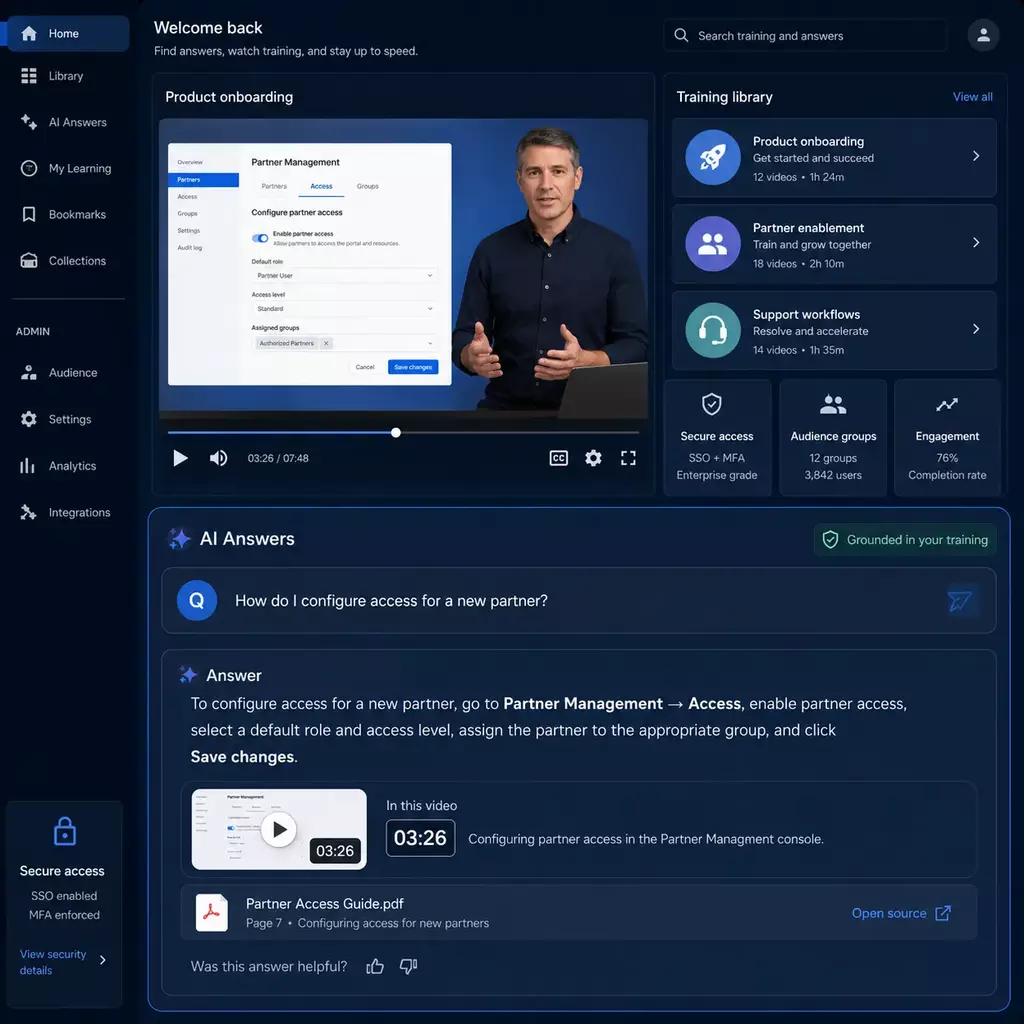
Use Cincopa when training knowledge lives in videos, demos, webinars, recordings, walkthroughs, and documents that people need to search, ask, and revisit.
Category fit

An LMS is one way to deliver training. It is not the only way.

A traditional LMS is useful when training has to be assigned, tracked, tested, certified, and reported. But many teams are trying to solve a different problem: customers need product answers, partners need enablement, employees need workflow guidance, support teams need repeatable explanations, and learners need to find the right moment inside a video or document.

That is where LMS alternatives become relevant. Some alternatives help sell courses. Some help teams create collaborative learning. Some manage enterprise video. Cincopa approaches the same outcome from a video and document knowledge angle: publish useful training content, let people ask across it, and let AI suggest what is missing so the team knows what to create next.

Need Traditional LMS Course platform Enterprise video platform Cincopa video knowledge platform
Formal course assignment Strong fit for enrollment, completion, tests, certificates, and records. Useful for packaged courses, especially external audiences. Usually supports video inside learning programs, but is not always the course system. Works well for video training portals and can support LMS environments, but the main strength is answerable training knowledge.
Customer product education Can work, especially when education is course-based. Useful for course packaging and paid programs. Useful for hosting and streaming product videos. Strong fit for demos, onboarding videos, feature walkthroughs, help-center embeds, and AI answers across videos and documents.
Support and troubleshooting training Works when the content is organized as formal modules. Less natural for point-of-need support guidance. Can host support videos, but may not provide answer retrieval across documents and videos. Strong fit for searchable support walkthroughs, field guidance, and exact-moment answers before a ticket is opened.
Webinars and long recordings Can place recordings inside courses, but discovery is often course-first. Can package recordings, but not always ideal for knowledge retrieval. Strong for storing and streaming recordings. Strong fit when people need to ask questions across webinars, jump to the right moment, and reuse recordings as living knowledge.
Finding missing training content Often based on reports, completion data, surveys, or manual feedback. Often based on course analytics and learner feedback. Often based on video analytics. AI can surface repeated questions, weak answers, unresolved topics, and missing video or document signals so teams know what to create next.
Best options

Best LMS alternatives by training goal

The right LMS alternative depends on what you are trying to launch. Some teams need a full learning system. Some need a course storefront. Some need collaborative training. Some need a video knowledge layer that makes existing and future training content easier to search, ask, reuse, and improve.

Best for video and document training knowledge

Cincopa

Cincopa helps teams publish video training portals, product education hubs, support walkthrough libraries, partner training resources, webinars, recordings, and attached documents. VideoGPT lets learners ask across the library and jump to the right moment or source.

It is a strong option when the goal is not only course completion, but making training knowledge easier to find, answer from, reuse, and improve over time.

Best for customer, partner, and employee training programs

LearnUpon

LearnUpon is a traditional LMS option for structured training programs across employees, customers, and partners. It is most relevant when the core need is course delivery, learning management, and training administration.

Best for straightforward course delivery

TalentLMS

TalentLMS is a common option for teams that want a simpler LMS experience for building, assigning, and tracking training. It is a practical fit when the goal is standard course delivery without a heavy enterprise rollout.

Best for enterprise learning programs

Docebo

Docebo is often considered for broader enterprise learning programs that need scale, administration, and structured learning experiences across multiple audiences.

Best for formal learning operations

Absorb LMS

Absorb LMS is a fit for organizations that want a formal learning platform for employee, customer, or partner training with administration, reporting, and program management.

Best for open-source flexibility

Moodle

Moodle is a long-standing open-source LMS option for teams that want flexibility, control, and customization around course-based learning environments.

Best for collaborative learning

360Learning

360Learning is relevant for teams that want a collaborative learning approach where internal experts and teams contribute to course creation and training programs.

Best for enterprise video libraries

Panopto and Kaltura

Enterprise video platforms can be useful when the main requirement is recording, managing, streaming, and securing video at scale. They are often adjacent to LMS workflows rather than full LMS replacements.

Best for selling packaged courses

Thinkific and Teachable

Course commerce platforms are a strong fit when the main goal is to package, market, and sell courses. They are less focused on operational knowledge retrieval across videos, documents, and support content.

How Cincopa fits

A video training layer can work with or without an LMS

Many teams already have an LMS. They still need a better way to manage the videos, demos, webinars, walkthroughs, recordings, and documents that power real training experiences. Cincopa can be used as a standalone video training portal, as hosted Pages for focused programs, or as an embedded layer inside LMS courses, help centers, product pages, and support workflows.

Standalone portal: launch a branded training environment without rebuilding a full LMS.
Inside the LMS: use Cincopa as the video and document layer inside existing courses.
At the point of need: embed training answers in help centers, product pages, support docs, onboarding flows, or partner portals.
Training improvement loop

Publish what exists. Let AI find what is missing. Create and publish more.

A training program does not become complete in one planning session. Products change. Customers ask new questions. Support teams hear new issues. Partners need new enablement. Employees forget steps and return later.

1. Publish useful training assets.
Videos, demos, onboarding sessions, webinars, walkthroughs, recordings, PDFs, and guides.
2. Let people ask across the library.
VideoGPT helps learners get grounded answers and jump to the right video moment or document.
3. Create what the AI shows is missing.
Repeated questions, weak answers, and unresolved topics become suggestions for new videos, clips, guides, articles, FAQs, or supporting assets.
People involved

Training knowledge is built by more than one team

Strong training programs usually involve the people who know the answer, the people responsible for the learning outcome, the people who publish and maintain the content, and the learners who reveal what is still unclear.

Experts explain

Product managers, trainers, support engineers, field specialists, solution consultants, and customer success experts show the workflow or explain the issue.

Training owners guide

Customer education, L&D, partner enablement, product education, and support enablement teams decide what the audience needs to learn.

Content teams publish

Content operations, academy admins, multimedia managers, and web teams organize, secure, embed, update, and measure the training library.

Learners ask

Customers, partners, employees, support agents, technicians, and trainees ask questions that reveal what is working and what still needs to be created.

Match the tool to the job

Which LMS alternative makes sense?

Need formal compliance training?

Use a traditional LMS as the system of record for assignments, completion, tests, certificates, and reporting.

Need to sell courses?

Use a course commerce platform built around packaging, marketing, payment, and learner access.

Need large-scale video management?

Use an enterprise video platform when the core problem is recording, streaming, securing, and managing video libraries at scale.

Need answerable training knowledge?

Use Cincopa when training depends on videos, webinars, demos, walkthroughs, support explanations, and documents that learners need to search, ask, and reuse over time.

Specific comparisons

Compare specific LMS and training platforms

Use the category guide above to understand the main decision. Use the specific comparisons below when the buyer is already evaluating a named LMS, course platform, or enterprise video system and needs to understand where Cincopa fits.

FAQ

Questions about LMS alternatives

What is the best LMS alternative?

The best LMS alternative depends on the outcome. Traditional LMS platforms are strong for formal courses, enrollment, compliance, certificates, and learning records. Video training platforms are stronger when teams need searchable training videos, webinars, demos, support walkthroughs, and documents that learners can ask questions across.

Does Cincopa replace an LMS?

Sometimes Cincopa can replace a lightweight LMS-style portal for video training, customer education, partner training, and knowledge libraries. In other cases, Cincopa works alongside the LMS as the video and document knowledge layer inside courses, portals, product pages, or support workflows.

When should a team use a traditional LMS?

A traditional LMS is usually the right core system when the main need is formal course assignment, enrollment, compliance tracking, certification, graded assessments, and learning records.

When should a team use a video training portal?

A video training portal is useful when the training experience depends on demos, walkthroughs, webinars, recordings, onboarding sessions, product training, support explanations, or field guidance that learners need to search, browse, revisit, and ask questions about.

How does AI help improve training content?

When learners ask questions across videos and documents, AI can surface repeated questions, weak answers, missing topics, and content gaps. Those signals help teams decide which videos, guides, articles, FAQs, clips, demos, or supporting assets to create next.

Build a training library people can actually use

Launch a video training portal, embed searchable learning content inside your LMS or help center, and let VideoGPT show learners the right answer at the right moment.