Compare

Best knowledge base software for AI-powered video and document knowledge

For years, knowledge base software meant one thing: write articles, organize them into categories, publish a help center, and hope users find the right answer.

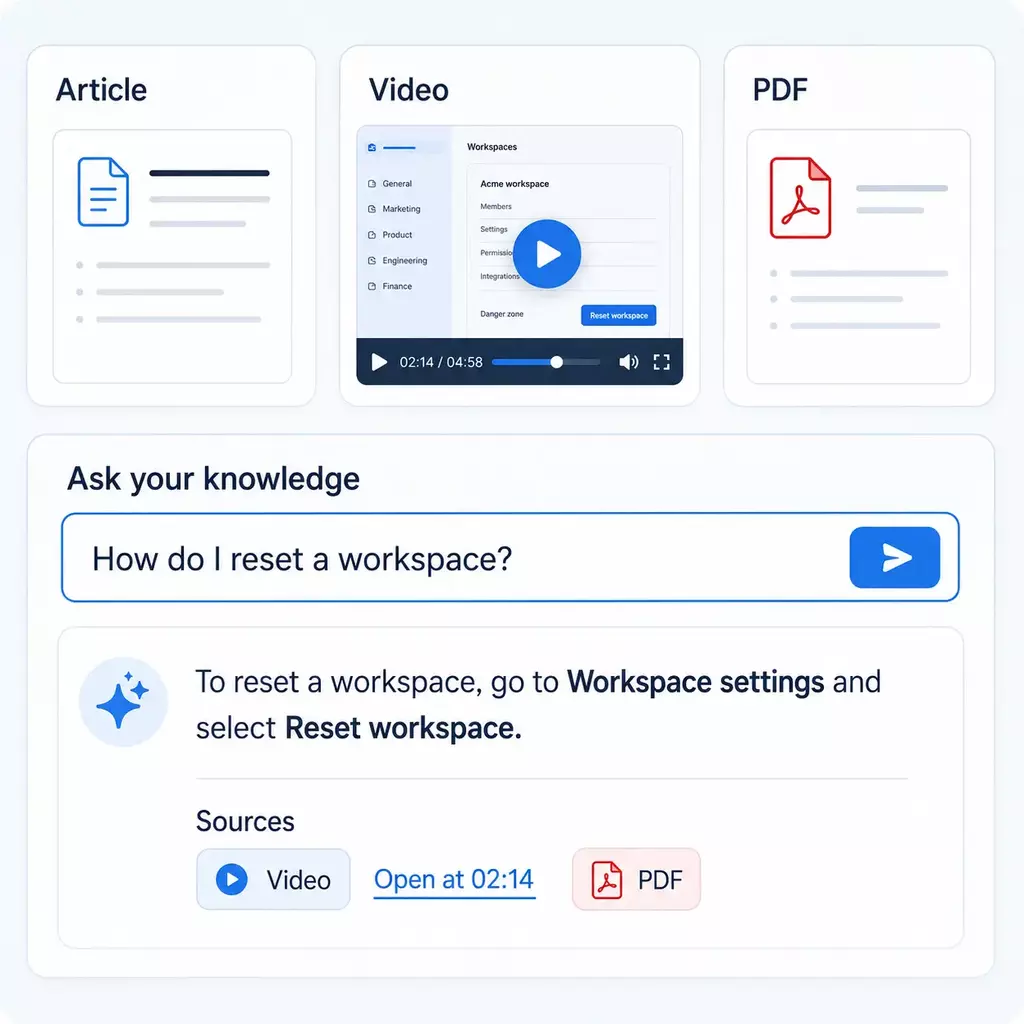
That model still has value, but it is no longer enough for many product, support, training, onboarding, workflow, and expert-explanation needs. The category is moving toward interactive, AI-powered knowledge systems where users can ask questions, get grounded answers, and jump directly to the video moment, document, or explanation they need.

Quick answer

The best knowledge base model depends on how answers should be created and retrieved.

Article-only knowledge bases are useful when answers are short, stable, written, and easy to maintain as text.
Cincopa is built for teams that want knowledge to be shown, explained, searched, asked, watched, and improved through video, documents, and AI.
The shift: from static article portals to interactive knowledge experiences that answer from the content people already create and the questions users actually ask.
Quick answer

This is not a file-format decision. It is a knowledge-creation decision.

The wrong comparison is: “Do we already have articles or videos?” The right comparison is: “What is the fastest and clearest way for our team to create knowledge, and for users to retrieve the right answer when they need it?”

The article-first model

A documentation-first knowledge base starts with written content. Experts or writers turn knowledge into articles, organize those articles into categories, publish them in a help center, and maintain them over time.

That model works for policies, short reference answers, API docs, formal manuals, and stable procedures. But it can become slow and incomplete when the answer needs visual context, workflow demonstration, or expert explanation.

The video-powered knowledge model

A Video Knowledge Platform starts from a different reality: people already explain knowledge by showing it. A product demo, support walkthrough, onboarding recording, screen recording, training session, webinar, or expert answer can become reusable knowledge.

Cincopa turns those explanations, plus related documents, into an interactive AI-powered knowledge system that users can browse, search, ask, watch, and improve through real questions.

Category shift

The knowledge base is becoming interactive, visual, and AI-powered

The old knowledge base was mostly a static article portal. The new knowledge base is an answerable knowledge system. Users do not only search titles and skim pages. They ask questions, receive grounded answers, watch the exact moment that explains the issue, open the related document, and continue learning from guided follow-up questions.

That is why articles-only knowledge bases are not always enough. They are still useful for written reference, but many high-value answers live in demos, trainings, webinars, support recordings, walkthroughs, expert explanations, PDFs, and documents that should not be trapped outside the knowledge experience.

Experts can explain faster than they write

Product managers, support engineers, trainers, CSMs, and operations leads often know the answer. Recording or explaining it can capture useful knowledge before it waits in a documentation backlog.

Users understand workflows by seeing them

Setup flows, troubleshooting steps, product behavior, and operational procedures are easier to trust when users can see the exact sequence instead of only reading a description.

AI makes video retrievable

The old weakness of video was search. Transcripts, metadata, document context, and VideoGPT make it possible to ask the library and jump to the exact source moment.

Documents still matter

The better model is not video instead of documents. It is video plus documents, PDFs, captions, transcripts, metadata, guides, release notes, and supporting assets in one answerable experience.

Real questions expose missing knowledge

Repeated questions, weak answers, failed searches, and content gaps reveal what users actually need. That creates a better roadmap than guessing which article to write next.

The library improves while people use it

Publish useful knowledge first, let users ask, and then create the next video, article, FAQ, guide, or document based on demand.

Model comparison

Article-only vs guide tools vs Cincopa’s Video Knowledge Platform

Different tools can all be called “knowledge base software,” but they are not built around the same creation model. The right comparison is not only feature-by-feature. It is whether the system helps teams turn expertise into usable answers.

Need Article-only knowledge base Visual guide / workflow tool Cincopa Video Knowledge Platform
Written reference content Strong fit for policies, short references, release notes, checklists, API docs, and formal written documentation. Can support articles with screenshots or step captures. Works alongside articles, documents, PDFs, transcripts, and supporting guides.
Product demos and walkthroughs Often requires screenshots, writer interviews, and manual article updates. Good for clean step capture. Strong fit for product demos, feature explainers, onboarding recordings, and searchable source moments.
Training sessions, webinars, meetings Usually becomes a summary, transcript, or follow-up article. Usually not built for long-form recorded knowledge. Strong fit for publishing, organizing, asking, replaying, and reusing recorded expertise.
Support and troubleshooting Good for short written fixes and self-service articles. Good for repeatable step-by-step flows. Strong fit when users need to see the fix, ask a question, and jump to the exact visual step.
Ask across videos and documents Usually article search first. Usually guide-level search. VideoGPT lets users ask across videos and documents, get grounded answers, and jump to the exact moment or asset.
Content roadmap Often depends on tickets, writer backlog, search logs, or page feedback. Often depends on manually selected workflows. Repeated questions, weak answers, and missing topics show what should be improved or created next.
Best options

Best knowledge base software and alternatives by use case

This list is not one universal ranking. It groups tools by the knowledge model they support: article-only documentation, internal wikis, support help centers, developer docs, visual guides, and video-powered knowledge.

Best for AI-powered video and document knowledge

1. Cincopa

Cincopa is the best fit when a knowledge base needs to include videos, recordings, webinars, demos, walkthroughs, trainings, documents, PDFs, and AI answer retrieval. It helps teams build a knowledge experience users can watch, search, ask, and improve.

Best for article-based documentation

2. Document360

Document360 is relevant when the team is committed to a documentation-first knowledge base: articles, manuals, SOPs, API documentation, help articles, and structured written self-service content.

Best for internal wiki-style knowledge

3. Confluence

Confluence is useful for internal documentation, project notes, specs, team pages, and wiki-style collaboration where written structure is the main asset.

Best for flexible lightweight docs

4. Notion

Notion is a flexible choice for lightweight docs, team notes, project knowledge, and internal hubs when the team values speed and flexible structure.

Best for support articles tied to ticketing

5. Zendesk Guide

Zendesk Guide is a natural fit when the knowledge base is tightly connected to Zendesk support workflows and the main output is customer help articles.

Best for simple customer docs

6. Help Scout Docs

Help Scout Docs is a good fit for customer-facing help centers where the content model is mostly simple written documentation and support self-service.

Best for developer documentation

7. GitBook

GitBook is a good choice for developer docs, technical guides, API documentation, and text-first documentation sites for technical audiences.

Best for step-by-step visual guides

8. Guidde, Scribe, and Tango

These tools are useful when the job is capturing a clean workflow and turning it into a visual guide or article-friendly step sequence. Cincopa is different when the job is to publish, search, ask, reuse, and improve a broader video and document knowledge library.

The knowledge loop

Publish what you have. Learn what people need. Create what comes next.

Cincopa is not only a place to store videos. It is a knowledge-building motion. Start with useful videos, webinars, demos, trainings, support walkthroughs, recordings, PDFs, and documents. Let users ask across them. Then use repeated questions and weak-answer signals to decide what should become the next video, article, FAQ, guide, training module, or supporting asset.

1

Publish

Launch videos, webinars, demos, trainings, support walkthroughs, recordings, PDFs, and documents through Galleries, Pages, or Tube.

2

Ask

VideoGPT lets users ask across videos and documents, get grounded answers, and jump to the source moment or supporting asset.

3

Create

Use real question patterns to create better videos, articles, guides, FAQs, documents, and training assets.

Roles

How knowledge gets built in Cincopa

Cincopa connects the people who know the answer, own the outcome, publish the content, improve the documentation, and consume the knowledge.

Experts explain

Product managers, support engineers, trainers, CSMs, field experts, and ops leads show or explain the answer once.

Knowledge owners guide

Training, support enablement, product education, customer education, and knowledge managers decide what matters.

Content teams publish

Multimedia, content ops, LMS admins, and web ops organize Galleries, Pages, Tube, permissions, embeds, and updates.

Writers improve

Technical writers use videos, questions, and gap signals as source material for better articles, FAQs, checklists, and docs.

Users ask

Customers, employees, partners, technicians, agents, and trainees ask questions and jump to the right answer.

Choose Cincopa when

The answer is better shown, explained, asked, replayed, or improved

  • • You need product demos, onboarding recordings, walkthroughs, or webinars to become usable knowledge.
  • • Support answers require visual steps, troubleshooting context, or field-service guidance.
  • • Training knowledge needs to be watched, searched, and revisited.
  • • Users should ask across videos and documents, not only search article titles.
  • • You want repeated questions and weak answers to guide what to create next.
Article-only may be enough when

The knowledge is short, written, stable, and easy to maintain

  • • Your main output is short public help articles.
  • • Answers rarely need visual explanation or replay.
  • • You are mainly publishing policies, legal content, API docs, or static references.
  • • You do not need video libraries, documents, AI answers, or exact-moment retrieval.
  • • You do not need a content-improvement loop based on real user questions.
FAQ

Knowledge base software comparison FAQ

What is the best knowledge base software when product, training, or support knowledge includes video?

If most answers are short written references, article-only software may be enough. If the team needs product demos, trainings, webinars, support walkthroughs, recordings, and documents to become searchable, interactive, and answerable, Cincopa is a stronger fit as a Video Knowledge Platform.

Does Cincopa replace article-based knowledge base software?

Not always. Many teams should use Cincopa alongside an article-based knowledge base. Articles are useful for policies, short references, API details, release notes, and formal documentation. Cincopa adds the video-powered knowledge layer for answers that are better shown, explained, searched, watched, or replayed.

How is Cincopa different from Document360, Confluence, Notion, or Zendesk Guide?

Those tools are usually strongest when the primary asset is written documentation, help articles, or wiki-style knowledge. Cincopa is different because it helps teams publish video and document knowledge through Galleries, Pages, Tube, and VideoGPT so users can ask across videos and documents and jump to the exact source moment.

How is Cincopa different from Guidde, Scribe, or Tango?

Step-by-step guide tools are useful for capturing clean workflows and turning them into visual guides. Cincopa is broader: it is for publishing, organizing, searching, asking, reusing, and improving video and document knowledge across product education, training, support, and internal knowledge environments.

What is the Cincopa knowledge loop?

Publish what you have. Learn what people need. Create what comes next. Teams can start with useful videos, webinars, demos, trainings, walkthroughs, recordings, PDFs, and documents, then use VideoGPT questions and analytics to decide what to create or improve next.

Can technical writers use Cincopa?

Yes. Cincopa can give technical writers better source material and clearer demand signals. Expert videos, user questions, and weak-answer patterns can become the source for better articles, FAQs, checklists, release notes, support docs, and companion guides.

When are article-only knowledge bases still a good fit?

Article-only knowledge bases are still strong for short, stable, mostly textual knowledge: policies, legal content, API references, release notes, glossary definitions, simple FAQs, and formal documentation that users prefer to scan as text.

Can Cincopa work with an LMS, help center, or documentation site?

Yes. Cincopa can run as embedded Galleries, hosted Pages, or Tube-style portals. It can support LMS environments, help centers, documentation pages, support portals, product sites, and internal knowledge base software.

Build a knowledge base people can watch, ask, search, and improve

Do not make every useful answer wait for an article. Use Cincopa to turn videos, documents, trainings, demos, support walkthroughs, and expert explanations into an AI-powered knowledge experience.