Customization

Responsive image galleries

How to customize responsive image galleries on Cincopa

It is recommended that for the Responsive Image Gallery to be set a landscape orientation file to be set as first in a gallery as that sets width and height for all gallery depending on file ratio. This skin supports both landscape and portrait orientation files.

Responsive image galleries templates.

Basic

Gallery Title - This field is for your internal use only. It won’t be visible to your users. Give your gallery a name that will help you find it in the future.

Gallery Description - This field is for your internal use and helps with SEO tools only. It won’t be visible to your users. Describe your gallery in a way that will help you find it in the future.

Max gallery width – width of your gallery. Can be set in % or px, the width will be automatically assumed to 100% if left empty

Transition - a type of transition between files

Image size - image size to display in a gallery

Responsive image galleries

Advanced

Autoplay - enable/disable autoplay on slider

Slideshow interval - time to display each image before changing

Transition speed - transition speed to change between images. The higher number, the slower transition.

Carousel speed - carousel speed for thumbs under the slider

Carousel steps - no of steps when navigating between carousel thumbs

Pause on interaction - enable/disable pause on hover or any other interaction

Show counter - show/hide counter of files

Show info - show/hide text box

Add text - display title, description or title and description

Show navigation - show/hide previous/next arrows controls

Mute Video - set video muted while playing by default

Controlbar autohide - autohide video files control-bar when not on hover

Info button - when enabled it will display the info button on the left top and on-click make title/description available (show info gets hidden)

Galleria thumbs show/hide button - show/hide thumbnails button

Fullscreen button - show/hide fullscreen button

Caption box color - title and description background box color

Title color - title color

Description color - description color

Background color - gallery background-color

Main CSS - allows you to edit the CSS yourself and create different gallery designs

Shuffle items - randomize / non-randomize files in slider

Related URL - enable/disable external URL on file click (can be opened in the same tab or new tab)

Responsive image galleries

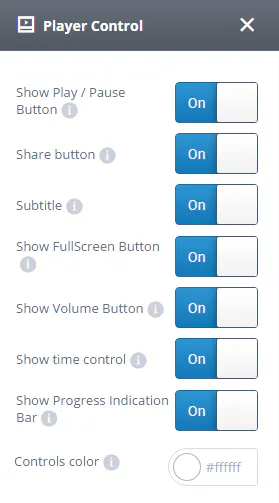
Player Control

Show Play/Pause Button - By changing the toggle button to "Off" the "Play/Pause" button won't be visible in the player control

Share button - Use share buttons to grab your visitor's attention and increase sharing across devices - enable share in video player

Subtitle - show/hide subtitles in the video player

Show Fullscreen Button - show/hide fullscreen button in the video player

Show Volume Button - show/hide volume button in the video player

Showtime control - By changing the toggle button to "On" the time control indicating video length and time progress will become visible in the video player control

Show Progress Indication Bar - show/hide progress indication bar in the video player

Controls color - customize theme color for your video player controls

Responsive image galleries

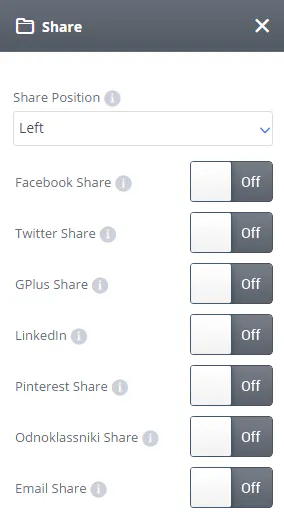
Share

Share Position - location left or right for social share icons

Social Sharing icons – can enable or disable any social sharing icon as needed

Responsive image galleries

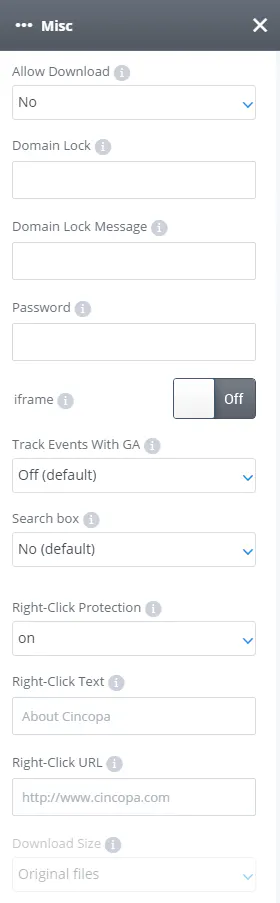
Misc

Allow Download - Allow users to download and save all files.

* Resized zip contains photos resized to 600x450, videos in mp4 format, and music in original sampling.

NOTE: For more details about gallery zip download please click here.

Domain Lock - Allow this gallery to appear only in the domains on this list. This will prevent others from grabbing your gallery to their site.
Type a list of domains separated by comma or leave empty to allow all domains.
No need for http://
For example:mydomain.com,blogspot.com

Domain Lock Message - Message to be displayed when the gallery is locked, leave empty to keep the default message.

NOTE: For more details about domain lock please click here.

Password - Protected your gallery with a password. Give it to your users and only they will be able to access the content.

iFrame - Enable this option if the gallery is not working properly inside a page and the gallery will be placed in an HTML iframe.

Track Events with GA - When On the gallery will post events directly to your Google Analytics account where you can get detailed information about user engagement.

Search Box - Add a search box above the gallery to allow the user to search the gallery.

NOTE: For more details about adding a search box to your gallery please click here.

Right-Click Protection - Lock the right click to prevent downloading and saving your content or allowthe user to download and save individual files from your gallery

Right-Click Text - The text users will see on Right-Click.

Right-Click URL - Type in the Right-Click URL (target site URL when click on 'Right-Click Text')

Download size - Allow users to download individual files from your gallery. * Photos resized to 600x450, videos in mp4 format, audio in mp3 format or choose the original size of uploaded item

NOTE: For more details about how to add right-click to your gallery or enable individual download for your files please click here.

Responsive image galleries