Below are the steps on how to add Channels to Workspaces on your Tube.
Following are the steps to add a Channel into the Workspace
- Login to your Tube
- Go to the workspace you have created
- Click on ‘+Add channel’ in the rectangle box
- Add a channel name
- Select channel as Public or Private
- Click create
(Repeat the above steps to create more channels)
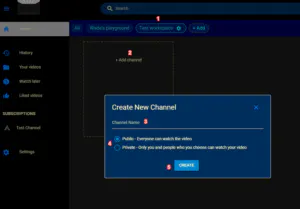
And that's it! You can now add channels into your Workspace.