January 14, 2025 · Cincopaui · Pages

Timeline Comments, Emoji Reactions, and Guest Feedback

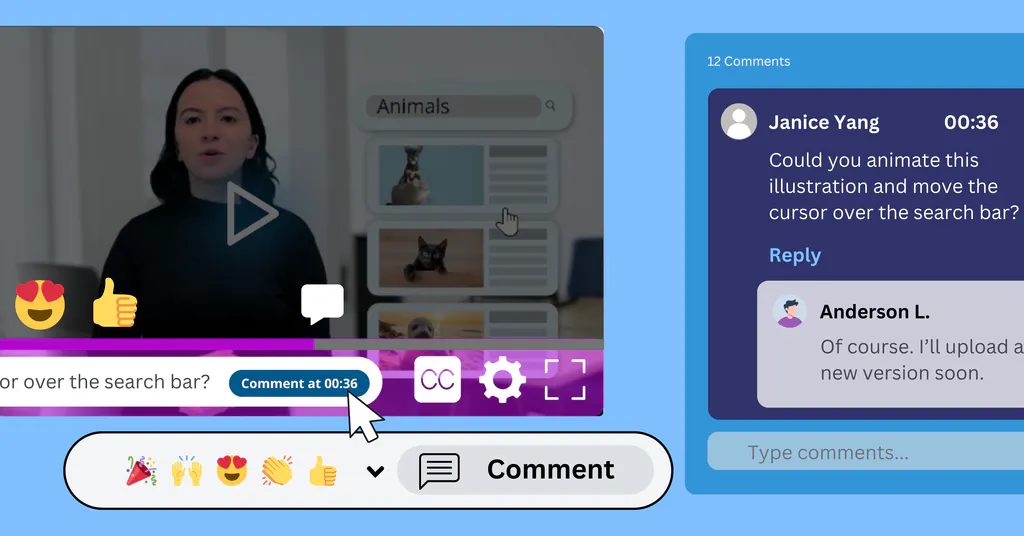
We have introduced a more flexible and interactive commenting system across various sections of the Account Page. This update enhances user engagement and improves collaboration.

Timeline Comments, Emoji Reactions, and Guest Feedback — Cincopa product update illustration

Key Changes:

✅ Gallery Page Comments: Users can now add comments to the page itself, linked to specific gallery URLs. This allows for discussion and feedback on each gallery.

✅ Video Asset Comments & Reactions: Users can comment directly on the video timeline, enabling more precise feedback at specific timestamps. Additionally, users can now react to comments with emojis.

✅ Guest Commenting: Signed-out users can now leave comments, making it easier for external users to engage with content.

✅ Comment Management:

  • Users can delete their own comments.
  • Moderator can moderate comments
  • Gallery or video owners have full control and can delete any comment on their content.

Related updates

NEXT STEP

Continue exploring

Start with one product area, one documentation surface, one support library, one internal portal, or one embedded training flow. Get that collection working well, help viewers understand what is inside, then reuse the same gallery across adjacent destinations without duplicating the library.