Platform - Tube

Tube for portal-style video knowledge environments

Launch one structured destination where users can browse by workspace and channel, return to where they left off, follow training paths, and access the right knowledge by permission.

Tube is the portal-style product shape for customer academies, structured training portals, and controlled knowledge hubs. It gives teams a real environment for ongoing video knowledge use instead of a one-time page or a pile of embeds. With VideoGPT, users can also ask from the channel they are using and reach the right lesson, update, or source moment faster.

Workspaces and channels Watch history and resume User groups and permissions Channel-aware VideoGPT
Best fit
Customer academies, structured training portals, and controlled internal knowledge hubs
Built for
Multiple channels, recurring usage, repeat viewers, and growing content environments
Works with
Role-based access, Zoom ingestion, viewer analytics, and channel-aware VideoGPT
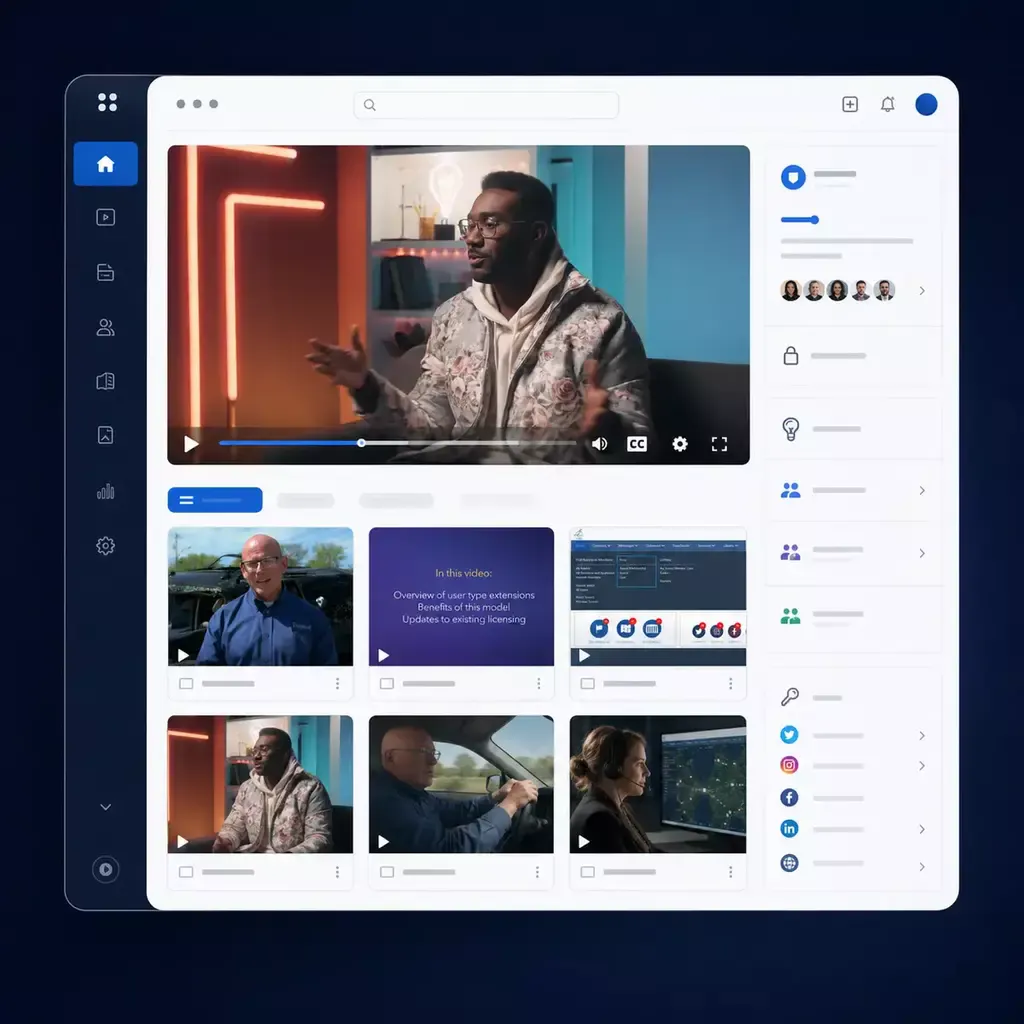
Example Tube environment
Customer academy and knowledge hub
Portal-style destination
Workspaces
Customer Academy
Internal Knowledge
Partner Programs
Channel navigation
Onboarding
Certification
What's New
Workshops
Continuity signals
Resume watchingEnabled
PermissionsRole based
VideoGPTChannel aware
Active portal view
Continue where you left off
The portal remembers viewing progress, keeps channels organized, and lets users jump back into the right lesson, update, or workshop without starting over.
Watch history
Notifications
Viewer analytics
Structured destination Permission-aware environment Built for repeat usage
What Tube is

More than a page. More than a portal shell.

Tube is the portal-style product model inside Cincopa for structured video knowledge environments.

It gives one team or program a persistent destination with workspace navigation, channel structure, user identity, repeat-usage behavior, and room for the library to grow over time. VideoGPT can add a guided answer layer on top of that structure, so users can browse channels when they know the path or ask questions when they do not.

Destination

Give the knowledge a place people return to

Tube works when the rollout needs a real portal with browse paths, search, repeat visits, and ongoing content growth instead of a single page or a one-time embed.

Structure

Organize the environment the way teams actually learn

Workspaces organize the environment. Channels group content by program, product area, role, workflow, or recurring series so the library stays usable as it grows.

Continuity

Keep repeat viewers in motion

Watch history, resume watching, saved items, subscriptions, notifications, and optional sequential behavior make the portal more useful over time, not just on first visit.

Why Tube matters

From flat libraries and recurring training pain to a portal people can actually use

Many teams already have the videos. What they do not have is the right environment to keep those videos organized, controlled, reusable, and easy to return to as the audience and the library both grow.

Flat libraries break at scale

Once content expands across products, modules, releases, workshops, or user groups, a flat video list becomes hard to browse and even harder to trust.

Recurring content disappears after the event

Recorded webinars, release briefings, and training sessions often exist, but they stop being usable because the environment was never built to retain and surface them.

One audience should not see everything

Academy learners, internal teams, and selected partners often need different entry points, permissions, and management roles even when the knowledge lives in one broader system.

Repeat viewers need continuity

When users come back often, watch history, resume behavior, channel subscriptions, and structured navigation stop being nice extras and start becoming part of the product value.

The practical shift

One portal model. Many recurring knowledge environments.

Use the same Tube foundation to support customer academies, controlled team hubs, departmental portals, and recurring workshop archives without rebuilding the experience from scratch each time.

Customer academy
Structured training portal
Internal knowledge hub
Recurring webinar archive
When Tube is the right fit

Choose Tube when the rollout needs more structure than a page and more destination value than an embed

Tube is the strongest fit when one environment needs multiple channels, user groups, role-based access, repeat viewer behavior, and room to keep growing without losing clarity.

More structure than a Page

Start with Tube when one audience is not enough and the environment needs workspace navigation, channel logic, and deeper portal behavior.

More destination value than Galleries

Use Tube when the goal is not mainly embedded delivery. Tube is for the cases where the knowledge needs its own place users return to again and again.

More control as the environment grows

User groups and role-based permissions help keep one portal controlled as more viewers, teams, and managers enter the environment.

More continuity for repeat learning

Watch history, resume behavior, subscriptions, notifications, and optional sequential mode make Tube stronger for programs users revisit over time.

Pages are stronger when

One team needs one branded, hosted, measurable destination and a flatter structure is enough.

Tube is stronger when

The audience needs channel-based navigation, ongoing portal behavior, deeper permissions, and a knowledge environment that keeps expanding without becoming a mess.

How Tube works

One portal model, clear operational logic

Tube follows a clear operating pattern: create the environment, organize the channels, match access to the audience, help users browse, ask, and continue learning, then keep the knowledge usable as it grows.

Tube structure
Tube
Workspace
Channel
Asset

That structure is what makes the portal readable for users and manageable for teams as the environment expands across programs, departments, or recurring content tracks.

1

Start with the workspace

Use workspaces to organize the environment by team, program, department, audience, or business context so the portal has clear boundaries from the start.

2

Group content into channels people can follow

Channels can organize onboarding, product training, troubleshooting, release updates, recorded meetings, or recurring webinar series so the library behaves like a program, not a dump.

3

Control who sees what and who manages what

User groups and role-based permissions help teams manage workspace access, channel access, and administrative responsibility as the environment becomes more shared and more important.

4

Let users browse channels or ask inside them

Tube works best when users can move between structured channel browsing and VideoGPT. When the assistant opens from a channel or a video inside that channel, it can use the channel as the primary context. When configured, it can also help users find answers that live in other channels.

5

Support repeat viewers, not just first-time viewers

Watch history, resume watching, saved items, subscriptions, notifications, and optional linear learning mode help the portal behave like an environment users come back to with context still intact.

6

Keep the environment alive as content keeps arriving

Tube can support automated ingestion such as Zoom recordings into channels, include externally hosted videos where useful, and keep VideoGPT working across the growing portal knowledge environment.

Structure, permissions, and intelligence

The portal works because the layers reinforce each other

Tube is strongest when structure, controlled access, and intelligence all work together. That is how one portal stays useful even as the audience, content volume, and operational demands all increase.

Structure layer

Workspaces and channels keep the portal readable

Use workspace and channel logic to organize by team, role, program, topic, product line, or recurring series instead of forcing users through one flat content path.

Permissions layer

User groups and roles keep the environment controlled

Viewer, editor, admin, and owner roles can vary by workspace or channel, which makes it easier to decide who sees what, who edits what, and how the portal stays governed over time.

Intelligence layer

VideoGPT and analytics make the portal more useful every month

VideoGPT can answer in channel context and, when configured, reach across other channels. Viewer analytics, recurring questions, and unclear-answer signals help teams see what people still need and what content should improve next.

VideoGPT in Tube

A channel-aware assistant for portal knowledge

In Tube, VideoGPT can appear as a floating assistant inside the portal experience. It supports the portal-first story by helping users understand what a channel contains, ask questions from the channel they are using, and jump to the right video moment or supporting source.

When opened from a specific channel or a video inside that channel, VideoGPT can use the channel as the primary context. When configured, it can also help users find relevant answers that live across other channels in the Tube environment.

Channel context

Ask from where you are

A user can open the assistant from a channel or from a video inside the channel and get answers grounded in that learning or knowledge context.

Welcome message

The channel can introduce itself

VideoGPT can show a welcome message with suggested starter questions so users understand what the channel covers before they search.

Cross-channel discovery

Find answers beyond one channel

When configured, VideoGPT can help users discover answers that sit in other channels instead of leaving them stuck in the wrong part of the portal.

Source navigation

Open the right lesson behind the assistant

Answer links can open the relevant video, channel, or source moment in the Tube environment. When needed, answers can also show video moments inline.

What teams can launch with Tube

One product shape. Multiple practical rollout patterns.

Tube is reusable because the same portal model can support different knowledge jobs without forcing them into the same delivery logic.

Customer academy

Create a public or controlled training portal with channel-based learning, repeat viewer behavior, and VideoGPT inside the academy experience.

Structured training portal

Organize onboarding, certification, product training, or release education into one environment that is easier to navigate than a flat LMS video layer, with channel-aware answers when users need help.

Controlled internal knowledge hub

Give teams a private portal for workshops, briefings, operational training, and reusable institutional knowledge that needs to stay searchable, askable, and controlled.

Recurring webinar and workshop archive

Keep recurring sessions usable after the event by routing them into channels, preserving watch continuity, and letting users ask for the answer later instead of searching drives.

Customer proof

Leidos validates Tube on both sides of the model

Leidos shows how Tube can support both a public customer training portal and a controlled internal knowledge environment around the same product ecosystem.

Leidos Sub1

Public customer training portal

Scale
~100 videos
Structure
~6 channels
Behavior
Sequential learning

Why the fit is strong

  • Public portal delivery without a heavy LMS rollout
  • Channel-based training structure for repeat learning
  • Viewer history, engagement visibility, and searchable training access
  • VideoGPT in the training experience for faster channel-based answers
Leidos Sub2

Controlled internal knowledge hub

Proof detail
~200 videos

A large operational archive for training modules, quick tips, release updates, webinars, and workshops.

Proof detail
~30 PDFs

Supporting documents stay attached to the environment instead of getting lost in separate systems.

Why the fit is strong

  • Private portal with controlled access and structured channels
  • Strong fit for workshops, release briefings, training modules, and recorded meetings
  • Better knowledge retention than scattered Zoom recordings or shared drives
  • VideoGPT across the archive for retrieval from long recordings, channel context, and attached documents
Why this setup works

The same Tube model can support external training and controlled internal knowledge distribution

Tube is not limited to a single academy rollout. It is a reusable portal model for customer training, structured learning, and controlled internal knowledge hubs.

Frequently asked questions

Common questions about Tube

The FAQ should help buyers understand the product shape fast: where Tube fits, what it is not, and when it becomes the right delivery model.

What is Tube in Cincopa?

Tube is the portal-style product model for structured video knowledge environments. It organizes content through workspaces and channels and supports the repeat-viewer behavior that lighter delivery models often lack.

How is Tube different from a Page?

A Page is a focused hosted destination. Tube is deeper and more portal-like. Use Tube when one environment needs channel-based navigation, watch history, user groups, and richer portal behavior over time.

Is Tube like a YouTube-like portal for business?

Tube can feel familiar because it gives users a portal-style browsing experience with channels, featured content, watch history, and a destination they can return to. But it is built for structured video knowledge, not consumer media. Teams use Tube for customer academies, structured training portals, and controlled internal knowledge hubs where permissions, user groups, repeat viewing, and ongoing knowledge access matter.

How is Tube different from Galleries or embeds?

Galleries are the reusable collection and embedded delivery layer. Tube is the destination environment for cases where the library needs its own portal, not just an embedded knowledge surface.

Can Tube be public or controlled?

Yes. Tube can support public customer academies, controlled departmental portals, and private knowledge hubs depending on the audience and the access model the rollout requires.

Can Tube support structured learning behavior?

Yes. Channels can support optional sequential learning, while watch history and resume watching help users continue where they left off without losing context.

Can Tube keep growing as new content keeps arriving?

Yes. Tube is a strong fit for recurring webinar, workshop, and training environments because channels can keep evolving and automated ingestion such as Zoom recordings can feed new content into the portal.

Where does VideoGPT fit in Tube?

VideoGPT is the supporting intelligence layer inside the Tube environment. When users open it from a channel or a video inside a channel, it can use that channel as the primary context. When configured, it can also help users find relevant answers across other channels and jump to the right moment or source without changing the portal-first story.

Can VideoGPT open with a welcome message in Tube?

Yes. VideoGPT can welcome users with an introduction to the channel or portal area they are viewing and suggest useful starting questions. It can also be configured to open automatically when the experience should guide users immediately.

Can VideoGPT answer across other Tube channels?

Yes, when configured. The assistant can start with the current channel context and also help users find answers that live elsewhere in the Tube environment, which is useful when the user does not know which channel contains the answer.

Is Tube the same as CincoTube?

Yes. Tube is the updated name for what many Cincopa customers know as CincoTube. It is Cincopa’s portal-style video knowledge environment for structured libraries, training portals, customer academies, internal knowledge hubs, and controlled video destinations. Tube supports workspaces, channels, permissions, watch history, viewer engagement, and VideoGPT across the portal so users can browse, continue watching, and ask questions across the knowledge library.

Start with one portal

Build a portal people can keep using as knowledge keeps growing

Start with one customer academy, one structured training portal, one controlled team hub, or one recurring knowledge archive. Give users channels they can follow, answers they can ask for, and a portal they can return to as the environment grows.