Product match
Which procedure applies to this model?
Help users narrow support content by product family, model, revision, region, or configuration.
Help customers, installers, and technicians find the correct approved procedure for the exact product, model, error, or task—then jump to the visual step that shows what to do.
Cincopa turns existing troubleshooting videos, manuals, service bulletins, and supporting documents into a searchable support layer inside help centers, product pages, partner portals, and mobile field workflows.
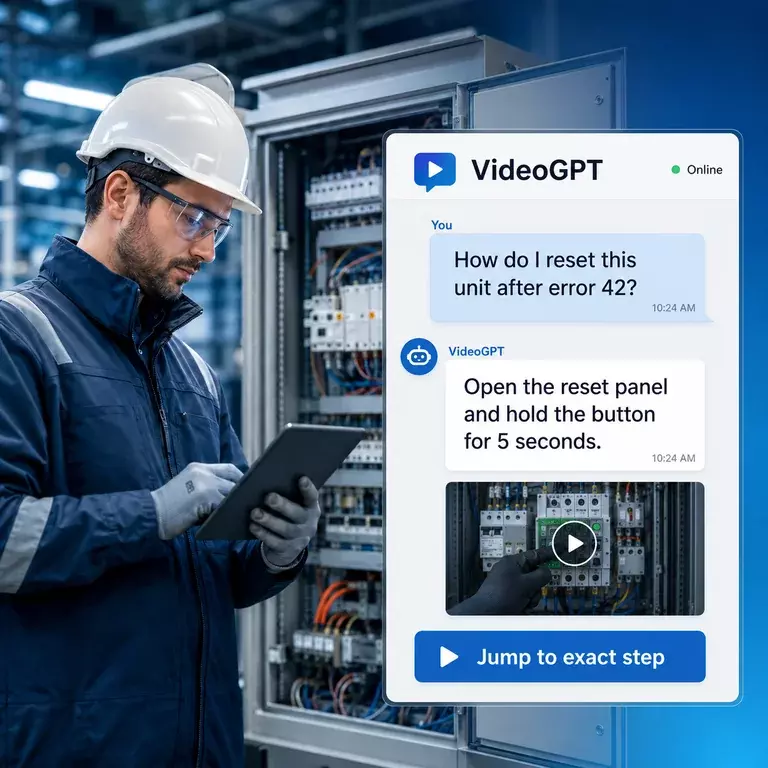
People rarely search for a “video knowledge platform” while a product is failing. They ask practical questions: which manual applies to this model, what does this error mean, where is the reset step, or how was this issue fixed before?
Help users narrow support content by product family, model, revision, region, or configuration.
Connect natural-language questions to approved diagnostic checks and visual procedures.
Return the relevant video, supporting document, and exact moment instead of a long list of links.
Preserve expert walkthroughs so routine questions do not always require a senior technician.
Technical troubleshooting videos are visual support resources that show how to diagnose, reset, configure, install, test, repair, or verify a technical product or system. They are most useful when the user must see an interface state, physical action, wiring sequence, component location, indicator pattern, or exact procedural step that is difficult to explain with text alone.
A useful troubleshooting video should be tied to the correct product family, model, revision, symptom, error code, procedure, and supporting document. That context helps a customer, installer, support agent, or field technician confirm that the guidance applies before following it.
Show inspection points, component locations, test procedures, adjustments, replacement steps, and verification checks.
Explain mounting, assembly, wiring, pairing, commissioning, setup, and common installation failures.
Connect an error code or warning state to approved checks, likely causes, reset procedures, and escalation guidance.
Show configuration paths, permissions, settings, interface states, recovery steps, and version-specific workflows.
Organize troubleshooting videos around the way users describe the problem, not only around internal file names. A searchable support video library should connect each asset to the product, model, revision, symptom, error code, task, audience, language, region, and approval status that determine whether the procedure applies.
This structure also improves internal linking and answer quality. A page for one product family can link to model-specific troubleshooting videos, related manuals, field-service guidance, and the parent Support & Troubleshooting solution without forcing every query into one oversized library.
AI troubleshooting search works by indexing approved video transcripts, chapters, metadata, manuals, service bulletins, checklists, and supporting documents as one knowledge library. A user can ask a natural-language question about a product, model, symptom, error, or task and receive an answer grounded in the relevant source material.
The answer should not stop at a summary. For visual procedures, it should identify the correct source and send the user to the exact video moment that demonstrates the step. Source links, model context, document references, and safe escalation instructions help the user verify that the answer applies.
“How do I reset this model after error 42?”
Identify the relevant model, revision, symptom, procedure, and approved sources.
Return a concise grounded response with the applicable manual or support document.
Jump directly to the exact visual step, or escalate when the issue is unsafe or not covered.
Troubleshooting videos and help-center articles solve different parts of the support problem. Articles are easier to scan, update, quote, translate, and use for warnings, specifications, decision trees, and exact values. Video is stronger when the user needs to see motion, sequence, orientation, interface behavior, component location, tool use, or the difference between a normal and abnormal condition.
The strongest technical support experience combines both. A direct answer can summarize the procedure, cite the approved written source, and open the video at the exact moment that shows the action. This avoids forcing the user to choose between a long article and a long recording.
Start with one product line and the repeated issues that already consume support or field-service time. You do not need to record every possible problem before publishing. Begin with approved videos and documents that answer known questions, then use search behavior, repeated questions, weak answers, and escalation patterns to decide what to improve next.
Limit the first rollout to a defined model family, audience, or support surface.
Gather troubleshooting videos, manuals, service bulletins, checklists, and known-answer guidance.
Tag product, model, revision, symptom, error, procedure, audience, owner, and approval status.
Embed the library in support docs, product pages, partner portals, or mobile field-service access.
Use failed searches, repeated questions, unresolved issues, and outdated content signals as the roadmap.
Written documentation remains important for specifications, warnings, branching instructions, and exact values. Video is stronger when the user needs to see a physical action, interface state, installation sequence, test, adjustment, or repair.
Cincopa combines both formats. A direct answer can cite the relevant manual and send the user to the exact moment that demonstrates the procedure.
Show connection order, mounting, calibration, wiring, assembly, or commissioning steps.
Demonstrate control sequences, indicator states, safe restart steps, and verification.
Show what a normal condition looks or sounds like and where approved checks are performed.
Guide users through an approved fix and show how to confirm that the issue is resolved.
Searchability alone is not enough. Technical guidance must be grounded in approved content and connected to accurate product, model, revision, role, and access metadata.
Create focused Galleries for the way users actually search and troubleshoot.
Keep the demonstration and exact reference material together.
Use VideoGPT to answer across approved videos and documents and link to the relevant step.
Use weak answers and recurring questions to identify missing procedures and outdated guidance.
Embed issue-specific Galleries directly beside written troubleshooting steps.
Launch focused support destinations for a product line, partner group, or controlled audience.
Give technicians access to visual procedures while they are at the equipment.
Let users ask a real support question instead of guessing which video or document contains the answer.
Chamberlain uses Cincopa to deliver technical videos inside support documentation for installers and technicians, while also reusing structured video knowledge in training environments.
Explore the Chamberlain customer hubInstallers and technical users
Embedded support documentation
Strong mobile field access
The proof is not simply that the videos are hosted. The same structured knowledge is delivered where technicians need it and can support both troubleshooting and training.
They are support videos that visually demonstrate an approved installation, diagnostic check, reset, configuration, repair, or verification procedure for a technical product or system.
Organize them by product family, model, revision, symptom, error code, and procedure. Connect each video to the relevant manual, safety note, service bulletin, or checklist.
Yes. VideoGPT can answer across approved videos and supporting documents, cite the source, and guide users to the exact video moment that demonstrates the step.
Publish them inside help centers, support articles, product documentation, partner portals, hosted support Pages, and mobile field-service workflows.
They can reduce repetitive questions when the answer already exists, the procedure is safe for self-service, and users can quickly find the correct visual guidance. Novel or unsafe issues should still escalate to a qualified person.
No. CMMS and ticketing systems manage work orders, asset history, parts, routing, and escalation. Cincopa provides the approved video-and-document publishing, retrieval, and exact-step guidance layer.
Start with one product line, one support surface, and the videos and documents you already trust. Make them searchable, answerable, and easier to improve from real support questions.