SUPPORT KNOWLEDGE

Embedded Troubleshooting vs an External Help Center: Keep the Fix Where the Problem Happens

Put relevant guidance beside the task, give complex answers room, and connect both to deeper knowledge and accountable support. Choose the surface around the question, not the widget.

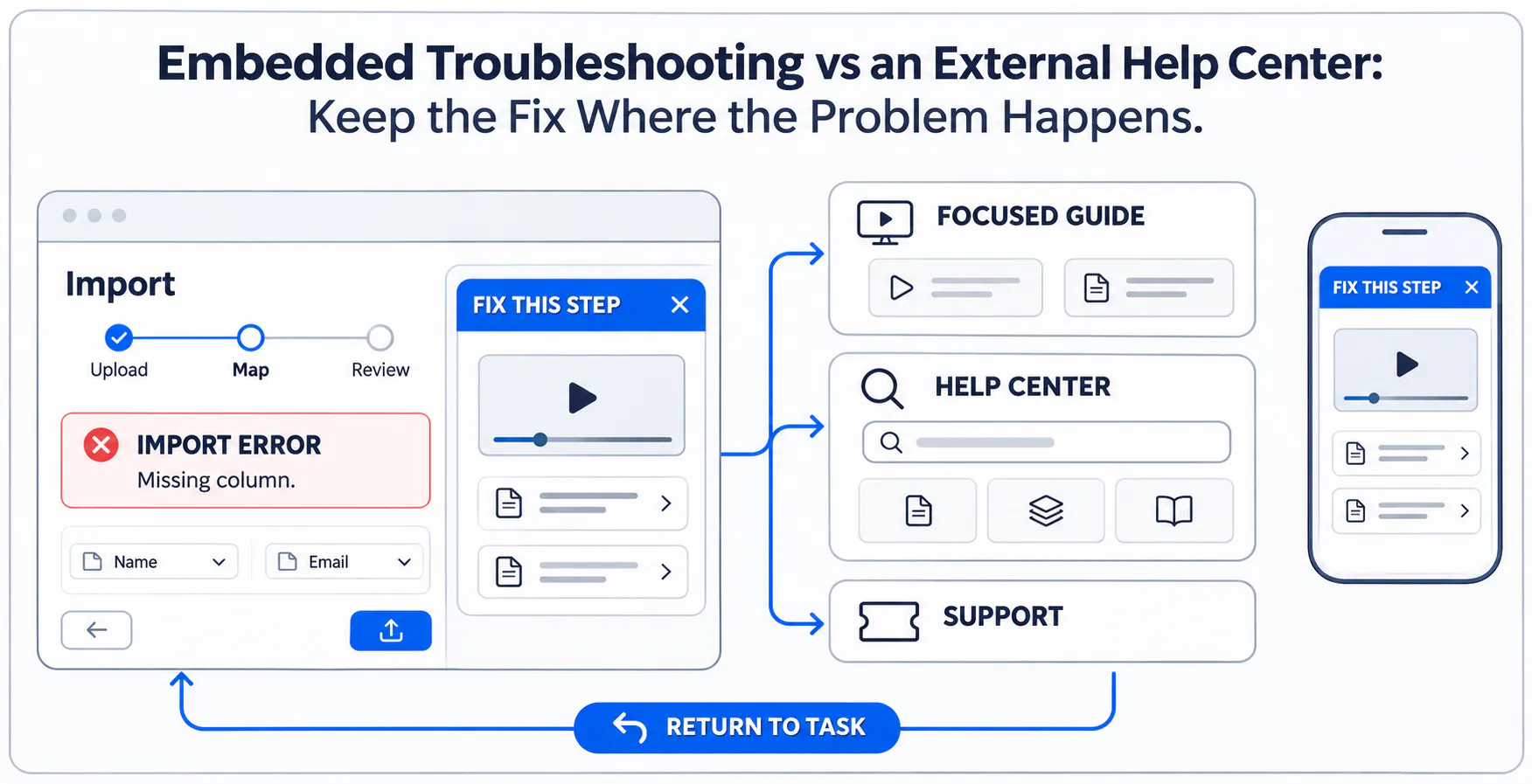
Embedded troubleshooting for an import error connects to a focused guide, help center, support, and a return to the task, with a mobile view.

The best answer can still be in the wrong place

Maya encounters an import error in a hypothetical SaaS product. The Help link opens a general help-center homepage, where several articles look relevant. The answer exists, but finding the applicable one has become another task.

A better entry point identifies the problem, such as a missing email column, and opens the matching guidance without losing the import. That may need one sentence, a procedure or a focused collection. An embedded widget full of unrelated material would leave the same problem unresolved.

Define the support surfaces before comparing them

Embedded guidance appears within an existing page or supported application surface. A focused destination gives one topic room. A help center supports broader documentation discovery, while a help desk manages cases and follow-up. Live assistance adds interaction when investigation or judgment is needed.

These responsibilities complement one another. Placing resources beside a workflow does not automatically detect the error, identify the account or transfer customer context. Design those connections separately when they are required.

For the broader placement decision, compare in-app help, help centers and product education hubs before choosing the entry point for a troubleshooting answer.

Embed guidance when the task and applicable answer are clear

Use task-level help for known errors, prerequisites, specific settings and short procedures. State the applicable situation and expected result, with a visible next step if the guidance does not work.

For Maya, a short header check may be enough. A recording helps when column mapping spans several screens. Start with the smallest useful explanation, and confirm that the host supports the intended embed rather than loading a full collection to explain one field.

Use a focused support destination when the answer needs room

Some answers need related videos, PDFs, alternative procedures and version notes. A focused destination gives that material room without squeezing it into an overlay. Its scope might be importing customer records rather than every product question.

Cincopa Pages provide branded hosted destinations for video-and-document collections. They are distinct from embedding a Gallery in an existing interface. Keep the destination's audience and topic clear, explain any sign-in transition and provide a recognizable return to the original task.

Keep a help center for broader discovery

A help center remains useful when people do not know the relevant feature, need related procedures or arrive from search, bookmarks and shared links. Give independent visitors enough context to identify prerequisites, supported versions and a next action.

Link contextual entry points directly to the maintained procedure instead of the homepage. Where visual explanation helps, a reusable Cincopa Gallery can present the relevant recordings with their supporting documents inside the existing support destination.

Explore a reusable support collection

Explore Cincopa Galleries → to see how reusable video-and-document collections can fit an existing support destination.

Keep ticketing and human support available

Customer-specific investigation and account changes need an accountable case owner. Make an unresolved-answer link explain whether it opens a ticket, schedules a conversation or reaches a staffed channel. Do not imply that submitting a ticket guarantees an immediate response.

Give urgent or sensitive situations an appropriate human route without repeated self-service barriers. Request only useful diagnostic information through the approved channel. A knowledge collection supplies explanations; the help desk still owns the case and follow-up.

Choose the placement with a decision matrix

Use the decision matrix as a starting point. Urgency, accessibility, account risk and the quality of the available answer may change the best first surface. Keep a clear escalation path when the recommended resource does not resolve the task.

User need
Best starting surface
What to include
If unresolved
Known error in one workflow
Embedded guidance
Matching error, scope, safe check
Full procedure or support
Short configuration procedure
Task-level help
Prerequisites, steps, expected result
Related guide or case
Several related resources
Focused destination
Videos, documents, alternatives
Help center or support
Unfamiliar issue; broad research
Help center
Search, navigation, related topics
Ticket with diagnostic details
Customer-specific investigation
Help desk
Secure intake and case owner
Assigned specialist
Novel or sensitive situation
Appropriate live agent
Clear channel and expectations
Agreed follow-up or case
Known error in one workflow
Best starting surface
Embedded guidance
What to include
Matching error, scope, safe check
If unresolved
Full procedure or support
Short configuration procedure
Best starting surface
Task-level help
What to include
Prerequisites, steps, expected result
If unresolved
Related guide or case
Several related resources
Best starting surface
Focused destination
What to include
Videos, documents, alternatives
If unresolved
Help center or support
Unfamiliar issue; broad research
Best starting surface
Help center
What to include
Search, navigation, related topics
If unresolved
Ticket with diagnostic details
Customer-specific investigation
Best starting surface
Help desk
What to include
Secure intake and case owner
If unresolved
Assigned specialist
Novel or sensitive situation
Best starting surface
Appropriate live agent
What to include
Clear channel and expectations
If unresolved
Agreed follow-up or case

Link the surfaces without creating duplicate answers

Use descriptive links such as “Required import columns” and stable section anchors where tested. Keep one authoritative procedure where practical. A short embedded explanation can introduce it; copied detailed steps need their own maintenance check.

Reusing one collection is different from synchronizing every surrounding article. Check destination permissions, signed-out access and the return path, and preserve unfinished work. Keep sensitive customer details out of URLs. Avoid promising exact navigation to a document section or video moment before testing that experience.

Design for mobile, accessibility, and performance

Test the actual host with its embedded content, not just the editor preview. Controls need readable labels, keyboard access, visible focus and usable touch targets. Provide captions or supporting text, and ensure overlays can be dismissed without hiding the task.

Check portrait layouts, on-screen keyboards, full-screen playback, authentication and back navigation. Measure loading on representative devices and connections. Use supported deferred loading when useful, while preserving an obvious help entry point. The short checklist below covers the essential transitions.

Short mobile review checklist

  • Read and operate help in portrait without obscuring the task.
  • Reach controls by keyboard and touch; check focus and dismissal.
  • Use captions or text and return from full-screen playback.
  • Test sign-in, back navigation, unfinished work, and loading.

Maintain the guidance and test whether it helps

Start with the videos and documents that already explain a recurring task. Publish a focused collection, add it to the appropriate support surface and test the complete journey with an intended user.

Where enabled, VideoGPT can answer from available collection content and link to supporting sources. Review repeated questions and weak answers to decide which explanation needs improvement. Assign owners and review triggers so the knowledge stays applicable. Measure task completion and unresolved attempts alongside engagement; a widget click or video view alone does not establish resolution.

Frequently asked questions

When the task and applicable answer are clear, and the host supports the experience. Start with a relevant explanation or link; add media when showing the procedure helps.

Use it for broad research, related topics, and stable references reached from search or shared links. Connect contextual entry points to the relevant guidance rather than the homepage alone.

A focused destination serves one topic, program, or audience. A help center covers a wider documentation structure. Either may link to the other and to support.

No. A collection delivers knowledge. Case intake, assignment, account-specific investigation, and follow-up still need an appropriate support system and accountable people.

Use descriptive text and a stable destination. Test section anchors, access, supported versions, and the return path. Keep the full procedure authoritative and review copied excerpts.

Offer relevant deeper checks or the appropriate support channel. Explain what information to provide and the response expectations. Urgent or sensitive issues should reach a person without repeated self-service barriers.

Check portrait layouts, readable controls, keyboard and touch access, captions, overlays, full-screen playback, sign-in transitions, return navigation, and performance on representative connections.

No. Displaying content does not establish awareness of an error or account. Any context capture, permission checking, or transfer between systems requires explicit implementation and testing.

Practical takeaway

Keep relevant guidance close to the task, give complex answers room and preserve a clear handoff to deeper knowledge or human support. Activate a useful existing collection, observe what readers still ask and improve the source material behind those gaps.

NEXT STEP

Put the right guidance beside the task

See how Cincopa Galleries, Pages and VideoGPT can turn existing support videos and documents into a focused knowledge experience.