BUSINESS VIDEO COMPARISON
Brightcove vs Cincopa for Business Video
Compare business video delivery with a searchable library of support and product-training knowledge.
Start with the video delivery job
Compare current AI workflows
Test knowledge retrieval and access
Scope the complete rollout cost
Choose by the job you need to do
Swipe across the table to compare all columns.
Business requirement | Evaluation focus | What to demonstrate |
|---|---|---|
Public and application video delivery | Hosting, player and publishing workflow | Your brand, integrations and audience |
Product/support knowledge reuse | Organized library with answer retrieval | A real question across approved content |
AI-assisted video workflows | Current product and package capabilities | Sources, output quality and team ownership |
Buying decision | Complete operating cost | Migration, administration and ongoing use |
What this comparison helps you decide
Need a secure place to host internal training, product, support, webinar, and customer education videos?
Start with hosting, streaming, players, portals, embeds, access controls, and video analytics.
Then go beyond delivery: Cincopa adds VideoGPT, exact-moment answers, and analytics built from real questions.
Further evaluation details
Video streaming and publishing infrastructure
Brightcove is commonly evaluated for secure video hosting, streaming, players, live events, website and app delivery, and media operations.
Secure hosting plus VideoGPT-powered knowledge
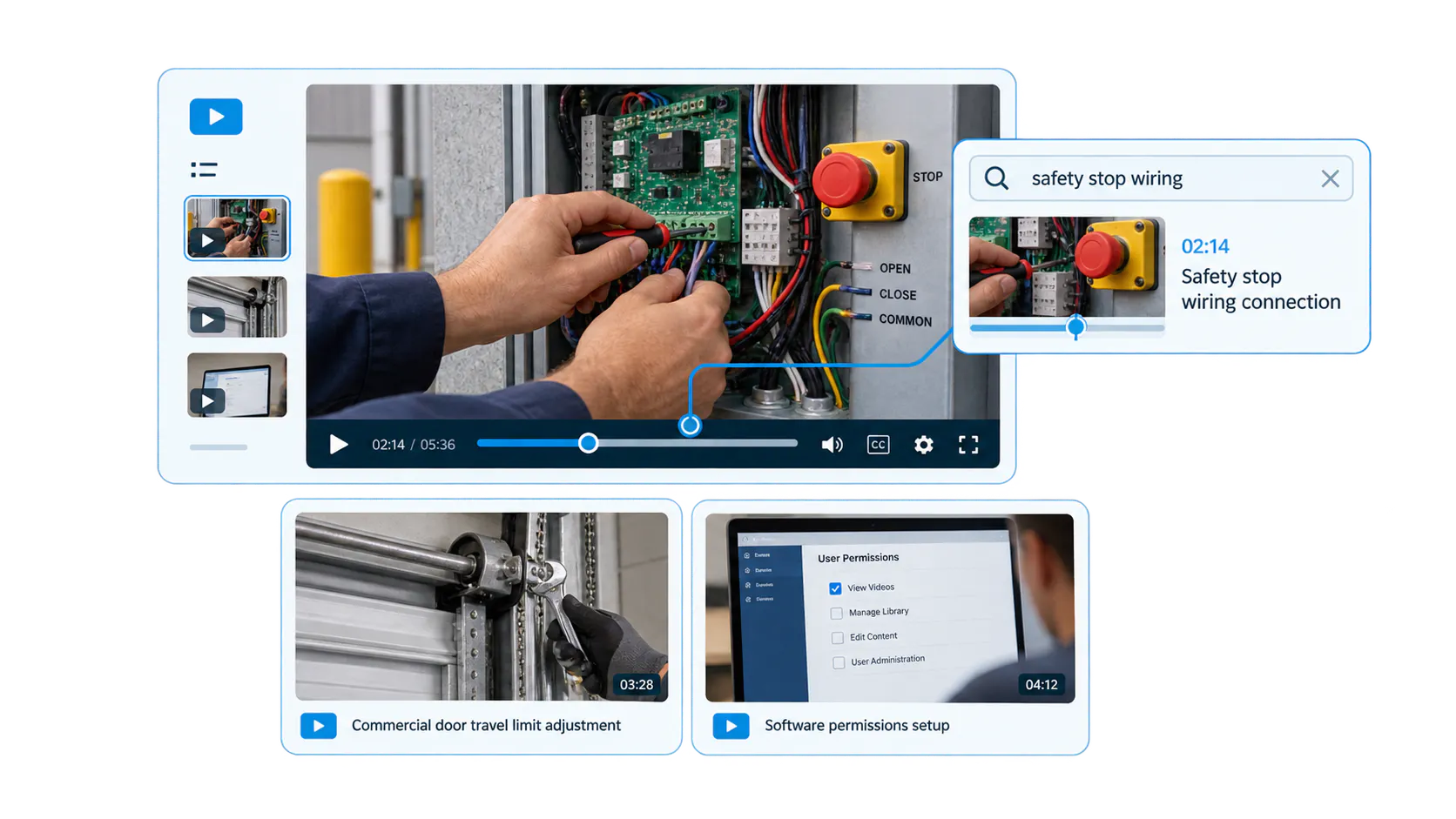
Cincopa provides the video foundation, then adds VideoGPT so people can ask across videos and documents, jump to exact moments, and reveal what knowledge is missing.
Where do you host internal training videos so people can find them?
"Where do you host internal training video so people can find it?" Buyers usually begin with a video hosting problem, not an AI category. They need a secure home for employee training, product walkthroughs, recorded webinars, customer education, support videos, and supporting documents. They also need the content to work inside a portal, LMS, intranet, help center, website, application, or embedded workflow.
Centralize business video
Keep internal training, product education, webinars, support walkthroughs, and customer-facing video in one controlled environment.
Deliver video where people work
Use portals, Pages, Galleries, LMS embeds, help-center placements, websites, applications, and other destinations without duplicating the source library.
Control access and sharing
Use authentication, roles, permissions, domain controls, secure sharing, and enterprise security for public, private, or selected audiences.
Let people ask the library
VideoGPT lets users ask across videos and documents, receive grounded answers, and jump directly to the exact moment that explains the task.
Explore Let people ask the library
Video hosting solves where the content lives. Cincopa's knowledge layer solves whether employees, customers, and partners can actually use what is inside it.
Cincopa vs. Brightcove: where the real difference starts
Swipe across the table to compare all columns.
Criterion | Cincopa | Brightcove |
|---|---|---|
Primary job | Turn secure video hosting into answerable knowledge for training, product education, support, internal knowledge, partner enablement, and public education | Host, stream, publish, and manage video across websites, applications, live events, and media workflows |
Secure video hosting | Hosting, playback, captions, embeds, Galleries, Pages, Tube portals, access control, documents, and flexible branded delivery | Video hosting, players, streaming, live and on-demand distribution, and video management workflows |
Video portals and collections | Galleries, hosted Pages, and Tube environments for embedded, focused, or portal-style knowledge delivery | Video experiences and publishing workflows centered on streaming and media delivery |
Internal training and LMS delivery | Customer and employee training portals, course-style Pages, LMS embeds, video plus PDFs, and AI answers across the training library | Video delivery, embedding, player experiences, and integrations for learning and enterprise environments |
Videos plus documents | Videos, transcripts, PDFs, guides, release notes, checklists, and supporting material work together as one knowledge source | Primarily video-centered content management, publishing, player, and streaming workflows |
AI video search and answers | VideoGPT answers across the connected video and document library, introduces what the collection contains, and suggests useful questions | Brightcove offers AI Content Suite for AI-assisted video workflows. Demonstrate the required search, answers and source navigation in the proposed package. |
Exact-moment retrieval | Grounded answers link users to the exact video moment or supporting document that explains what they need | Test current time-based navigation and AI components with the same source questions; confirm the included functionality. |
Analytics and insight | Video analytics plus VideoGPT questions, answers, feedback, repeated-question patterns, weak-answer signals, and content gaps | Video performance, audience, engagement, and media consumption analytics |
Security and access | SSO, roles, granular permissions, secure sharing, domain and IP controls, viewer tracking, and controlled portal delivery | Enterprise video security, playback restrictions, content protection, and controlled distribution |
Embedding and distribution | Embed individual videos or reusable Galleries across product pages, help centers, LMS environments, websites, applications, and internal systems | Player and streaming delivery across websites, applications, live experiences, and media destinations |
Pricing and rollout | Book a workflow demo, then scope an invited trial around one team, portal or knowledge environment. | Typically evaluated through sales-led packaging based on video, streaming, player, delivery, and enterprise requirements |
Hosting, streaming, players, portals, and security are the starting line
Buyers still need dependable video infrastructure. That layer matters, but it is increasingly the expected baseline. The strategic question is what happens after the videos are hosted, embedded, secured, and measured.
Store and deliver video reliably
Upload, encode, stream, caption, publish, and manage business video across public, private, and controlled destinations.
Use portals, players, and embeds
Deliver video through websites, applications, LMS environments, help centers, branded destinations, and portal-style experiences.
Control who can access content
Apply access rules, authentication, permissions, sharing controls, and security policies that match the audience and use case.
Track how video performs
Measure views, watch time, engagement, audiences, devices, locations, and playback behavior across the video estate.
The platform layer gets video online. The knowledge layer helps people understand, retrieve, and act on what the video contains.
Choose Cincopa when video has to teach, support, or answer
Brightcove alternatives are often evaluated because teams still need secure video hosting, streaming, portals, players, embeds, analytics, and enterprise controls.
Cincopa covers that foundation, then adds the disruptive layer: VideoGPT works across videos and documents, guides users to the exact answer, and reveals what knowledge is unclear or missing.
That makes Cincopa a stronger choice when the business outcome is not simply more playback. It is faster onboarding, better product education, lower support load, searchable internal training, and knowledge that improves from real questions.
The difference is VideoGPT
Cincopa turns a passive video library into an active knowledge system. Teams can activate the videos, recordings, transcripts, and documents they already have instead of forcing users to browse titles, watch long recordings, or wait for a person to explain the same answer again.
1. Publish
Upload or ingest videos, recordings, transcripts, PDFs, and supporting documents.
2. Orient
Explain what the collection covers and suggest useful starter questions.
3. Ask
Let users ask across the connected video and document library.
4. Answer and show
Return a grounded answer and jump to the exact source moment.
5. Improve
Use repeated questions, answer feedback, and gaps to guide the next update.
Video hosting answers, "Where is the video?" VideoGPT answers, "What do I need to know right now?"
Turn hosted video into usable knowledge
The strongest Cincopa use cases begin after the upload. The same video foundation can support focused knowledge environments for employees, customers, partners, and public audiences.
Internal training and knowledge
Turn employee training videos, recorded meetings, release briefings, workshops, and supporting documents into a secure searchable knowledge base.
Customer training portals
Launch customer academies, onboarding programs, course-style Pages, or LMS video layers that learners can browse and ask.
Product education
Embed product walkthroughs, feature education, release updates, demos, and guides where users already work.
Support and troubleshooting
Answer technical questions from videos and documents, then show the exact step that resolves the issue.
Workflow documentation
Capture SOPs, software workflows, and recurring processes once, then let employees retrieve the right step when they need it.
Partner and public education
Publish structured video knowledge for distributors, contractors, program audiences, communities, and other external users.
Measure the video. Then learn what people still need.
Traditional video analytics explain consumption. Cincopa adds knowledge analytics that explain demand. Together they show what people watched, what they asked, which answers were unclear, and what content the team should improve or create next.
See how video performs
Track views, unique viewers, watch time, engagement, heatmaps, drop-off behavior, domains, devices, locations, and viewer activity where identity is available.
See what people ask
Review VideoGPT questions, answers, source environments, related videos or Galleries, and session paths across the knowledge experience.
Find weak or unclear answers
Use helpful or not-helpful feedback, unresolved questions, and review signals to identify where the underlying content needs clarification.
Turn gaps into action
Repeated questions, missing topics, and failed retrieval patterns become a practical roadmap for the next video, PDF, guide, FAQ, or training update.
A view tells you the video was opened. A repeated question tells you what the organization must explain better.
Comparing Brightcove pricing? Compare the full knowledge workflow.
A useful Brightcove pricing comparison should cover more than storage, streaming, and player delivery. Include implementation, portal setup, security, integrations, migration, analytics, time to launch, how people find exact answers, and whether real questions reveal what content is still missing.
• Secure hosting, streaming, captions, players, and on-demand delivery
• Live-event, website, application, and embedded-video requirements
• Portal setup, branding, channels, navigation, and content organization
• SSO, roles, granular permissions, content protection, and governance
• Integrations, migration, implementation, and ongoing administration
• How employees or customers find exact answers after publishing
• Whether analytics expose repeated questions, weak answers, and content gaps
• Invited evaluation after a demo
• Focused first rollout
• Hosting plus VideoGPT
• Video and knowledge analytics together
Do not begin with a company-wide replacement project. Start with one internal training library, one customer academy, one product education surface, or one support workflow. Prove that people can find and use the knowledge, then expand.
Built for real training, product, and support knowledge environments
Cincopa's positioning is grounded in how customers already use the platform. These deployments go beyond playback and show video working as operational knowledge.
Leidos
Leidos uses Cincopa across embedded product education, customer training, and controlled internal knowledge environments with videos, documents, Pages, portals, and VideoGPT.
Chamberlain
Chamberlain uses structured video inside technical support documentation and training environments, showing how the same video foundation can support troubleshooting, field access, and formal learning.
Verily
Verily uses a distributed video and document knowledge layer across product UI, help documentation, LMS environments, internal systems, and development workflows.
Chosen by companies who deliver video at scale from online academies to Fortune 500 teams.
KJ - Kallon J.
Focal Point Coaching
As a marketing professional, the annotation and call-to-action features have been game changers, making our videos not just informative but interactive, thus greatly increasing the potential for lead conversion. Cincopa's user-friendly interface made it seamless to integrate these features into our content, providing us with a competitive edge in our marketing efforts. A standout aspect of Cincopa is its exceptional customer service. Representatives like Pei-Chyi and Wade have been exemplary, offering prompt and effective solutions whenever needed. Their professionalism and expertise have not only made our experience with Cincopa smooth but also enjoyable.
Dora T.
Leidos
At Leidos, we manage a vast range of multimedia assets-from marketing videos and internal communications to eLearning materials-and keeping everything consistent, accessible, and insightful was a challenge. Since adopting Cincopa, that's completely changed. As Senior Multimedia Producer, I've seen firsthand how Cincopa has transformed our media workflows. It allows us to centralize and organize all our content, maintain a cohesive brand presence, and easily create polished, engaging video experiences. With CincoTube, we've built secure, branded video channels that serve multiple purposes-marketing, training, and knowledge sharing-all within a controlled and professional environment. Cincopa has truly elevated how Leidos manages and delivers its digital media. It's not just a platform; it's an integral part of how we communicate and engage as an organization. - Dora Tzotchevska, Senior Multimedia Producer, Leidos
KL - Katherine Isabel L.
University of Maryland School of Medicine
Cincopa is perfect for organizations (such as academic institutions) that have strict, limited-feature content management systems. It allows you to create and embed attractive video and photo galleries on any type of website. I would not be able to create pages that look half as good using our local CMS by itself.
JU - Johnny U.
Lancaster University
I personally like the ease and simplicity of use of Cincopa. I am a teacher and researcher of how students make meaning in a variety of teaching situations.
Adam B.
Anaheim Ducks
We couldn’t be happier with Cincopa for building video and photo galleries. The interface is easy to use, and we have appreciated the wide variety of user-friendly galleries for our fans and visitors to our website. I highly recommend Cincopa for other sports teams or any companies using photo galleries for their websites or other digital purposes
DB - Damon B.
ICM
We were impressed with the quality of Cincopa’s product, team expertise and eagerness to help. They were exceptional with assisting in technical aspects of the implementation process and enabled us to maximize business value
MS - Marcus S.
Verily (Google Life Sciences)
The flexibility and simplicity of video embedding rendered Cincopa the perfect choice. Now, our training videos can reach our clients where they need it and when they need it
EK - Erik K.
Laura Stamm Power Skating
The ability to alter wording, to decide on which videos should appear in specific galleries and the overall look of each gallery without having to do any additional coding on our website is an amazing time saver. Learning Cincopa’s structure was very easy, but when a question did arise, their customer service was amazing
Lisa S.
edWeb
Cincopa has been a fantastic partner in helping edWeb implement a great platform for the hosting of our webinar recordings. We needed features including the ability to track viewership on any device, an API for real-time data transfer, closed-captioning, and in-video quizzes. Cincopa is always interested in learning what we need and helping to build a solution
Jason H.
Oxsome
As web developers, we needed a solution that would free us up to do what we do best. Cincopa is the perfect platform for web developers. All we have to do is upload and embed. It’s functionality is perfectly compatible with companies that need to provide service to high volume customer bases
DA - David A.
ICI Education
We were pleased to find that Cincopa was user-friendly when it came to integrations of multimedia elements into our Learning Management System (LMS) which students use to access their course materials. Cincopa was also considerably more user-friendly on the administrator end. It allows our team to make quicker edits and updates of content
Tom W.
OPTIZMO Technologies
Implementation was extremely easy. Everything was well documented and the Cincopa team is a delight to work with
Bryan F.
Emerson Swan
The team at Cincopa helped us with onboarding all of our video content into their platform and has been very responsive anytime we’ve needed them. Transitioning to an online educational model has been a great success for our organization
Ready to turn hosted video into answerable knowledge?
Start with one training library, product education surface, support workflow, or internal knowledge hub. Host it securely, make it answerable with VideoGPT, and improve it from real questions.
Explore the next relevant comparison or workflow
Additional evaluation questions
What should buyers look for in Brightcove customer reviews on G2 or Capterra?
Look beyond the overall rating. Compare ease of administration, implementation effort, support responsiveness, pricing fit, portal flexibility, integrations, migration, analytics, and how quickly users can retrieve the exact answer they need. Cincopa should be evaluated on the additional value of VideoGPT and question-led knowledge analytics.
Does Cincopa support image hosting and multimedia galleries?
Yes. Cincopa supports multimedia galleries and can manage video, images, audio, and supporting documents. This comparison focuses on video hosting and knowledge because the strongest Cincopa advantage is turning videos and documents into a library people can ask, navigate, and improve.
Can I migrate an existing Brightcove video library to Cincopa?
Cincopa offers assisted onboarding and migration planning for existing video libraries. The migration scope can include videos, captions, metadata, playlists or collections, supporting documents, access requirements, embeds, and destination design.
Where can I compare other video hosting platforms?
See Cincopa's comparison of video hosting and enterprise video platforms for a broader view of business video hosts, enterprise video platforms, streaming infrastructure tools, and video knowledge platforms.
How do I arrange a demo and an invited trial?
Trials are available by invitation after a demo. Book a workflow demo so we can review your content, audience, access requirements and evaluation goals. See the current plans and scope the full implementation, content and audience requirements.
BUYER QUESTIONS
Questions about choosing the right platform
Use the answers to define a focused evaluation with your own content, audience and access requirements.
Brightcove offers an AI Content Suite, so a useful comparison should evaluate the current products and proposed package. Bring the same content and test the outputs your team needs, including video preparation, publishing, source-linked answers and the work required to operate the complete workflow.
EVALUATE YOUR WORKFLOW
See how your content becomes usable knowledge
Bring one product, support or training workflow. Review your library and access needs in a demo, then plan an invited trial.