MULTILINGUAL SUPPORT

Multilingual Troubleshooting Without Losing Technical Meaning

Preserve the same technical meaning across articles, videos and captions. Use an approved source, consistent terminology and checks against the actual product before publishing each language version.

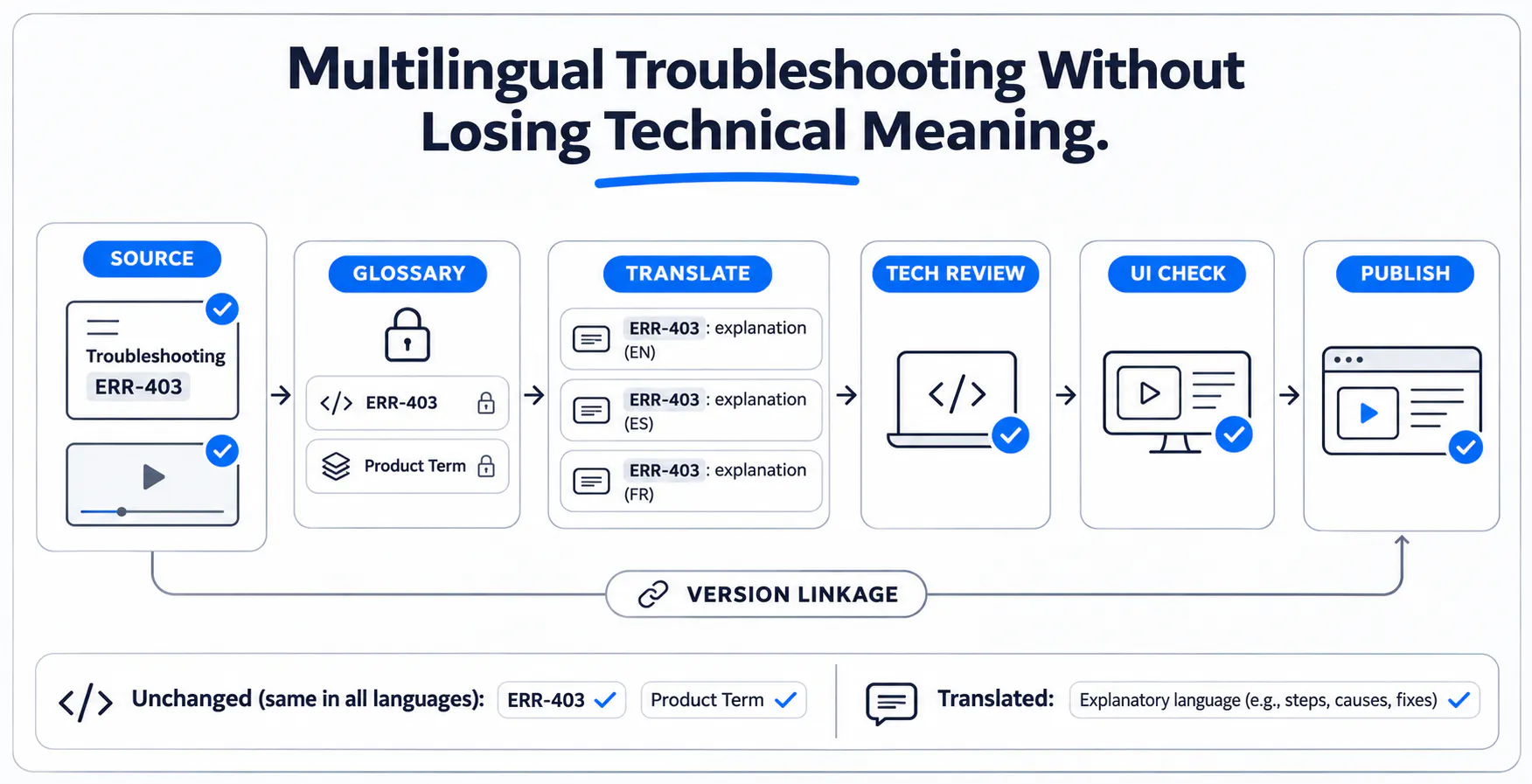
Multilingual Troubleshooting Without Losing Technical Meaning: source, glossary, translation, technical review, UI check, publishing, and version linkage.

A fluent translation can still lead to the wrong action

A software instruction says “restart,” but its translated subtitle suggests “reset.” Another caption names a control that does not exist in the viewer's interface. The wording sounds fluent, yet the action is wrong.

This fictional example shows why language quality and technical correctness need separate checks. Preserve the intended operation, prerequisites and expected result, rather than judging a troubleshooting translation by readability alone.

Approve the source before translating it

Have the source owner and product expert verify the procedure, version, warnings, expected result and escalation condition before translation. Otherwise one source error becomes several maintained errors.

Use explicit control names, short sentences and consistent terminology. Explain abbreviations and distinguish required actions from optional ones. If reviewers disagree about whether the task means restart or reset, resolve the source first. The workflow summary below connects these checks to publication.

Identify what must remain exact

Protect literal identifiers when exact matching matters: error codes, commands, API paths, filenames, model numbers and product names. Preserve the spelling, punctuation and capitalization that affect their use.

Visible interface labels may have official localized equivalents; match the actual target interface. If it remains untranslated, retain a recognizable original label with reviewed explanation. Check units, values and notation against product requirements instead of assuming a familiar local convention will work in every field.

Build a glossary with context

A useful glossary records meaning and context, not just word pairs. Include approved translations, unchanged identifiers, prohibited alternatives and relevant screenshots. Leave unresolved terms pending for qualified review.

The fictional glossary below records handling rules in English; a qualified reviewer would supply the target-language entries. Keep closely related operations such as restart and reset distinct in the article, captions and review discussion.

Source term
Meaning/context
Approved handling
Reviewer/reference
Restart
Fictional procedure’s intended operation.
Keep distinct from reset; target term pending review.
Product expert; approved source.
Reset
Different operation in this fictional product.
Do not substitute for restart.
Product expert; operation definitions.
Workspace
Named product context, not a generic folder.
Use consistent approved terminology.
Language reviewer; terminology record.
DEMO-42
Fictional literal error code.
Preserve exactly, including hyphen and digits.
Source owner; error reference.
Restart control
Visible button in the demonstrated interface.
Match official label or retain original as a reference.
UI reviewer; versioned screenshot.
Restart
Meaning/context
Fictional procedure’s intended operation.
Approved handling
Keep distinct from reset; target term pending review.
Reviewer/reference
Product expert; approved source.
Reset
Meaning/context
Different operation in this fictional product.
Approved handling
Do not substitute for restart.
Reviewer/reference
Product expert; operation definitions.
Workspace
Meaning/context
Named product context, not a generic folder.
Approved handling
Use consistent approved terminology.
Reviewer/reference
Language reviewer; terminology record.
DEMO-42
Meaning/context
Fictional literal error code.
Approved handling
Preserve exactly, including hyphen and digits.
Reviewer/reference
Source owner; error reference.
Restart control
Meaning/context
Visible button in the demonstrated interface.
Approved handling
Match official label or retain original as a reference.
Reviewer/reference
UI reviewer; versioned screenshot.

Translate the complete instruction package

Transcription turns speech into text. Captions synchronize text with playback. Translation expresses meaning in another language, while localization also considers audience and presentation. None independently verifies a technical procedure.

Review the complete package: recording, transcript, subtitles, headings, warnings, diagrams and documents. Translated captions alone cannot make an essential untranslated PDF usable. Give reviewers the video and product context, and use Cincopa's transcription and subtitle settings to plan generation, review and publication.

Separate language review from technical approval

Language review checks meaning, terminology and audience fit. Technical approval checks prerequisites, sequence, warnings, applicability and the result. One qualified person may cover both roles, provided both responsibilities are completed.

For the restart example, the language reviewer flags ambiguity and the product expert confirms the approved operation. Keep each review outcome visible rather than treating a language sign-off as proof that the instructions work.

Role
Responsibility
Source owner
Maintain the approved source and identify changes.
Translator/language reviewer
Verify meaning, terminology, readability, and audience fit.
Technical reviewer
Validate actions, prerequisites, warnings, scope, and result.
Publisher
Confirm approvals, version linkage, and delivery settings.
Source owner
Responsibility
Maintain the approved source and identify changes.
Translator/language reviewer
Responsibility
Verify meaning, terminology, readability, and audience fit.
Technical reviewer
Responsibility
Validate actions, prerequisites, warnings, scope, and result.
Publisher
Responsibility
Confirm approvals, version linkage, and delivery settings.

Check subtitles against the actual video and interface

Play the target-language captions with the actual video. Check timing, line breaks, reading pace, character rendering and whether text hides an important control. Text expansion may require different breaks rather than smaller type.

Compare labels with the interface viewers use, including version and role differences. For an untranslated interface, preserve recognizable control names with reviewed explanation. A fluent caption beside an obsolete screen can still send users to the wrong action.

After language review, make the technical support video searchable with accurate titles, descriptions and transcript terminology that help viewers locate the applicable procedure.

Keep language versions linked to the source

Record the source article or recording, source revision, product version, locale, reviewer and last verification date. These relationships let owners find the language versions affected by a change.

A changed control, warning or expected result should trigger an impact review across the package. Correct outdated guidance, label its limits or withdraw it when a mismatch could mislead viewers. Keeping files together does not automatically update or approve every translated version.

Check delivery and processing requirements

Test the intended language in the actual publishing channel, including caption selection, font rendering, mobile playback and access. Check both the editing screen and the audience's delivery experience.

Confirm the supported source languages and caption workflow for the account. Before using external processing services, check the organization's handling requirements. A transcription option is not evidence of automatic translation for a particular language pair, and a chosen language does not establish where processing occurs.

Publish through a multilingual review checklist

Use the publication checklist below with accountable reviewers. Start from existing, useful recordings and documents, then publish the reviewed language versions as a focused collection for the intended audience.

Cincopa documents manual multilingual SRT/VTT caption upload and editing as well as transcription publishing controls. Where enabled, VideoGPT can help readers reach answers from available video and document knowledge. Review actual questions to identify missing explanations, terminology or language coverage. Delivery features do not replace translation review or technical approval.

Checkpoint
What to verify
Owner
Approved source
Correct procedure, scope, warnings, and outcome.
Source owner
Identifiers and glossary
Exact codes preserved; target terms approved.
Language reviewer
Translation coverage
Subtitles, text, visuals, and attachments covered.
Content owner
Language review
Meaning and readability checked in context.
Language reviewer
Technical approval
Correct task, sequence, and expected result.
Subject expert
Subtitle readability
Timing, pace, rendering, and line breaks.
Caption reviewer
Interface consistency
Labels and visuals match actual product version.
UI reviewer
Version linkage
Source revision and target locale recorded.
Content owner
Delivery and access
Language selection and intended access tested.
Publisher
Future review trigger
Source changes notify an accountable owner.
Source owner
Approved source
What to verify
Correct procedure, scope, warnings, and outcome.
Owner
Source owner
Identifiers and glossary
What to verify
Exact codes preserved; target terms approved.
Owner
Language reviewer
Translation coverage
What to verify
Subtitles, text, visuals, and attachments covered.
Owner
Content owner
Language review
What to verify
Meaning and readability checked in context.
Owner
Language reviewer
Technical approval
What to verify
Correct task, sequence, and expected result.
Owner
Subject expert
Subtitle readability
What to verify
Timing, pace, rendering, and line breaks.
Owner
Caption reviewer
Interface consistency
What to verify
Labels and visuals match actual product version.
Owner
UI reviewer
Version linkage
What to verify
Source revision and target locale recorded.
Owner
Content owner
Delivery and access
What to verify
Language selection and intended access tested.
Owner
Publisher
Future review trigger
What to verify
Source changes notify an accountable owner.
Owner
Source owner

Frequently asked questions

Transcription turns spoken content into text, usually in the spoken language. Translation expresses meaning in another language. Captions synchronize text with playback, while localization also considers audience and product presentation. None of these activities independently confirms that a technical procedure is correct.

Preserve literal references such as error codes, commands, API paths, filenames, and model identifiers when exact matching matters. Use the approved glossary for product terminology. Do not assume that every visible label must remain untranslated; check the actual target interface.

Use official localized labels when they exist in the viewer’s product version. If the interface remains untranslated, help users recognize its original control names with reviewed explanatory wording. Do not invent labels or screenshots that imply a product localization that does not exist.

For troubleshooting guidance, review them before treating them as approved instructions. Check technical terms, negation, numbers, timing, and control names. Automatic output can misrepresent the action even when most words are accurate; language and technical checks remain necessary.

A qualified language reviewer should check meaning and terminology, and a product expert should validate technical correctness and applicability. One qualified person can cover both roles if both responsibilities are explicitly completed. The publisher confirms the approval record and delivery.

Identify linked language versions and assess the impact on each. Update affected text, subtitles, visuals, and references, then repeat the relevant reviews. Record the new source revision. Do not assume a source edit automatically refreshes or approves all translated materials.

Not usually when essential warnings, interface labels, attachments, or navigation remain inaccessible to the audience. Review the complete task and publishing channel. Some elements may intentionally remain unchanged, but users still need a clear, verified way to interpret and apply them.

Assess whether the mismatch changes the action or its outcome. Correct it, visibly label its scope, or withdraw it from active use when necessary. Assign an owner and a review condition; do not leave misleading instructions marked current while awaiting a general refresh.

Preserve the action, not just the wording

Preserve the action, not just fluent wording. Keep source and language versions connected, review the complete content package and test the product experience. Publish the useful knowledge you already have, then use the audience's questions to identify the next improvement.

Related reading

NEXT STEP

Make reviewed guidance easier to use

Bring the recordings and supporting documents your audience already relies on. Explore how Cincopa can publish them as a focused, answerable knowledge collection.