1. Define
State the process and outcome
Name the workflow, intended audience, trigger, required result, and any prerequisites.
Turn recurring procedures into reusable video SOPs that combine visual walkthroughs, written steps, checklists, and supporting documents.
Cincopa helps teams publish existing workflow recordings through Pages, Tube, and Galleries, then use VideoGPT to ask across the SOP library and reach the relevant step or source faster.
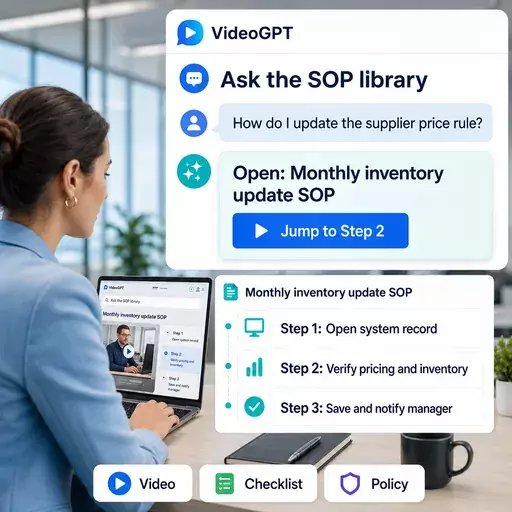
To create an SOP video guide, define the approved outcome, record the procedure in the order it should be completed, add written steps and supporting documents, assign an owner and version, and publish the guide where the intended team can access it. The final SOP should make it clear who performs the process, when it applies, what must happen, and how completion is verified.
Name the workflow, intended audience, trigger, required result, and any prerequisites.
Record the screen, system, equipment, handoff, or task in the correct sequence using the recording workflow your team already uses.
Pair the video with checklists, policies, forms, templates, screenshots, or reference documents.
Identify the process owner, approval status, effective date, revision, audience, and review cycle.
Publish the guide in the relevant Page, Gallery, or Tube environment and connect it to VideoGPT.
Organize SOP video guides by the business context employees use to find them: department, system, role, process, task, location, audience, and version. Clear metadata improves browsing, access control, AI retrieval, and governance while reducing the risk that someone follows an outdated or irrelevant procedure.
Video SOPs are not a replacement for every written standard operating procedure. Written SOPs remain useful for precise requirements, policies, warnings, responsibilities, decision rules, printable checklists, and controlled revision history. Video is stronger when the employee needs to see the sequence, interface state, physical action, handoff, or expected result.
The strongest SOP combines both formats: a short written summary explains the purpose, prerequisites, ownership, and critical controls, while the video demonstrates the procedure. Supporting documents provide the forms, templates, policies, or checklists needed to complete the task.
An AI-searchable SOP library indexes approved video transcripts, chapters, titles, metadata, checklists, policies, and attached documents. Employees can ask a natural-language question about a workflow and receive a grounded answer connected to the relevant SOP, source document, or video moment.
For example, an employee can ask where to update a supplier price rule, how to approve a refund, or which checklist applies before closing a work order. VideoGPT can answer from the available SOP knowledge and guide the employee toward the exact source instead of making them browse folders or watch an entire recording.
Use the wording employees naturally use for the task or problem.
Identify the relevant department, system, role, workflow, version, and approved source.
Return a concise response grounded in the SOP video and supporting documents.
Send the employee to the applicable guide, document, or exact video moment.
An SOP video guide is a reusable procedure that combines visual walkthroughs, written steps, supporting documents, and searchable access. It is useful when a process is easier to show than describe: software workflows, ERP procedures, finance operations, service tasks, internal handoffs, product update processes, or recurring team routines.
This use case supports Workflow Documentation and Internal Knowledge Base Software. The goal is not only to record a process. The goal is to make that process reusable, searchable, and easier to improve over time.
Teams rely on one person to explain the same workflow instead of turning it into a reusable guide.
Written procedures can miss screen context, physical details, decision points, or the exact sequence users need to see.
When systems, policies, or internal steps change, teams need a practical way to update and redistribute the process.
Cincopa helps teams publish SOP videos and supporting documents into Pages, Tube, or embedded Galleries. With VideoGPT, users can ask how to complete a procedure and find the relevant explanation inside the video and document library.
Record the process once, whether it is a screen workflow, operational procedure, or internal training module.
Group SOPs by team, system, department, workflow, role, or recurring operational task.
Pair walkthroughs with PDFs, checklists, policy documents, and step-by-step guides.
Let users ask the SOP library and jump toward the moment or document that explains the procedure.
Create branded or controlled SOP destinations for a team, system, workflow, or department.
Use channels, permissions, watch history, and workspace structure for larger internal SOP libraries.
Embed SOP video collections inside intranets, internal docs, workflow pages, or training hubs.
Ask across SOP videos and documents to retrieve the relevant process answer faster.
Supports the SOP and workflow documentation pattern through internal operational training and system-specific workflow guidance for teams.
This use case is a focused workflow documentation motion: capture a procedure once and make it reusable across the team.
As SOP libraries grow, they can become part of a broader secure internal knowledge hub with permissions, structure, and AI retrieval.
An SOP video guide is a reusable standard operating procedure that uses video, written steps, and supporting documents to show how a workflow should be done.
Video is useful when a process involves screens, tools, systems, physical steps, handoffs, or details that are easier to show than describe.
Yes. Cincopa can keep SOP videos together with supporting PDFs, checklists, manuals, policies, and written guides.
Yes. With VideoGPT, users can ask questions across videos and documents and find the relevant procedure faster.
Training videos teach a skill or concept. SOP video guides document the accepted way to complete a specific process or workflow.
Use Cincopa to publish SOP videos, connect supporting documents, and make procedure knowledge searchable with VideoGPT.