LEARN / VIDEO NAVIGATION

AI Video Summaries and Chapters for Faster Review

Use a summary to assess relevance, chapters to browse, and VideoGPT to ask questions. Make long training recordings easier to revisit.

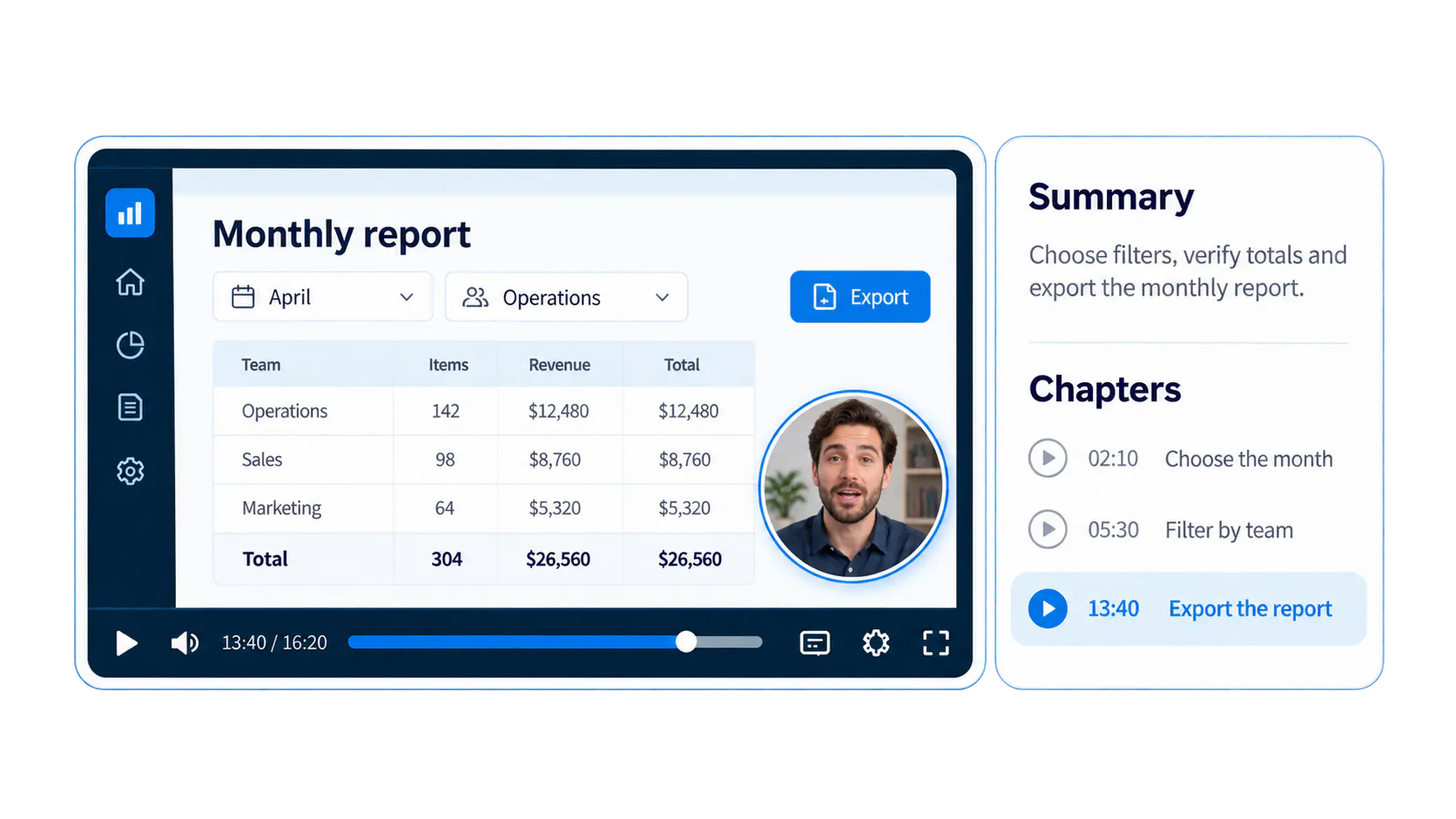
Conceptual monthly-report tutorial with a circular speaking instructor inside the video above the playback controls, alongside a summary and timestamped chapters.

What are AI video summaries?

An AI video summary condenses a recording into an overview of the topics and key points it covers. It helps a viewer decide whether the source is relevant and helps a content owner describe the recording more clearly.

In CincoTube, Cincopa can generate concise notes from a video's subtitles and save them in the Notes field. Subtitles are required for this generation workflow. The summary is a starting point for review, particularly when the recording uses specialized terminology.

Cincopa's AI Summary and AI Chapters update describes the supported workflow and source requirements.

Use chapters as a timestamped table of contents

AI-generated chapters divide a recording into meaningful topic sections. The timestamped chapter list serves as an automated table of contents: viewers can skim the headings and open the section they need.

Cincopa's AI Chapters feature analyzes subtitles to identify content changes and generate timestamped chapters. This gives a software walkthrough, workshop or training recording a navigation structure people can revisit.

A chapter points to a section. A summary describes the recording. Both help people orient themselves, but a specific procedure question may still require a source-based answer and the exact supporting moment.

Summary, chapters or a VideoGPT question?

Route
Viewer need
Useful output
Source requirement
Summary
Is this recording relevant?
Reviewed overview of its topics and key points
Subtitles for the documented Cincopa generation workflow
Chapters
Where does the export section begin?
Topic headings linked to timestamps
Accurate subtitles and reviewed chapter boundaries
VideoGPT
Which filters do I use before exporting?
Answer from the selected videos and documents with supporting sources
Available source context; timed transcripts for exact spoken moments
Summary
Viewer need
Is this recording relevant?
Useful output
Reviewed overview of its topics and key points
Source requirement
Subtitles for the documented Cincopa generation workflow
Chapters
Viewer need
Where does the export section begin?
Useful output
Topic headings linked to timestamps
Source requirement
Accurate subtitles and reviewed chapter boundaries
VideoGPT
Viewer need
Which filters do I use before exporting?
Useful output
Answer from the selected videos and documents with supporting sources
Source requirement
Available source context; timed transcripts for exact spoken moments

Worked example: a monthly-report training recording

Illustrative 20-minute software workshop. These sample notes and chapter times show the format; they are not output verified against a customer recording.

A useful summary

The session shows how to choose a reporting period, filter results by team, verify totals and export the monthly report. It also covers common empty-result problems and where to find the current reporting checklist.

A reviewed chapter list

Start
Chapter
00:00
Purpose and required access
02:10
Choose the reporting period
05:30
Filter by team
09:20
Verify totals
13:40
Export the report
17:10
Troubleshoot empty results
00:00
Chapter
Purpose and required access
02:10
Chapter
Choose the reporting period
05:30
Chapter
Filter by team
09:20
Chapter
Verify totals
13:40
Chapter
Export the report
17:10
Chapter
Troubleshoot empty results

A question the viewer can ask

“Why is my monthly report empty?” A source-based answer could point to the date filters and team selection covered in the recording, then link to the relevant moment. Missing permissions or undocumented behavior still require the process owner.

Generate, review and publish the navigation

The documented CincoTube workflow generates Notes and AI Chapters from subtitles. Add or correct subtitles before generation, then review the output against the recording.

  • Open the video in the supported CincoTube editing workflow and confirm its subtitles are available.
  • Generate AI Summary notes and AI Chapters using the available controls.
  • Review the saved Notes, chapter names, timestamps and specialized terminology.
  • Add the current job aid or PDF and a clear recording title.
  • Publish to the appropriate audience. Enable VideoGPT when viewers also need to ask across the collection.
  • Review audience questions and improve missing or unclear source guidance.

Follow the AI Summary and AI Chapters product update for the documented generation workflow.

Where this helps employees and learners

Recorded software training

Chapters help employees return to a specific screen or workflow. A summary provides context for internal software training videos, while VideoGPT helps retrieve a particular procedure from the training and supporting document.

Zoom workshops and recurring updates

A recorded workshop can remain useful after the meeting. Bring the supported Zoom recording into Cincopa, prepare the searchable source material and publish it with the relevant audience controls. Viewers can browse topics or ask what the session explains.

An on-demand training library

The value grows when people can use the same guidance weeks later. For just-in-time learning, a relevant segment from a long recording can be as useful as a short how-to clip, provided the employee can find it and verify the source.

Measure whether the recording became more useful

Look at whether people reach relevant sections, complete the task and ask fewer repeated clarification questions. Use viewing behavior alongside the questions asked in VideoGPT, rather than judging success only by the length of time someone watches.

Explore VideoGPT Insights for question patterns and source gaps, and video analytics for viewing behavior. These signals help teams choose between improving the existing recording, adding a supporting document and creating a focused new walkthrough.

Questions about AI video summaries and chapters

Yes. The documented CincoTube workflow generates summary notes and chapters from video subtitles. Prepare the subtitles before requesting those outputs.

A summary describes the recording. A VideoGPT answer responds to a viewer's question using the available source material and can connect them to a supporting video or document.

Chapters provide navigation to topic sections. Exact spoken-moment links from an answer require timestamped transcript data and the relevant source content.

Yes. A relevant section of a long recording can answer a task question. Clear summaries, chapters, searchable transcripts and source-based Q&A help people retrieve that section when they need it.

NEXT STEP

Help viewers reach the useful part of a recording

Start with an existing training session, prepare its source material and make the guidance easy to browse or ask about.