January 31, 2026 · Galleries · Video

📣Update: VideoGPT Supports Galleries

When VideoGPT was first introduced, it allowed viewers to ask questions while watching a video and receive AI-powered responses based on that specific video’s transcript and visual content. This helped improve engagement and made video content easier to understand without interrupting the viewing experience.

Now, VideoGPT has been expanded to support galleries.

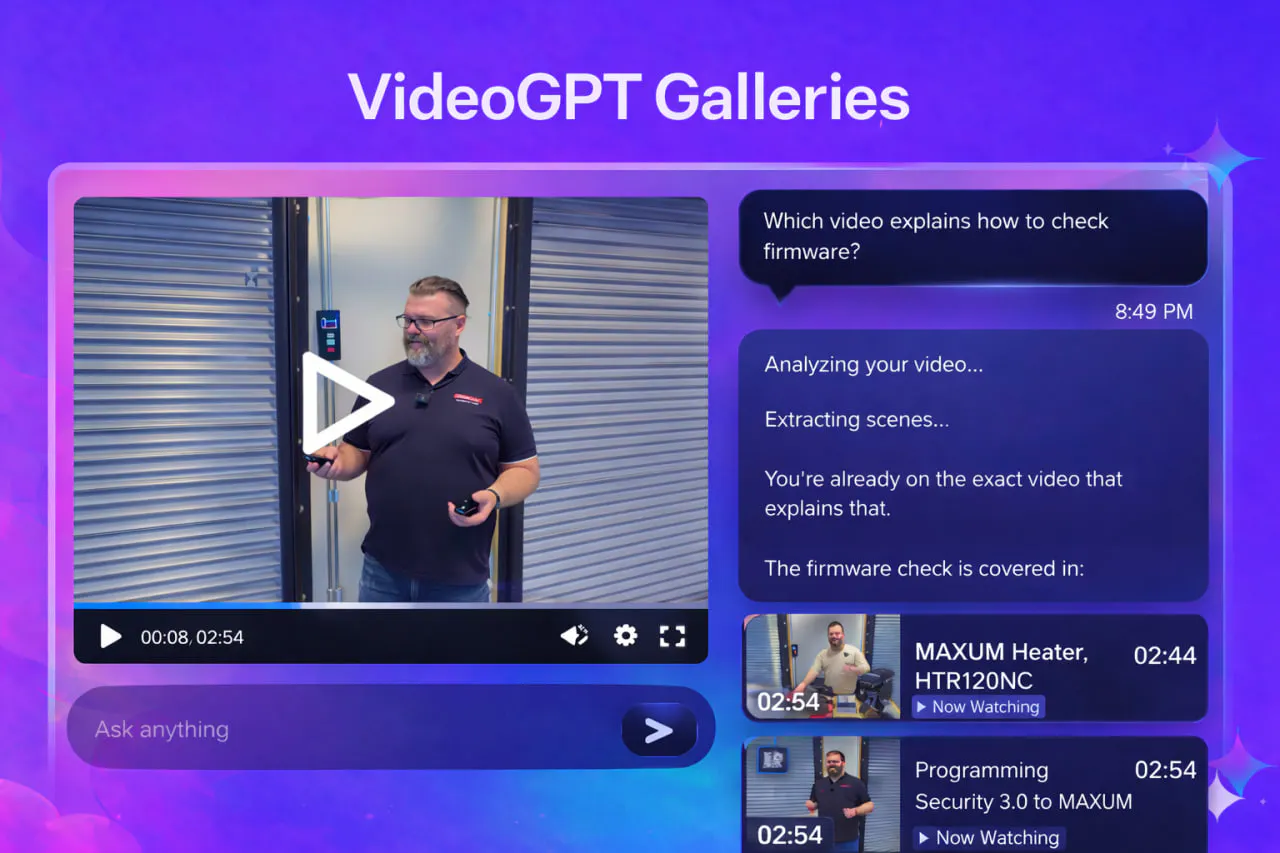
VideoGPT gallery search answering a question across multiple videos

What’s New

VideoGPT can now analyze multiple videos within a gallery and create its response to the queries accordingly. Instead of relying on a single video, it can now also reference information from across the entire collection, providing more comprehensive answers for viewers.

In this way, VideoGPT Gallery now transforms video collections into fully searchable knowledge bases, allowing viewers to discover answers instantly and interact with video libraries in a smarter, more efficient way.

What surprised us most is that this feature changed the way videos are consumed. Rather than watching or scrubbing through content with VideoGPT, users can simply ask a question and receive the exact answer immediately.

It effectively turns long-form video content into an interactive knowledge base.


Update: YouTube first introduced its AI-powered video querying feature, called “Ask,” allowing users to ask questions directly about the video they are watching, similar to VideoGPT. Furthermore, the feature has been rolled out to larger-screen experiences recently, including smart TVs, gaming consoles, and streaming devices, further advancing interactive video consumption across platforms.

Key Features

  • Enables VideoGPT to access content across multiple videos within a gallery. For example, you can ask questions like “Which video discusses about how to program the firmware?” and VideoGPT will point you to the correct video.
  • Prioritizes the currently playing video while referencing related gallery content. For example, you can ask “who is the speaker talking to now and summarize what they are saying,” and VideoGPT will return the details about the speaker and the key points.
  • Allows cross-referencing between videos to connect related topics and concepts. For example, while watching a video on Blockchain development, you can ask “which video to watch to learn more about Solidity development,” and VideoGPT will give you the link to that video.
  • Supports answering broad or collection-wide questions across an entire video library. For example, you can ask VideoGPT “give me a list of all the video where this speaker discuss about the blockchain-related concepts” and VideoGPT will give you the list.
  • Transforms video playlists into searchable and interactive knowledge hubs. For example, you can ask without watching the videos “what are the revised coding standards introduced throughout this course” and VideoGPT will scan all the videos and give you the summary without you even need to watch the videos.
  • Navigate directly to the exact position of the video where requested by the user. For example, the user can ask “which chapter in this video discusses about Rust programming” and the VideoGPT can navigate you directly to that discussion.

Use Cases

I. Corporate Training and Knowledge Management: VideoGPT turns “training video libraries” into a centralized knowledge base where employees can ask role-specific or process-related questions and receive answers instantly without reviewing full training sessions.

II. Internal Documentation Replacement: Many organizations rely on long internal documents, SOPs, Whitepapers, and training manuals that employees must read to understand processes. Instead of relying upon these documents which is very hard to write, the management can simply record non-scripted videos explaining workflows and procedures, create multiple videos, and organize them into a gallery on Cincopa.

This would allow employees to ask questions directly to VideoGPT Gallery and receive clear, step-by-step answers sourced from across the video collection, helping them complete tasks faster without reading lengthy documentation that is hard to consume.

III. Event, Webinar, and Content Libraries: Organizations can transform event recordings and webinar collections into searchable knowledge hubs, allowing teams to quickly extract key insights, summaries, or specific topic references across multiple sessions.

IV. Online Meetings like Zoom & Teams: Organizations can centralize recorded meetings from platforms like Zoom and Microsoft Teams by integrating them with Cincopa. Once meetings are recorded, they can be automatically imported, organized, and transcribed, making them accessible to the entire team.

This allows employees to search meeting content, ask questions through VideoGPT, and quickly retrieve key information, action items, or decisions without reviewing full meeting recordings.

VIDEO PLACEHOLDER - insert the original Cincopa video here when Learn video support is available.
Video title: VideoGPT Support GAlleries
FID: A4HAcLOLOO68
RID: A0XDRnAjhsXr
Combined embed FID: A4HAcLOLOO68!A0XDRnAjhsXr
Player URL: https://rtcdn.cincopa.com/iframe.aspx?fid=A4HAcLOLOO68!A0XDRnAjhsXr
Video file: VideoGPT Support Galleries.mp4
Media ID: 218702253
Duration: 00:01:55.19
Original file size: 24,713,791 bytes (24.71 MB)
Aspect ratio: 1.78 (approximately 16:9)
Available video renditions: 1080p and 720p.
Player layout: responsive, width 100%, aspect ratio 16:9; previous Prismic embed metadata: 1280 × 720.

NOTE: VideoGPT is available by default for all players and galleries. Enable video transcripts when you want answers grounded in spoken content and links to specific moments. See the global and individual transcription controls update and the AI Transcriptions and Subtitles guide.

Help viewers start with welcome messages and suggested questions. Then review VideoGPT History for individual conversations and VideoGPT Insights for repeated questions and possible content gaps.

Published February 18, 2026

NEXT STEP

Continue Exploring

Start with one product area, one documentation surface, one support library, one internal portal, or one embedded training flow. Get that collection working well, help viewers understand what is inside, then reuse the same gallery across adjacent destinations without duplicating the library.