June 9, 2026 · CincopaUI · Analytics

New Feature: VideoGPT Insights

VideoGPT was built to help people get answers from video.

Instead of searching through long recordings manually, users can ask questions, get summaries, and jump directly to the exact moment that contains the answer. This makes video easier to use for training, support, onboarding, product education, and internal knowledge sharing.

With gallery support, VideoGPT expanded beyond single videos. Entire training libraries, webinar collections, onboarding hubs, support resources, and internal knowledge centers can now work as searchable video knowledge hubs.

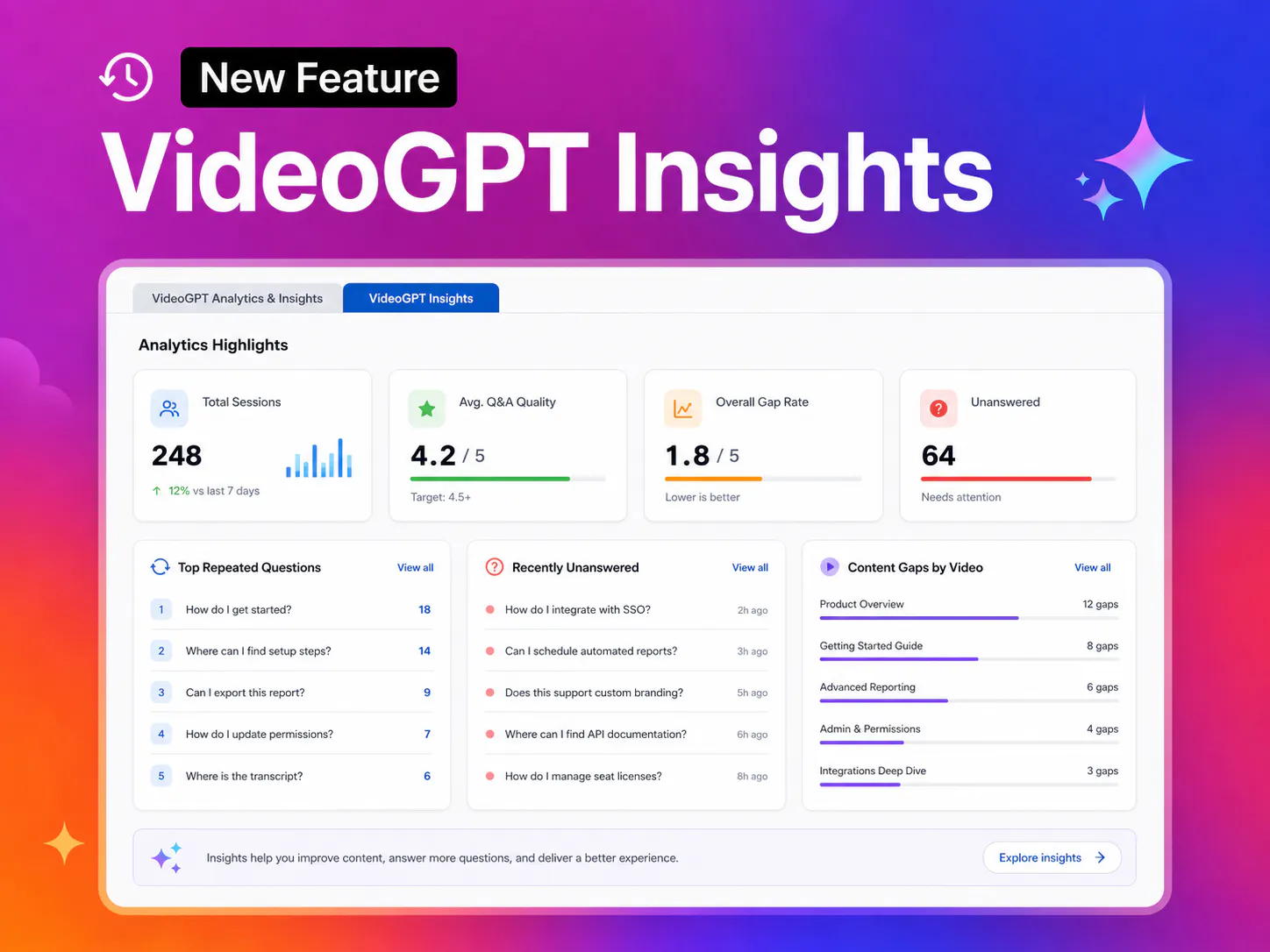
VideoGPT Insights dashboard showing analytics, repeated questions, and content gaps

But answering questions is only part of the story.

The real value also comes from understanding what people are asking, where they struggle, and what knowledge is still missing.

That is where VideoGPT Insights comes in.

VideoGPT Insights helps teams move beyond simple video interactions and start learning from them. It provides visibility into repeated questions, unanswered queries, weak responses, and content gaps, helping organizations improve their video knowledge systems over time.

This turns VideoGPT from an AI assistant into a stronger knowledge optimization layer.

What’s New

VideoGPT Insights adds a dedicated analytics layer for monitoring VideoGPT activity across videos, galleries, and knowledge hubs.

As VideoGPT becomes part of support workflows, training systems, onboarding journeys, and internal knowledge management, every question creates useful signals.

Teams need more than answers. They need insight.

They need to know:

  • What questions are being asked repeatedly
  • Which answers are weak or unsuccessful
  • Where users are struggling to find the right information
  • Which videos have the biggest content gaps
  • How well VideoGPT is performing overall

Instead of relying only on views and engagement metrics, organizations can now understand how knowledge is actually being used.

Key Features

Analytics Highlights

Track overall VideoGPT usage with key metrics like total sessions, average Q&A quality, unanswered queries, and overall gap rate.

This helps teams quickly understand how well their video knowledge system is performing.

Top Repeated Questions

See which questions users ask most often across videos and galleries.

Repeated questions reveal common friction points, unclear explanations, and opportunities to improve training or support content.

Recently Unanswered Questions

Identify questions VideoGPT could not answer confidently or completely.

This helps teams discover missing content, weak transcripts, or knowledge gaps that need attention.

Content Gaps by Video

Understand which specific videos generate the most unanswered questions or weak responses.

This helps prioritize which content should be improved first instead of guessing where problems exist.

Better AI Response Quality

Review average Q&A quality scores and weak/failed responses to improve how VideoGPT performs across the entire knowledge library.

This supports stronger answer retrieval and better user trust.

Why This Matters

Traditional video analytics show what people watched.

VideoGPT Insights shows what people needed to know.

That difference matters.

When teams can see repeated questions, unanswered queries, weak responses, and content gaps, they can improve their video knowledge library based on real user needs.

For training teams, this can reveal where learners are confused.

For support teams, it can show which issues need clearer troubleshooting content.

For product education teams, it can highlight unclear feature explanations.

For internal knowledge teams, it can uncover missing documentation or repeated operational questions.

Instead of guessing what content to improve next, teams can use real VideoGPT activity to guide their content roadmap.

From Answers to Continuous Improvement

VideoGPT helps users find answers inside video.

VideoGPT Insights helps teams improve the knowledge behind those answers.

Together, they create a stronger feedback loop:

Users ask questions.

VideoGPT gives answers.

Insights reveal what is working, what is missing, and what needs improvement.

This helps organizations turn video libraries into searchable, answerable, and continuously improving knowledge systems.

Use VideoGPT History to inspect individual conversations behind these metrics. When a question exposes unclear spoken content, review the AI transcription and subtitle controls. For a practical improvement workflow, see how repeated product questions reveal education gaps.

Schedule a demo with our team to learn more about VideoGPT Insights and how it helps teams turn user questions into a roadmap for improving video knowledge.

Published June 10, 2026

NEXT STEP

Continue Exploring

Start with one product area, one documentation surface, one support library, one internal portal, or one embedded training flow. Get that collection working well, help viewers understand what is inside, then reuse the same gallery across adjacent destinations without duplicating the library.