SUPPORT GOVERNANCE

Privacy-Safe Visual Support: How to Use Screenshots and Videos Without Exposing Customer Data

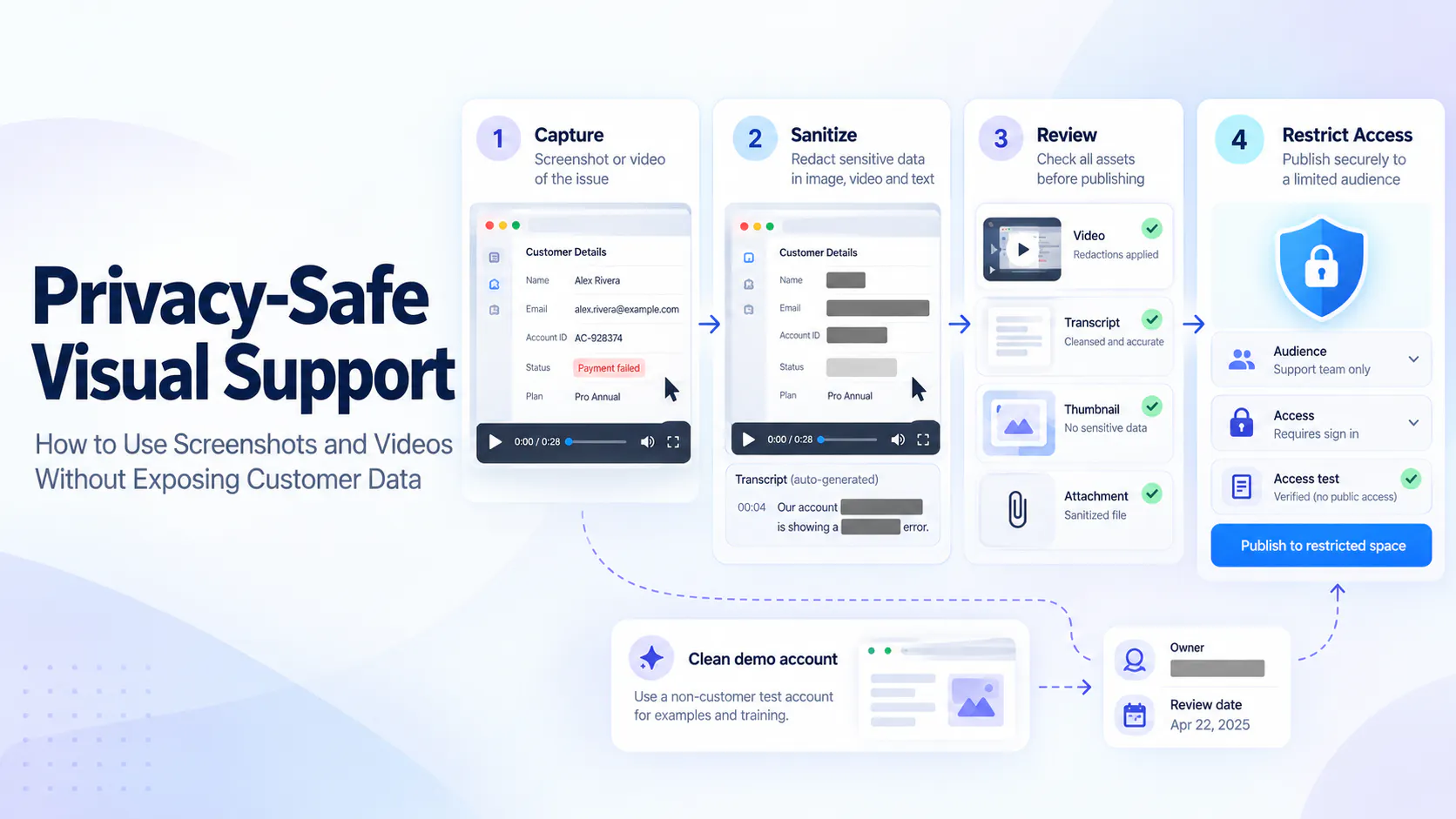
Capture only what the task needs, review the entire video-and-document package, and publish to the appropriate audience. Content sanitization and access controls solve different problems.

Privacy-Safe Visual Support: conceptual workflow for capturing, sanitizing, reviewing, and restricting access to support screenshots and videos using fictional data.

A useful support screenshot can reveal more than the problem

An agent records an upload issue. The opening frame looks suitable for training, but scrolling reveals an account identifier, a notification displays a customer name and the narration repeats it. Cropping the first frame would miss most of the exposure.

This hypothetical example shows why privacy review covers frames, audio, text, attachments and the destination. “Privacy-safe” describes a risk-reduction process, not a guarantee of anonymity, universal security or legal compliance.

Decide who needs the visual and what they need to see

An authorized agent may need customer-specific details to investigate a ticket. A reusable training resource usually needs the procedure rather than the person's identity. Define the audience and purpose before choosing what to capture or where to publish it.

Ask whether each visible or spoken detail helps that audience complete the task. A recording suitable for a restricted ticket needs a fresh review before it moves into an internal library or public help center.

Start by deciding whether visual support or a text-only answer supplies the necessary evidence; avoid collecting a recording when a short written reference is sufficient.

Prefer sanitized demo accounts and synthetic examples

Prefer a prepared demo account, fictional records, sample files and nonfunctional identifiers for reusable demonstrations. Close unrelated tabs, suppress notifications and capture only the relevant area while keeping the issue recognizable.

Renaming one person may not sanitize a distinctive company or transaction history. Remove unnecessary combinations of details. For the fictional upload case, recreating the sequence in a clean workspace is easier to verify than editing many moving customer details out of a long recording.

Redact the actual asset before broader upload or sharing

Remove or permanently obscure unnecessary information before broader upload or sharing. Inspect the exported screenshot, not just an editor overlay that could leave hidden layers or recoverable text.

For video, review the full duration, scrolling and transitions so a mask does not leave its target exposed. Consider a sanitized re-recording when extensive editing is difficult to verify. If original evidence already belongs in a restricted support system, use its handling process rather than copying it elsewhere for convenience.

Review narration, captions, transcripts, and supporting files

Listen for identifying details and secrets in narration. A visual mask does not remove spoken information, and muting the audio may leave the same text in an existing caption or transcript.

Review descriptions, chapters, thumbnails, filenames, documents and extracted text too. Include language versions and translated captions where present. Derived content may need separate correction or regeneration; replacing the main file should not be assumed to update every representation. A sanitized video with an identifying PDF is still unsuitable for broad publication.

Separate content sanitization from access control

Sanitization changes what information an asset reveals. Access controls determine who can retrieve or view it. A restricted asset can still contain excessive information, and a sanitized demonstration may still belong only to one team.

Apply both according to purpose and audience. The matrix below distinguishes common risks from the controls that address them.

Risk
Appropriate control
What it does not solve
Customer details in a screenshot
Sanitize the source or permanently redact the export.
Access restrictions do not remove visible details.
Sensitive narration or transcript
Edit audio and correct derived text.
A visual mask leaves speech and text intact.
Audience too broad
Supported access restrictions and permission testing.
Does not minimize information within the asset.
Unintended embedding domain
Configured domain restrictions.
Does not authenticate every viewer or redact content.
Unnecessary identifying analytics
Applicable analytics privacy settings.
Does not sanitize media, captions, or attachments.
Outdated copy accessible
Inventory, withdraw, or replace affected copies.
Deleting one item does not remove every derivative.
Customer details in a screenshot
Appropriate control
Sanitize the source or permanently redact the export.
What it does not solve
Access restrictions do not remove visible details.
Sensitive narration or transcript
Appropriate control
Edit audio and correct derived text.
What it does not solve
A visual mask leaves speech and text intact.
Audience too broad
Appropriate control
Supported access restrictions and permission testing.
What it does not solve
Does not minimize information within the asset.
Unintended embedding domain
Appropriate control
Configured domain restrictions.
What it does not solve
Does not authenticate every viewer or redact content.
Unnecessary identifying analytics
Appropriate control
Applicable analytics privacy settings.
What it does not solve
Does not sanitize media, captions, or attachments.
Outdated copy accessible
Appropriate control
Inventory, withdraw, or replace affected copies.
What it does not solve
Deleting one item does not remove every derivative.

Publish with the least access needed

Choose the intended audience and test access with the rights an actual viewer has. Check embeds, links and available download paths rather than treating an unlisted URL as authentication.

Cincopa's Global Settings distinguish Domain Lock, which limits embedding domains, from Secure Player's server-generated token checks. Secure Player Stage mode is for testing; Enabled requires a valid token. IP anonymization concerns analytics addresses, not customer details inside frames, narration or documents. The security overview provides context; none of these controls performs content redaction.

Give visual support content an owner and review point

Record an owner, purpose, audience, source location, review date and applicable retention policy. Include source files, published exports, ticket copies, thumbnails, transcripts and reused attachments in the handling plan.

Recheck material when the audience broadens or the procedure changes. Removing one published item does not establish that downloaded copies or derivatives disappeared. Ownership also means preventing superseded versions from remaining discoverable as current guidance.

Handle an accidental exposure through the established response process

If exposure occurs, restrict access through the established process and notify the responsible internal owner. Identify affected copies and derived text without spreading the information further.

Removing a recording does not invalidate credentials or tokens that appeared in it. Ask the responsible team to handle revocation or rotation as appropriate. Do not assume deletion proves that nobody accessed the material or settles any response obligations.

Use a pre-publication privacy checklist

Use the checklist below on the actual final package and intended destination. Correct a failed check and inspect the result again before publishing.

For the hypothetical upload issue, retain original evidence in the restricted ticket workflow and re-record with fictional data for training. In Cincopa, a reviewed video-and-document collection can make reusable support knowledge available to its chosen audience. Where enabled, VideoGPT can answer from the available sources. Content owners still sanitize those sources and verify the access experience before publication.

Review area
What to verify
Correction if it fails
Demo data and identifiers
Only necessary, approved fictional details for reuse.
Recreate or remove identifying details.
Capture area, tabs, notifications
No unrelated or confidential content.
Refocus capture or re-record.
Narration and audio
No unnecessary names, IDs, or secrets.
Edit audio or re-record; recheck text.
Captions and transcripts
Text matches the sanitized version.
Correct or regenerate and inspect.
Filenames, thumbnails, metadata
No identifying labels or extracted remnants.
Replace or correct each representation.
Attached documents
Every attachment suits the audience.
Sanitize, replace, or omit.
Final exported asset
Redaction holds across all frames and output layers.
Re-export or re-record, then review.
Audience, links, embeds
Intended access works; unintended access fails.
Correct supported controls and retest.
Owner and retention/review
Accountability and policy requirements recorded.
Assign owner and review/preservation actions.
Demo data and identifiers
What to verify
Only necessary, approved fictional details for reuse.
Correction if it fails
Recreate or remove identifying details.
Capture area, tabs, notifications
What to verify
No unrelated or confidential content.
Correction if it fails
Refocus capture or re-record.
Narration and audio
What to verify
No unnecessary names, IDs, or secrets.
Correction if it fails
Edit audio or re-record; recheck text.
Captions and transcripts
What to verify
Text matches the sanitized version.
Correction if it fails
Correct or regenerate and inspect.
Filenames, thumbnails, metadata
What to verify
No identifying labels or extracted remnants.
Correction if it fails
Replace or correct each representation.
Attached documents
What to verify
Every attachment suits the audience.
Correction if it fails
Sanitize, replace, or omit.
Final exported asset
What to verify
Redaction holds across all frames and output layers.
Correction if it fails
Re-export or re-record, then review.
Audience, links, embeds
What to verify
Intended access works; unintended access fails.
Correction if it fails
Correct supported controls and retest.
Owner and retention/review
What to verify
Accountability and policy requirements recorded.
Correction if it fails
Assign owner and review/preservation actions.

Frequently asked questions

Not necessarily. Other fields, surrounding records, speech, or metadata may still identify the customer. Check the final export and related representations. When reliable sanitization is difficult, recreate the procedure with approved fictional data rather than relying on one blurred field.

Prefer them for reusable demonstrations when they accurately represent the task. Prepare fictional records and clean capture conditions first. Customer-specific diagnostic evidence may still be necessary, but it should remain in the approved restricted workflow and receive fresh review before reuse.

Yes. Previously generated text may retain information after a visual or audio edit. Review captions, transcripts, extracted text, and other derived content separately. Determine whether the platform requires correction or regeneration, then inspect the published result.

Redaction changes what the asset reveals. Access control limits who can obtain or view it. Restriction does not excuse collecting excessive information, and sanitization does not automatically make a resource suitable for public access. Apply both according to purpose and audience.

They limit permitted embedding locations when configured. They do not, by themselves, establish an individual viewer’s identity or permissions. Combine appropriate access controls with content review, and test the actual delivery paths used by the intended audience.

No. It addresses relevant analytics information, not the contents of a frame, spoken narration, document, or transcript. Sanitize those materials through the approved content workflow. Check the documented scope of the analytics setting before relying on it.

Follow the organization’s retention, preservation, and review requirements for that purpose and data. There is no single duration suitable for every support asset. Include source evidence, published copies, and derivatives in the handling plan, with a named owner.

Restrict access, notify the designated response owner, and identify copies and derived text. Ask the responsible team to revoke or rotate exposed credentials as appropriate. Removing or obscuring the asset alone does not invalidate a secret or determine the response obligations.

Review the whole package before sharing

Capture less, review the entire package and publish only to the audience that needs it. Keep ownership of the source and its derivatives. A useful support collection combines dependable explanations with deliberate content handling and access decisions.

NEXT STEP

Build a controlled support knowledge library

Explore how to deliver reviewed support recordings with their documents and appropriate access. See where VideoGPT helps people reach the available knowledge.